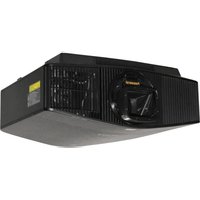
DCR-S1 - Video projector Panamorph - Free user manual and instructions
Find the device manual for free DCR-S1 Panamorph in PDF.


Pick your language and provide your email: we'll send you a specifically translated version.
| Type of product | Video projector |
| Brand | Panamorph |
| Model | DCR-S1 |
| Display technology | DLP with 1080p DMD chip |
| Native resolution | 1920 x 1080 pixels (Full HD) |
| Brightness | 3000 ANSI lumens |
| Contrast ratio | 10000:1 |
| Aspect ratio | 16:9 native, with anamorphic support |
| Lamp power | 200 W |
| Lamp life | Up to 5000 hours (normal), 7000 hours (Eco) |
| Lens | Manual zoom 1.2x, focus |
| Lens shift | Vertical lens shift |
| Throw ratio | 1.5 – 1.8 : 1 |
| Inputs | 2x HDMI, 1x VGA, component, composite, USB |
| Outputs | 3.5 mm audio, RS-232 control |
| Built-in speaker | 10 W mono |
| Noise level | 30 dB (Eco mode) |
| Dimensions (W x D x H) | 335 mm x 245 mm x 102 mm |
| Weight | 3.4 kg |
| Power consumption | 300 W typical |
| Security | Kensington lock slot, password protection |
| Care and cleaning | Clean the air filter every 100 hours; wipe the lens with a soft cloth |
| Spare parts and repairability | User-replaceable lamp and air filter; instructions in manual |
Frequently Asked Questions - DCR-S1 Panamorph
How do I connect my laptop to the DCR-S1?
Use an HDMI cable from your laptop to the HDMI input. Select the correct input source using the projector's remote or control panel.
How can I adjust the projected image size?
Use the zoom ring on the lens to adjust the size. Move the projector closer to or farther from the screen to fine-tune the focus.
What should I do if the projector lamp doesn't turn on?
Check that the power cord is securely plugged in and the power switch is on. If the lamp indicator is red, the lamp may be faulty. Wait for the projector to cool down before attempting to reset.
How often should I clean the air filter?
Clean the air filter every 100 hours of use to prevent overheating. Remove the filter cover, wash the filter with water, dry it thoroughly, and reinstall.
Can I use the projector outdoors?
The DCR-S1 is designed for indoor use only. Avoid exposure to rain, moisture, and extreme temperatures. Use it in a well-ventilated area to prevent overheating.
How do I enable the anamorphic mode?
Go to the projector menu, select Image Settings, and choose Anamorphic Mode. This mode is optimized for 2.40:1 Cinemascope content when used with a compatible anamorphic lens.
What is the recommended distance for a 100-inch screen?
Based on the throw ratio of 1.5–1.8, the projector should be placed approximately 3.3 to 4.0 meters from the screen to achieve a 100-inch diagonal image.
How can I replace the lamp?
Turn off and unplug the projector. Wait for it to cool completely. Open the lamp compartment cover, remove the old lamp by loosening the screw, disconnect the connector, and slide in the new lamp. Reconnect and tighten the screw, then reset the lamp timer.
Why is the image not sharp?
Adjust the focus ring until the image is clear. Also, ensure the projector is at the correct distance from the screen and the resolution of the source is set to 1080p.
Is the projector compatible with 3D content?
The DCR-S1 supports 3D playback via HDMI. You will need a 3D source device, a compatible 3D emitter, and 3D glasses. Check the manual for supported formats.
User questions about DCR-S1 Panamorph
0 question about this device. Answer the ones you know or ask your own.
Ask a new question about this device
No questions yet. Be the first to ask one.
Download the instructions for your Video projector in PDF format for free! Find your manual DCR-S1 - Panamorph and take your electronic device back in hand. On this page are published all the documents necessary for the use of your device. DCR-S1 by Panamorph.
USER MANUAL DCR-S1 Panamorph
Manual assistant
Powered by Anthropic
Waiting for your message
Product information
Brand : Panamorph
Model : DCR-S1
Category : Video projector