
ELPMBP03 - Projector EPSON - Free user manual and instructions
Find the device manual for free ELPMBP03 EPSON in PDF.
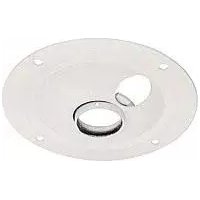


Pick your language and provide your email: we'll send you a specifically translated version.
| Product Type | Replacement lamp for video projectors |
| Brand | Epson |
| Model | ELPMBP03 |
| Compatible Projector Series | Epson EB-400 series, EB-500 series, and other compatible models |
| Lamp Type | UHE (Ultra High Efficiency) lamp |
| Power Consumption | 200 W |
| Brightness | Up to 3000 lumens (depending on projector model) |
| Average Lamp Life | Up to 4000 hours in normal mode, 5000 hours in eco mode |
| Dimensions (W x D x H) | Approximately 10.2 x 10.2 x 5.1 cm (4 x 4 x 2 inches) |
| Weight | Approximately 0.5 kg (1.1 lbs) |
| Input Voltage | AC 100-240 V, 50/60 Hz (via projector) |
| Main Function | Provides light source for projection, ensuring bright and clear images |
| Installation | Easy replacement with no special tools required; refer to projector manual |
| Maintenance | Clean the lamp compartment and air filter periodically to maintain performance |
| Safety Features | Built-in thermal protection; do not touch lamp during operation or immediately after switching off |
| Spare Parts and Repairability | Genuine Epson replacement parts available; lamp is replaceable and recyclable |
| General Information | Designed for optimal performance and longevity with Epson projectors |
Frequently Asked Questions - ELPMBP03 EPSON
What is the Epson ELPMBP03 lamp used for?
The Epson ELPMBP03 is a genuine replacement lamp assembly designed for Epson multimedia projectors. It provides the light source needed to project clear, bright images. Over time, the lamp loses brightness and must be replaced to maintain optimal performance.
How do I know if the ELPMBP03 lamp is compatible with my Epson projector?
Check your projector's manual or the compatibility list printed on the packaging. The ELPMBP03 is compatible with several Epson projector models, including the EB-470, EB-475W, EB-480, and similar series. Always verify your projector model before purchasing.
How long does the ELPMBP03 lamp last?
The average lamp life is up to 4000 hours in normal mode and up to 5000 hours in eco mode. Actual lifespan depends on usage patterns and environmental conditions. Avoid frequent power cycling to extend lamp life.
How do I replace the ELPMBP03 lamp in my projector?
Turn off the projector, unplug it, and wait for the lamp to cool completely. Locate the lamp compartment cover, remove it, loosen the screws securing the lamp, and gently pull out the old lamp. Insert the new ELPMBP03 lamp firmly, tighten the screws, and replace the cover. Reset the lamp timer via the projector's menu.
What safety precautions should I take when handling the lamp?
Always let the projector cool down for at least 1 hour before handling the lamp. The lamp contains mercury and glass; do not drop or break it. Avoid touching the glass portion with bare hands, as oils can reduce performance. Use gloves or a soft cloth when installing.
Can I use the ELPMBP03 lamp in non-Epson projectors?
No. The ELPMBP03 is specifically designed for Epson projectors. Using it in other brands may cause poor performance or damage. Always use genuine Epson lamps to ensure safety and optimal image quality.
How do I clean the lamp and its surroundings?
After the lamp has cooled, use a soft, dry cloth to wipe the lamp exterior. Clean the air filter and ventilation slots regularly to prevent dust buildup, which can overheat the lamp. Do not use liquid cleaners or solvents.
What should I do with the old lamp after replacement?
The old lamp contains mercury and must be disposed of according to local regulations. Many electronics stores offer recycling programs. Never throw it in regular household waste.
Why does my projector still show a replacement message after installing a new lamp?
The projector's lamp timer must be reset. After installing the new lamp, go to the projector's menu, find the 'Lamp Hours' or 'Lamp Reset' option, and select 'Reset'. Consult your projector manual for specific steps.
Where can I find the user manual for the ELPMBP03?
The user manual for the Epson ELPMBP03 lamp is available for free download on the official Epson website or on notice-facile.com. The manual includes installation instructions, specifications, and safety guidelines.
User questions about ELPMBP03 EPSON
0 question about this device. Answer the ones you know or ask your own.
Ask a new question about this device
No questions yet. Be the first to ask one.
Download the instructions for your Projector in PDF format for free! Find your manual ELPMBP03 - EPSON and take your electronic device back in hand. On this page are published all the documents necessary for the use of your device. ELPMBP03 by EPSON.
USER MANUAL ELPMBP03 EPSON

Manual assistant
Powered by Anthropic
Waiting for your message
Product information
Brand : EPSON
Model : ELPMBP03
Category : Projector