
GY-HMZ1MP - Video camera JVC - Free user manual and instructions
Find the device manual for free GY-HMZ1MP JVC in PDF.
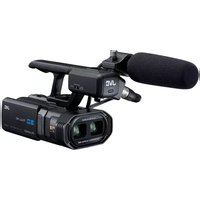


Pick your language and provide your email: we'll send you a specifically translated version.
| Product type | Professional video camera |
| Brand | JVC |
| Model | GY-HMZ1MP |
| Image sensor | 1/2.3" CMOS sensor |
| Video resolution | Full HD 1080p (1920 x 1080) |
| Optical zoom | 10x zoom lens |
| Image stabilization | Optical image stabilization |
| Recording media | Dual SD / SDHC / SDXC card slots |
| LCD screen | 3.5-inch LCD monitor |
| Electronic viewfinder | Built-in electronic viewfinder |
| Connectivity | HDMI, USB 2.0, AV output |
| Power supply | Rechargeable lithium-ion battery (BN-VF823U) |
| Dimensions (approx.) | 150 x 180 x 250 mm |
| Weight (approx.) | 1.4 kg |
| Operating temperature | 0°C to 40°C |
| Maintenance | Clean the lens with a soft, dry cloth; periodical check-up recommended |
| Safety | Do not expose to water or high humidity; avoid extreme temperatures |
| Spare parts & repairability | Battery, charger, cables and remote control available as accessories |
| General information | Manual available in 138 pages; includes English instructions |
Frequently Asked Questions - GY-HMZ1MP JVC
What type of memory card should I use?
The JVC GY-HMZ1MP supports SD, SDHC and SDXC memory cards. For high-definition recording, it is recommended to use Class 10 or higher for smooth writing.
How do I connect the camera to a TV?
You can connect the camera to a TV using the HDMI cable or the AV cable. Simply plug the cable into the corresponding port on the camera and select the correct input on your TV.
How long does the battery last?
The battery life varies depending on usage, but with the included BN-VF823U battery, you can expect around 90 minutes of continuous recording under normal conditions.
Can I record in low light?
Yes, the camera features a high-sensitivity CMOS sensor that performs well in low light. You can also adjust the gain to make the image brighter.
How should I clean the lens?
Use a soft, dry microfiber cloth to gently wipe the lens in circular motions. For stubborn spots, use a sensor cleaning brush or a lens cleaning solution applied to the cloth.
Is this camera waterproof?
No, the GY-HMZ1MP is not waterproof. Keep it away from water, rain, and high humidity. Use a rain cover if shooting in wet conditions.
What software is included with the camera?
The camera comes with a CD-ROM containing the Digital Photo Navigator software for managing and editing your recorded videos and photos.
How do I set the date and time?
Go to the Menu, select Clock or Date/Time, and use the control buttons to adjust the values. The settings will be saved for future recordings.
Does the camera have image stabilization?
Yes, the camera is equipped with optical image stabilization to reduce the effects of camera shake, especially useful when shooting at full zoom.
Can I update the firmware?
Firmware updates can be downloaded from the JVC support website. Follow the instructions on the site to transfer the update to an SD card, then insert it into the camera and run the update from the menu.
User questions about GY-HMZ1MP JVC
0 question about this device. Answer the ones you know or ask your own.
Ask a new question about this device
No questions yet. Be the first to ask one.
Download the instructions for your Video camera in PDF format for free! Find your manual GY-HMZ1MP - JVC and take your electronic device back in hand. On this page are published all the documents necessary for the use of your device. GY-HMZ1MP by JVC.
USER MANUAL GY-HMZ1MP JVC
Manual assistant
Powered by Anthropic
Waiting for your message
Product information
Brand : JVC
Model : GY-HMZ1MP
Category : Video camera