
PowerLite 703c - Projector EPSON - Free user manual and instructions
Find the device manual for free PowerLite 703c EPSON in PDF.
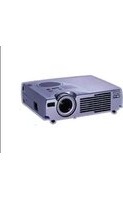


Pick your language and provide your email: we'll send you a specifically translated version.
| Product Type | Video projector |
| Brand | Epson |
| Model | PowerLite 703c |
| Projection Technology | 3LCD |
| Native Resolution | XGA (1024 x 768) |
| Brightness (White) | 2000 ANSI lumens |
| Brightness (Color) | 2000 ANSI lumens |
| Contrast Ratio | 400:1 |
| Lamp Type | UHE (Ultra High Efficiency) |
| Lamp Life (Normal Mode) | 2000 hours |
| Lamp Life (ECO Mode) | 3000 hours |
| Zoom | Manual, 1.2x |
| Keystone Correction | Vertical: ±30 degrees |
| Built-in Speaker | 1 x 1W |
| Connectivity | VGA, S-Video, Composite, Audio In |
| Weight | 3.2 kg |
| Product Dimensions (W x D x H) | 327 x 238 x 92 mm |
| Power Consumption (Normal) | 265W |
| Power Supply | AC 100-240V, 50/60Hz |
| Main Functions | Portable projector for business and education |
| Maintenance | Air filter cleaning recommended every 1000 hours |
| Security | Kensington lock slot |
| Repairability | User-replaceable lamp module |
Frequently Asked Questions - PowerLite 703c EPSON
How do I connect a laptop to the Epson PowerLite 703c?
Use a VGA cable to connect your laptop's VGA output to the projector's Computer/Component Video port. Then press the Source Search button on the remote or control panel to select the correct input.
How do I replace the lamp in the PowerLite 703c?
Turn off the projector and unplug it. Allow the lamp to cool for at least 40 minutes. Remove the lamp cover on the bottom, slip the lamp housing out, and insert the new ELPLP27 lamp. Tighten the screws and replace the cover.
What is the projection distance for a 100-inch screen?
For a 100-inch diagonal image, place the projector approximately 3.1 to 3.7 meters from the screen, depending on the zoom setting. Check the throw distance chart in the manual for precise measurements.
How do I clean the air filter?
Turn off and unplug the projector. Remove the air filter cover, take out the filter, and wash it with water or gently vacuum it. Dry it completely before reinserting. Cleaning every 1000 hours helps prevent overheating.
Why is my projector not turning on?
Check the power cable and wall outlet. Ensure the lamp cover is securely closed. If the lamp error indicator flashes, replace the lamp or consult the troubleshooting section of the manual.
How do I adjust keystone distortion?
Press the Keystone button on the remote or control panel. Use the arrow keys to correct the vertical keystone distortion, reducing the trapezoid shape until the image is rectangular.
How do I reset the lamp timer?
After replacing the lamp, press the Menu button, navigate to the Reset section, and select Reset Lamp Timer. Confirm with Enter. This ensures accurate lamp usage tracking.
Can I connect a DVD player using composite cables?
Yes, connect the yellow composite video cable to the Video port on the projector, and the red and white audio cables to the Audio L/R inputs. Then select the Video source.
What is the typical lamp replacement interval?
The lamp lasts approximately 2000 hours in normal mode and 3000 hours in ECO mode. Replace the lamp when the image becomes dim or the lamp warning indicator appears.
How can I maximize the lamp's lifespan?
Use ECO mode to reduce brightness and electricity consumption. Keep the air filter clean and ensure proper ventilation. Avoid turning the projector off unnecessarily; use the sleep mode timer.
User questions about PowerLite 703c EPSON
0 question about this device. Answer the ones you know or ask your own.
Ask a new question about this device
No questions yet. Be the first to ask one.
Download the instructions for your Projector in PDF format for free! Find your manual PowerLite 703c - EPSON and take your electronic device back in hand. On this page are published all the documents necessary for the use of your device. PowerLite 703c by EPSON.
USER MANUAL PowerLite 703c EPSON

Manual assistant
Powered by Anthropic
Waiting for your message
Product information
Brand : EPSON
Model : PowerLite 703c
Category : Projector