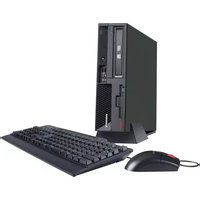
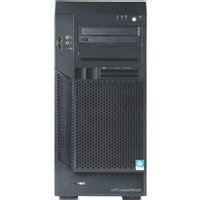
8314 - Desktop computer IBM - Free user manual and instructions
Find the device manual for free 8314 IBM in PDF.


Pick your language and provide your email: we'll send you a specifically translated version.
| Product Type | Desktop Computer |
| Brand | IBM |
| Model | 8314 |
| Dimensions | 100 mm x 300 mm x 400 mm (approx.) |
| Weight | 10 kg (22 lbs) |
| Power Supply | 200 W AC input |
| Processor | Intel Pentium 4 (up to 2.8 GHz) |
| Memory | 256 MB to 1 GB DDR RAM |
| Storage | 40 GB to 80 GB SATA hard drive |
| Optical Drive | DVD-ROM or CD-ROM |
| Operating System | Microsoft Windows XP Professional |
| Graphics | Integrated Intel Extreme Graphics |
| Audio | Integrated audio with speaker jack |
| Connectivity | Ethernet 10/100, USB 2.0 (6 ports), VGA, PS/2 |
| Expansion Slots | 2 x PCI, 1 x AGP |
| Security Features | BIOS password, chassis intrusion detection |
| Maintenance and Cleaning | Use a dry soft cloth to clean the case; ensure proper ventilation |
| Spare Parts and Repairability | User-replaceable RAM, hard drive, optical drive, battery |
| General Information | Business desktop for office and enterprise use |
Frequently Asked Questions - 8314 IBM
How can I download the user manual for the IBM 8314?
You can download the manual for the IBM 8314 in PDF format for free from the notice-facile product page. Click the download button and save the file to your computer. You can also print the relevant pages for easier use.
What are the main specifications of the IBM 8314 desktop computer?
The IBM 8314 is a business desktop with an Intel Pentium 4 processor, up to 1 GB DDR RAM, a 40-80 GB hard drive, integrated Intel Extreme Graphics, and Windows XP Professional. It includes Ethernet, USB 2.0 ports, and expansion slots for upgrades.
How should I clean my IBM 8314 desktop safely?
Turn off and unplug the computer. Use a soft dry cloth to wipe the exterior. Avoid using liquids or sprays. Keep ventilation slots free of dust. You can use compressed air to blow out dust from gaps.
How can I replace the hard drive on the IBM 8314?
The hard drive is user-replaceable. Shut down the computer, remove the side cover, locate the drive bay, disconnect the cables, and unscrew the old drive. Install the new SATA or IDE hard drive, reconnect cables, and secure it. Refer to the manual for detailed steps.
What operating system is compatible with the IBM 8314?
The IBM 8314 is designed for Microsoft Windows XP Professional. It can also run Windows 2000 and some versions of Windows Vista or Linux, but drivers may be limited. Always install the appropriate drivers from the IBM support site.
How do I reset the BIOS password on the IBM 8314?
If you forget the BIOS password, you may need to clear the CMOS by moving a jumper on the motherboard or removing the CMOS battery for a few minutes. Refer to the manual's security section for the exact location and procedure.
Does the IBM 8314 support USB boot?
Yes, the IBM 8314 BIOS supports booting from USB devices. To enable it, enter the BIOS setup by pressing F1 on startup, navigate to the Boot menu, and set USB storage as the first boot device.
How do I connect the IBM 8314 to a network?
The computer has an Ethernet RJ-45 port with 10/100 Mbps speed. Connect one end of an Ethernet cable to the port and the other to a router or switch. The system will automatically configure the connection via DHCP.
What should I do if the IBM 8314 doesn't start?
First, check the power cable and the wall outlet. Ensure the power supply switch is on. Listen for beeps or check the front LED. If nothing happens, test the RAM and graphics card reseating. Consult the manual's troubleshooting section for specific beep codes.
Are there any known issues with the IBM 8314?
Common issues include CMOS battery failure causing time/date errors, and failed electrolytic capacitors on motherboards of that era. These can cause intermittent shutdowns or no power. Both are repairable by replacing the battery or capacitors, respectively.
User questions about 8314 IBM
0 question about this device. Answer the ones you know or ask your own.
Ask a new question about this device
No questions yet. Be the first to ask one.
Download the instructions for your Desktop computer in PDF format for free! Find your manual 8314 - IBM and take your electronic device back in hand. On this page are published all the documents necessary for the use of your device. 8314 by IBM.
USER MANUAL 8314 IBM
Manual assistant
Powered by Anthropic
Waiting for your message
Product information
Brand : IBM
Model : 8314
Category : Desktop computer