BDTF150 - Household Fan BLACK & DECKER - Free user manual and instructions
Find the device manual for free BDTF150 BLACK & DECKER in PDF.


Pick your language and provide your email: we'll send you a specifically translated version.
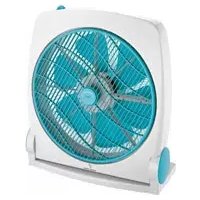
| Product Type | Household Fan |
| Brand | Black & Decker |
| Model | BDTF150 |
| Fan Type | Table Fan |
| Number of Speeds | 3 (Low, Medium, High) |
| Oscillation | Automatic 90° oscillation |
| Tilt Adjustment | Manual tilt for directional air |
| Power Source | 120V AC, 60 Hz |
| Power Consumption | 50 Watts |
| Blade Diameter | 12 inches (30 cm) |
| Dimensions | 15 x 12 x 8 inches (H x W x D) |
| Weight | 5.8 lbs (2.6 kg) |
| Cord Length | 6 feet |
| Safety Rating | ETL listed for home use |
| Cleaning | Removable front grille for easy cleaning |
| Assembly | Minimal assembly, no tools required |
| Warranty | 2-year limited warranty |
| Controls | Rotary switch for speed |
| Use | Indoor household use |
| Repairability | Spare parts available from authorized service centers |
Frequently Asked Questions - BDTF150 BLACK & DECKER
How do I assemble the BDTF150 fan?
Assembling the fan is simple. Unbox all parts, match the base to the pole, and secure it with the included brackets. No tools are required for standard assembly; simply follow the instructions in the user manual.
How do I clean the BDTF150 fan?
Unplug the fan first. Remove the front grille by releasing the side clips. Use a soft, damp cloth to wipe the blades, grille, and housing. Never submerge any part in water. Dry thoroughly before reassembling.
Can I use the fan outdoors?
The BDTF150 is intended for indoor household use only. Avoid exposure to rain or moisture to prevent electrical shock and damage to the motor.
How do I change the speed settings?
Use the rotary switch on the back of the motor housing to select between Low (1), Medium (2), and High (3). The highest setting provides maximum airflow.
How does the oscillation function work?
Press the oscillation button located on the motor housing to activate automatic left-to-right rotation. Press again to stop oscillating; you can then manually adjust the head direction.
What is the power consumption of the fan?
The fan operates on standard 120V AC and uses approximately 50 watts at the highest speed, making it an energy-efficient choice for cooling.
The fan is making a rattling noise. What should I do?
Ensure all screws and grille clips are securely tightened. Check that the blades are not bent or obstructed. If the noise continues, contact Black & Decker customer support for further assistance.
Does the fan have a timer function?
No, the BDTF150 does not include an integrated timer. You can purchase an external outlet timer to schedule automatic shut-off.
Is the fan covered by warranty? How long?
Yes, the BDTF150 comes with a 2-year limited warranty that covers defects in materials and workmanship under normal household use. Keep your receipt for service claims.
How do I store the fan during off-season?
Clean and dry the fan completely, wrap the power cord around the base, and cover it with a plastic bag or cloth. Store it in a cool, dry location away from direct sunlight.
User questions about BDTF150 BLACK & DECKER
0 question about this device. Answer the ones you know or ask your own.
Ask a new question about this device
No questions yet. Be the first to ask one.
Download the instructions for your Household Fan in PDF format for free! Find your manual BDTF150 - BLACK & DECKER and take your electronic device back in hand. On this page are published all the documents necessary for the use of your device. BDTF150 by BLACK & DECKER.
USER MANUAL BDTF150 BLACK & DECKER

Manual assistant
Powered by Anthropic
Waiting for your message
Product information
Brand : BLACK & DECKER
Model : BDTF150
Category : Household Fan