835 - Coffee maker Cecilware - Free user manual and instructions
Find the device manual for free 835 Cecilware in PDF.


Pick your language and provide your email: we'll send you a specifically translated version.
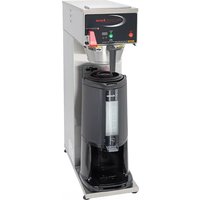
| Product Type | Coffee Maker |
| Brand | Cecilware |
| Model | 835 |
| Capacity | Up to 100 cups per hour |
| Dimensions (W x D x H) | Approximately 17.5 x 15 x 23 inches |
| Weight | Approximately 45 lbs (20.4 kg) |
| Power Supply | 120V AC, 60Hz, 1450W |
| Brewing System | Automatic pour-over with adjustable brew volume |
| Water Reservoir | Removable, with sight glass for level monitoring |
| Materials | Stainless steel body and warming plate |
| Controls | On/off switch and heat indicator light |
| Main Functions | Brewing, keep-warm, and manual pour-over operation |
| Cleaning and Maintenance | Daily cleaning of decanter and spray head; periodic descaling |
| Safety Features | Automatic shut-off and heat-sensitive thermostat |
| Accessories Included | Decanter (or urn), filter basket, and measuring scoop |
| Spare Parts Availability | Replacement decanters, filters, and heating elements available |
| Repairability | Modular design for easy service access |
| Warranty | 1-year limited warranty |
| Certifications | UL and NSF listed |
Frequently Asked Questions - 835 Cecilware
How do I brew coffee with the Cecilware 835?
Fill the water reservoir to the desired level, add ground coffee to the filter basket, and press the on/off switch. The brewer will heat the water and dispense it over the grounds automatically.
What is the maximum capacity of this coffee maker?
The Cecilware 835 can brew up to 100 cups per hour, making it ideal for commercial use or large gatherings.
How often should I descale the coffee maker?
Descaling should be performed every 3 to 6 months, depending on water hardness. Use a commercial descaling solution and follow the instructions in the manual.
Can I use regular coffee filters with this model?
Yes, you can use standard commercial paper filters or a reusable filter basket. Ensure they are compatible with the filter basket dimensions.
Why is the coffee maker not brewing?
Check that the unit is plugged in and the power switch is on. Ensure the water reservoir has enough water and the spray head is not clogged. If the problem persists, consult the troubleshooting section of the manual.
How do I clean the coffee maker after daily use?
Turn off and unplug the machine, then remove the filter basket and decanter. Wash them with warm soapy water and rinse thoroughly. Wipe the exterior with a damp cloth.
Can I leave the coffee maker on all day?
The Cecilware 835 has a keep-warm function that maintains coffee temperature, but for safety and energy efficiency, it is recommended to turn it off when not in use. Some models have an automatic shut-off feature.
What type of coffee grind should I use?
A medium to medium-coarse grind is recommended for best extraction. Too fine a grind may clog the filter and cause overflow.
Is replacement parts availability an issue?
No, replacement parts like decanters, filter baskets, and heating elements are widely available through Cecilware distributors or online retailers.
Does the 835 have any safety certifications?
Yes, the Cecilware 835 is UL and NSF listed, ensuring it meets strict safety and sanitation standards for commercial foodservice equipment.
User questions about 835 Cecilware
0 question about this device. Answer the ones you know or ask your own.
Ask a new question about this device
No questions yet. Be the first to ask one.
Download the instructions for your Coffee maker in PDF format for free! Find your manual 835 - Cecilware and take your electronic device back in hand. On this page are published all the documents necessary for the use of your device. 835 by Cecilware.
USER MANUAL 835 Cecilware

Manual assistant
Powered by Anthropic
Waiting for your message
Product information
Brand : Cecilware
Model : 835
Category : Coffee maker