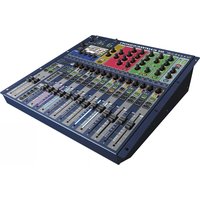
Series 10s - Mixer SOUNDCRAFT - Free user manual and instructions
Find the device manual for free Series 10s SOUNDCRAFT in PDF.


Pick your language and provide your email: we'll send you a specifically translated version.
| Product Type | Analog Audio Mixer |
| Brand | Soundcraft |
| Model | Series 10s |
| Number of Channels | 10 Input Channels |
| Built-in Effects | Digital Effects Processor |
| Phantom Power | +48V on selected inputs |
| Equalizer | 3-band EQ per channel |
| Input Connectors | Combined XLR/Jack on each channel |
| Output Connectors | Main outputs (XLR), monitor outputs, headphones |
| Power Supply | External AC adapter included |
| Frequency Response | 20 Hz - 20 kHz |
| Dimensions | 350 x 280 x 90 mm (est.) |
| Weight | 2.8 kg (est.) |
| Construction | Sturdy powder-coated steel chassis |
| Channel Insert Points | Yes (for external processing) |
| Aux Sends | 2 per channel |
| Monitoring | Headphone output with level control |
| Connectivity | Main mix, monitor, talkback |
| Cooling | Passive, no user-maintenance required |
| Maintenance | Clean with a dry cloth |
| Safety | Class 1 electrical safety design |
| Reparability | Modular design for easy servicing |
Frequently Asked Questions - Series 10s SOUNDCRAFT
How do I connect a microphone to the Soundcraft Series 10s?
Plug the microphone cable into the combined XLR/Jack input of the desired channel. Turn the microphone's gain knob to an appropriate level, and set the channel fader to unity (0 dB). Then adjust the master fader to hear the sound.
How can I use condenser microphones that require phantom power?
Activate the +48V phantom power switch on the rear panel. This supplies power to the microphone inputs that support condenser mics. Always ensure the mixer is muted before toggling phantom power.
How do I prevent feedback during live performances?
Position microphones away from monitor speakers, reduce gain levels, and use the 3-band EQ to cut frequencies that ring. Utilize the aux sends to control monitor levels independently.
Can I record the mixer's output to a computer?
Yes, connect the main output (XLR or jack) to an audio interface via suitable cables. The output level is controlled by the master fader. If your interface has line inputs, use balanced cables for optimal signal.
How do I use the built-in effects?
Press the effect button on the desired channel to route the signal to the internal DSP effect processor. Turn the effect send knob to adjust the effect level, and select a preset using the effect selector.
What maintenance is required for the mixer?
Keep the mixer in a dust-free environment and clean the surface with a dry, soft cloth. Ensure all knobs and faders are free of debris. Avoid using harsh chemicals. No internal cleaning is necessary.
What should I do if a channel has no sound?
Check the channel fader and gain knob, ensure the mute button is off, and verify the input cable is connected. Test the microphone with another channel. Also confirm the master fader is up and the main output is connected.
How do I connect external monitor speakers?
Connect the monitor speakers to the monitor output jacks on the rear panel. Use balanced TRS cables for best audio quality, and control the monitor level with the monitor knob on the top panel.
Can I use this mixer for live band performances?
Absolutely. The Soundcraft Series 10s offers 10 input channels, digital effects, and monitor sends, making it suitable for small live acts. Its sturdy construction is designed for portability.
How do I reset the mixer to factory settings?
This analog mixer has no digital menus. To reset levels, set all faders to unity, turn all gain knobs to min, and set EQ to 12 o'clock. Disconnect all inputs and power cycle the device.
User questions about Series 10s SOUNDCRAFT
0 question about this device. Answer the ones you know or ask your own.
Ask a new question about this device
No questions yet. Be the first to ask one.
Download the instructions for your Mixer in PDF format for free! Find your manual Series 10s - SOUNDCRAFT and take your electronic device back in hand. On this page are published all the documents necessary for the use of your device. Series 10s by SOUNDCRAFT.
USER MANUAL Series 10s SOUNDCRAFT




Manual assistant
Powered by Anthropic
Waiting for your message
Product information
Brand : SOUNDCRAFT
Model : Series 10s
Category : Mixer