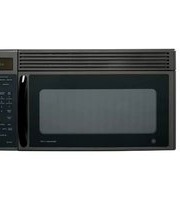
DVM1850DMBB - Microwave Adora - Free user manual and instructions
Find the device manual for free DVM1850DMBB Adora in PDF.


Pick your language and provide your email: we'll send you a specifically translated version.
| Product Type | Countertop Microwave Oven |
| Brand | Adora |
| Model | DVM1850DMBB |
| Color | Black |
| Capacity | 1.8 cubic feet |
| Power Output | 1000 Watts |
| Voltage | 120 V AC, 60 Hz |
| Power Levels | 10 settings |
| Control Type | Digital touch panel |
| Display | LED digital clock |
| Timer | 99 minutes 99 seconds |
| Turntable | 12 inch rotating glass tray |
| Defrost Functions | Weight and time defrost |
| Quick Cook Menus | Popcorn, potato, pizza, beverage, frozen dinner |
| Memory Function | Up to 2 cooking stages |
| Child Safety Lock | Yes |
| Interior Light | Yes |
| Interior Finish | Stainless steel cavity |
| Door Type | Push-button release |
| Installation | Freestanding |
| Dimensions (W x D x H) | 20.5 x 16.5 x 12.3 inches |
| Weight | 38.5 pounds |
| Cleaning | Wipe with damp cloth and mild detergent |
| Spare Parts | Available from Adora authorized service centers |
| Repair | Authorized Adora technicians recommended |
Frequently Asked Questions - DVM1850DMBB Adora
How do I set the clock on my Adora DVM1850DMBB microwave?
Press Clock, then use the number pad to enter the time, and press Clock again. The clock uses a 12-hour format. If you see 0:00, set the clock before using timed cooking.
How do I use the child safety lock?
Press and hold the Stop/Clear button for about 3 seconds. The display shows a lock icon. To unlock, press and hold Stop/Clear again. This prevents small children from starting the microwave.
How do I defrost food in this microwave?
Use the Weight Defrost or Time Defrost function. For weight defrost, enter the food weight in pounds and press Start. For time defrost, enter defrosting time and press Start. Rotate or turn food halfway through for even thawing.
Can I use metal containers?
No, metal containers, aluminum foil, and metal-trimmed dishes can cause arcing and damage the microwave. Use only microwave-safe glass, ceramic, or plastic cookware.
How should I clean the microwave?
Unplug the microwave and wipe the interior and exterior with a soft damp cloth and mild detergent. Do not use abrasive cleaners or steel wool. Clean the turntable and roller ring in warm soapy water.
Why is my microwave not heating?
Check that the door is fully closed and the Door Interlock switch is engaged. Also, make sure the timer is set and the power cord is plugged in. If it still does not heat, contact an authorized Adora service center.
What is the turntable for?
The turntable rotates food so it cooks and reheats evenly. Always place food directly on the turntable or on a microwave-safe dish, and make sure the glass tray can rotate freely.
How do I set express cook?
Press the Express Cook pad repeatedly to add 30 seconds of cooking time, or press it once and use the number pad to enter a time. The microwave starts automatically at 100% power.
Can I change the power level?
Yes, press Power Level, then enter a number from 1 to 10. For example, 10 for High, 7 for Medium-High, 5 for Medium, and 3 for Medium-Low. Press Start to confirm.
What should I do after a power interruption?
The clock may reset to 0:00. Press Stop/Clear, then set the clock again. All other programmed settings will return to default.
User questions about DVM1850DMBB Adora
0 question about this device. Answer the ones you know or ask your own.
Ask a new question about this device
No questions yet. Be the first to ask one.
Download the instructions for your Microwave in PDF format for free! Find your manual DVM1850DMBB - Adora and take your electronic device back in hand. On this page are published all the documents necessary for the use of your device. DVM1850DMBB by Adora.
USER MANUAL DVM1850DMBB Adora
Manual assistant
Powered by Anthropic
Waiting for your message
Product information
Brand : Adora
Model : DVM1850DMBB
Category : Microwave