Khaido - Keyboard Krom - Free user manual and instructions
Find the device manual for free Khaido Krom in PDF.


Pick your language and provide your email: we'll send you a specifically translated version.
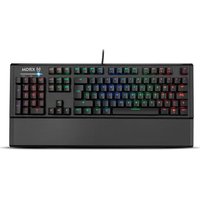
| Type of product | Gaming keyboard |
| Brand | Krom |
| Model | Khaido |
| Connection type | Wired USB |
| Interface | USB 2.0 |
| Keyboard type | Mechanical |
| Layout | Full-size (104 keys) |
| Number of keys | 104 |
| Switch type | Mechanical linear switches |
| Backlight | RGB LED |
| Backlight modes | Multiple presets and customizable effects |
| Multimedia keys | Yes, via Fn combination |
| Anti-ghosting | N-key rollover support |
| Polling rate | 1000 Hz |
| Cable length | 1.6 m |
| Dimensions (W x D x H) | 44 x 13 x 3 cm |
| Weight | 900 g |
| Power supply | USB powered (5V / 500mA) |
| Power consumption | Up to 2.5 W with full RGB illumination |
| Compatible operating systems | Windows, macOS, Linux |
| Box contents | Keyboard, user manual, warranty card |
| Cleaning | Unplug before cleaning, use soft dry cloth |
| Safety | Keep away from liquids and extreme temperatures |
| Repairability | Switches are replaceable; contact certified service for other repairs |
| General information | Designed for long gaming sessions with anti-slip feet |
Frequently Asked Questions - Khaido Krom
How do I connect the Krom Khaido keyboard to my computer?
Simply plug the USB cable into an available USB port on your computer. The keyboard is plug-and-play and does not require additional drivers for basic functionality.
How can I change the RGB lighting effects on the Khaido keyboard?
Use the Fn key in combination with arrow keys or dedicated function keys to cycle through lighting presets. For custom effects, download the official Krom software from the support website and adjust colors, brightness, and animation modes.
Does the Krom Khaido support macro programming?
Yes, the keyboard supports macro recording through dedicated software. You can assign complex commands to any key and store profiles on your system.
How do I adjust the volume or multimedia keys?
The keyboard includes multimedia shortcuts accessed by holding the Fn key and pressing the corresponding F1-F12 key (e.g., Fn+F10 for mute). Refer to the quick guide in the manual for the full list.
Is the keyboard compatible with game consoles?
It works with PC and laptops running Windows, macOS, or Linux. If your console supports USB keyboards and has an available port, it may also work for basic typing, but advanced features like RGB control are PC-only.
What should I do if some keys are not responding?
First, unplug and replug the keyboard. Check the USB port function with another device. If the issue persists, follow the troubleshooting section in the manual, or contact Krom support for warranty assistance.
Can I replace the keycaps or switches?
Yes, the Khaido uses mechanical switches that can be pulled out with a switch or keycap puller. Ensure the keyboard is unplugged and remove the keycap carefully to avoid damage.
How do I clean the keyboard safely?
Disconnect the keyboard first. Use a soft, lint-free cloth slightly dampened with water or isopropyl alcohol. Avoid harsh chemicals or spraying liquid directly on the keys. Shake gently to remove debris.
Why does the RGB lighting turn off after inactivity?
Your power settings may have USB selective suspend enabled. Go to your operating system's power options and disable this feature to keep the backlight always on. Alternatively, check the keyboard software for a sleep timer setting.
What should I do if the firmware needs an update?
Visit the Krom official website, navigate to the Khaido product page, and download the latest firmware update utility. Run it while the keyboard is connected, and follow the on-screen instructions carefully to avoid interruption.
User questions about Khaido Krom
0 question about this device. Answer the ones you know or ask your own.
Ask a new question about this device
No questions yet. Be the first to ask one.
Download the instructions for your Keyboard in PDF format for free! Find your manual Khaido - Krom and take your electronic device back in hand. On this page are published all the documents necessary for the use of your device. Khaido by Krom.
USER MANUAL Khaido Krom


Manual assistant
Powered by Anthropic
Waiting for your message
Product information
Brand : Krom
Model : Khaido
Category : Keyboard