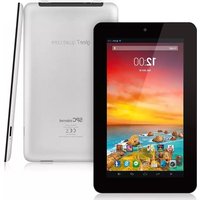
DARK 10.1 - Tablet SPC - Free user manual and instructions
Find the device manual for free DARK 10.1 SPC in PDF.


Pick your language and provide your email: we'll send you a specifically translated version.
| Product Type | Android Tablet |
| Brand | SPC |
| Model | DARK 10.1 |
| Display Size | 10.1 inches |
| Screen Resolution | 1280 x 800 pixels |
| Operating System | Android 10 (Go Edition) |
| Processor | Quad-core 1.5 GHz |
| RAM | 2 GB |
| Internal Storage | 32 GB |
| Expandable Storage | microSD up to 128 GB |
| Rear Camera | 5 MP |
| Front Camera | 2 MP |
| Connectivity | Wi-Fi 802.11 b/g/n, Bluetooth 4.0 |
| Battery Capacity | 5000 mAh |
| Charging | 5V 2A via micro-USB |
| Dimensions | 240 x 150 x 10 mm |
| Weight | 520 g |
| Maintenance | Clean with a soft dry cloth; do not use solvents. |
| Safety | Do not expose to water, heat, or direct sunlight. |
| Spare Parts and Reparability | Battery and screen replaceable by an authorized service center; use original accessories. |
| General Information | Includes USB cable and user manual; 1-year warranty. |
Frequently Asked Questions - DARK 10.1 SPC
How do I update the operating system on my SPC DARK 10.1?
Go to Settings > System > System Update and check for updates. Make sure the tablet is charged above 50% and connected to Wi-Fi.
Can I expand the storage on the DARK 10.1?
Yes, the tablet supports microSD cards up to 128 GB. Insert the card into the slot on the side to expand your storage for photos, videos, and apps.
How do I take a screenshot?
Press and hold the Power and Volume Down buttons simultaneously for about 2 seconds. The screenshot will be saved in the Gallery.
Is the battery removable?
The battery is built-in and not user-replaceable. If you experience battery issues, contact the SPC authorized service center for assistance.
How do I connect to a TV?
The tablet does not have an HDMI port. You can use screen mirroring via Wi-Fi or a Chromecast device if available.
What is the warranty period for the SPC DARK 10.1?
The tablet comes with a 1-year warranty covering manufacturing defects. Warranty does not cover accidental damage or unauthorized repairs.
How can I save battery life?
Reduce screen brightness, turn off Bluetooth and GPS when not in use, and enable Battery Saver mode in Settings.
Is the SPC DARK 10.1 4G/LTE compatible?
No, this model is Wi-Fi only. It does not have a SIM card slot. You can use a portable Wi-Fi hotspot.
Does the tablet come with Google Play Store?
Yes, the tablet runs Android and includes Google Play Store pre-installed, allowing you to download apps and games.
How do I reset the tablet to factory settings?
Go to Settings > System > Reset Options > Erase all data. This will delete all personal data, so make a backup first.
User questions about DARK 10.1 SPC
0 question about this device. Answer the ones you know or ask your own.
Ask a new question about this device
No questions yet. Be the first to ask one.
Download the instructions for your Tablet in PDF format for free! Find your manual DARK 10.1 - SPC and take your electronic device back in hand. On this page are published all the documents necessary for the use of your device. DARK 10.1 by SPC.
USER MANUAL DARK 10.1 SPC


Manual assistant
Powered by Anthropic
Waiting for your message
Product information
Brand : SPC
Model : DARK 10.1
Category : Tablet