UAP-AC-3 - Access Point Ubiquiti Networks - Free user manual and instructions
Find the device manual for free UAP-AC-3 Ubiquiti Networks in PDF.


Pick your language and provide your email: we'll send you a specifically translated version.
| Product Type | Access Point |
| Brand | Ubiquiti Networks |
| Model | UAP-AC-3 |
| Wireless Standard | IEEE 802.11 a/b/g/n/ac |
| Frequency Band | 2.4 GHz / 5 GHz |
| Maximum Data Rate | 1167 Mbps (300 Mbps on 2.4 GHz + 867 Mbps on 5 GHz) |
| Ethernet Ports | 1 x 10/100/1000 Mbps RJ-45 |
| Power Method | Power over Ethernet (PoE) 802.3af or included PoE adapter |
| Power Consumption | 7W max |
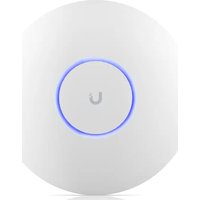
| Antenna Type | Internal omnidirectional antennas |
| Mounting | Ceiling or wall mount included |
| Security | WPA/WPA2-Personal, WPA/WPA2-Enterprise |
| Management | UniFi Controller software |
| Dimensions | 200 x 200 x 35 mm (7.87 x 7.87 x 1.38 in) |
| Weight | 300 g (10.6 oz) |
| Operating Temperature | -10°C to 50°C (14°F to 122°F) |
| Operating Humidity | 5% to 95% non-condensing |
| LED Indicators | Status LED |
| Package Contents | Access point, mounting kit, PoE adapter, quick start guide |
| Cleaning & Maintenance | Wipe with a soft dry cloth; do not use liquids or sprays |
| Safety | Ensure proper ventilation; use only specified power source |
| Spare Parts & Repairability | Contact authorized Ubiquiti distributors for spare parts |
| Warranty | 1-year limited warranty |
Frequently Asked Questions - UAP-AC-3 Ubiquiti Networks
How do I reset the UAP-AC-3 to factory default settings?
Press and hold the reset button on the device for 10 seconds until the LED turns off, then release. The AP will reboot with factory defaults.
Does the UAP-AC-3 support Power over Ethernet?
Yes, it supports 802.3af PoE as well as the included Ubiquiti PoE adapter. Check your switch or injector output.
Can I use this access point without a UniFi controller?
Yes, it can operate standalone. However, for advanced features and management, the UniFi Controller is recommended.
What is the maximum number of concurrent clients supported?
The UAP-AC-3 supports roughly 100+ concurrent clients, though real-world performance depends on traffic and environment.
How do I mount the UAP-AC-3 on a wall?
Use the included mounting plate as a template to mark screw holes, attach the plate, then align the AP and twist to lock it onto the plate.
Is the UAP-AC-3 compatible with 802.3af PoE switches?
Yes, it is fully compatible with 802.3af PoE switches. Higher PoE standards like 802.3at also work.
How can I update the firmware on the UAP-AC-3?
In the UniFi Controller, go to the device’s settings and select Upgrade if a newer firmware is available. Controller or standalone methods work.
What is the typical wireless coverage range indoors?
Indoor coverage is approximately 30-50 meters depending on walls and interference. Outdoor range can be much larger.
Does it support fast roaming or mesh?
Yes, when managed by a UniFi Controller, it supports fast roaming (802.11r) and can be used in mesh networks.
How do I secure my Wi-Fi network?
Set WPA2-AES encryption with a strong passphrase. Use WPA2-Enterprise for higher security in business environments.
User questions about UAP-AC-3 Ubiquiti Networks
0 question about this device. Answer the ones you know or ask your own.
Ask a new question about this device
No questions yet. Be the first to ask one.
Download the instructions for your Access Point in PDF format for free! Find your manual UAP-AC-3 - Ubiquiti Networks and take your electronic device back in hand. On this page are published all the documents necessary for the use of your device. UAP-AC-3 by Ubiquiti Networks.
USER MANUAL UAP-AC-3 Ubiquiti Networks

Manual assistant
Powered by Anthropic
Waiting for your message
Product information
Brand : Ubiquiti Networks
Model : UAP-AC-3
Category : Access Point