UB-UAP-PRO-1 - Access Point Ubiquiti Networks - Free user manual and instructions
Find the device manual for free UB-UAP-PRO-1 Ubiquiti Networks in PDF.


Pick your language and provide your email: we'll send you a specifically translated version.
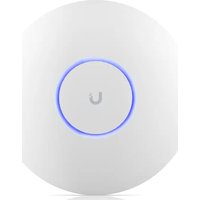
| Product type | Professional wireless access point |
| Brand | Ubiquiti Networks |
| Model | UB-UAP-PRO-1 |
| Wireless standard | IEEE 802.11 a/b/g/n |
| Maximum data rate | 900 Mbps (2.4 GHz: 450 Mbps, 5 GHz: 450 Mbps) |
| Frequency band | Dual band 2.4 GHz and 5 GHz |
| Antennas | Integrated, 3x3 MIMO |
| Ethernet ports | 1 x Gigabit RJ45 port (10/100/1000) |
| Power supply | 24V passive PoE (compatible PoE adapter or switch) |
| Dimensions | 20.5 cm diameter, 4.5 cm thick |
| Weight | Approximately 400 g |
| Mounting | On table or ceiling (mounting kit included) |
| Management | UniFi Controller software (centralized management) |
| Wireless security | WPA2-AES, WPA-Enterprise (802.1X) |
| Main features | Seamless roaming, VLAN, multi-SSID, QoS |
| Maintenance and cleaning | Clean with a soft, dry cloth; avoid solvents and liquids |
| Safety instructions | Place in a ventilated area, out of reach of children |
| Spare parts and repairability | Not available; service by an approved professional |
| General information | Designed for indoor use up to a 30 m radius |
Frequently Asked Questions - UB-UAP-PRO-1 Ubiquiti Networks
How to install the Ubiquiti UB-UAP-PRO-1?
Attach the access point to the ceiling or place it on a flat surface, then connect the Ethernet cable to your network and to the device's PoE port. Installation is simplified with the UniFi Controller software, which automatically detects the device.
What power supply is required for this access point?
The device uses 24V passive PoE power. You can use the supplied adapter or a network switch compatible with the 24V Power over Ethernet standard. Check the polarity to avoid any damage.
How to configure the Wi-Fi network after installation?
Install UniFi Controller on your computer or server. Launch the software, adopt the access point, then create your SSID networks with the desired security settings (WPA2-AES recommended).
What are the dual-band performance capabilities?
The UB-UAP-PRO-1 operates simultaneously on the 2.4 GHz and 5 GHz bands, each offering up to 450 Mbps theoretical throughput. This reduces interference and improves overall throughput for compatible clients.
How to reset the access point to factory settings?
Insert a paperclip into the Reset button on the back of the device and hold it for more than 5 seconds. The LEDs will blink and the device will restart with the default settings.
Can I manage multiple access points remotely?
Yes, with UniFi Controller, you can manage a set of access points from a centralized interface. Advanced features such as roaming and VLAN assignment are configured in just a few clicks.
What is the maximum Wi-Fi signal range?
In a typical indoor environment, the range is approximately 30 meters in open space. Obstacles such as thick walls can reduce this distance. 3x3 MIMO technology improves stability and coverage.
How to clean and maintain the device?
To avoid any damage, use a soft, dry cloth to wipe the surface. Never use chemicals, solvents, or water. Make sure the ventilation openings are not blocked.
What safety precautions should I follow?
Install the access point in a ventilated area, away from heat sources and moisture. Do not expose it to rain or extreme temperatures. Children should not handle the device without supervision.
Is the access point compatible with external antennas?
No, this model has integrated antennas with 3x3 MIMO. It does not have connectors for external antennas. For extended coverage, we recommend adding additional UniFi-managed access points.
User questions about UB-UAP-PRO-1 Ubiquiti Networks
0 question about this device. Answer the ones you know or ask your own.
Ask a new question about this device
No questions yet. Be the first to ask one.
Download the instructions for your Access Point in PDF format for free! Find your manual UB-UAP-PRO-1 - Ubiquiti Networks and take your electronic device back in hand. On this page are published all the documents necessary for the use of your device. UB-UAP-PRO-1 by Ubiquiti Networks.
USER MANUAL UB-UAP-PRO-1 Ubiquiti Networks


Manual assistant
Powered by Anthropic
Waiting for your message
Product information
Brand : Ubiquiti Networks
Model : UB-UAP-PRO-1
Category : Access Point