SB4020M-A0C - Soundbar VIZIO - Free user manual and instructions
Find the device manual for free SB4020M-A0C VIZIO in PDF.


Pick your language and provide your email: we'll send you a specifically translated version.
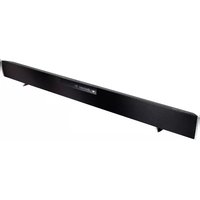
| Product Type | Soundbar Speaker System |
| Model Number | SB4020M-A0C |
| Brand | VIZIO |
| Channels | 2.0 |
| Total Power Output | 80 Watts RMS |
| Speaker Drivers | 2 x Full-Range Drivers |
| Dimensions (W x H x D) | 40.0" x 3.0" x 2.5" |
| Weight | 4.8 lbs |
| Power Supply | 100-240V AC, 50/60Hz |
| Power Consumption | 35W (max) |
| Wireless Connectivity | Bluetooth 4.1 |
| Audio Inputs | Optical (Toslink), 3.5mm AUX, RCA (L/R) |
| Remote Control | Included (IR) |
| Mounting Options | Tabletop or Wall-Mountable (brackets included) |
| Bluetooth Range | Up to 30 feet (line-of-sight) |
| Decoding Formats | Dolby Digital, DTS |
| Frequency Response | 70Hz - 20kHz |
| Maintenance | Wipe with dry, soft cloth; avoid water and solvents |
| Safety Compliance | UL, FCC, CE certified |
| Repairability | Consumer replaceable power cord; no user-serviceable parts inside |
| Included Accessories | Remote, optical cable, 3.5mm cable, wall bracket kit |
| General Information | Designed for TV and music playback; easy setup |
Frequently Asked Questions - SB4020M-A0C VIZIO
How do I connect the soundbar to my TV?
Use the optical cable (included) to connect the TV's optical output to the soundbar's OPTICAL IN port. You can also use the 3.5mm AUX cable or RCA cables for analog connections.
How do I pair a Bluetooth device?
Press the Bluetooth button on the remote or soundbar to enter pairing mode. The LED indicator will flash. On your phone or tablet, select 'VIZIO SB4020M' from the Bluetooth list. The LED will turn solid when paired.
Why is there no sound?
Check that the soundbar is powered on and the correct input is selected. Ensure the TV's audio output is set to PCM or Dolby Digital, and that the volume is not muted. Try a different cable or Bluetooth source to isolate the issue.
Can I wall-mount this soundbar?
Yes, the soundbar comes with a wall-mount bracket kit. Attach the brackets to the back of the soundbar, mark the screw holes on the wall, drill pilot holes, and secure the brackets. Then snap the soundbar onto the brackets.
How do I clean the soundbar?
Unplug the soundbar and wipe the exterior with a dry, soft cloth. Do not use water, cleaning chemicals, or abrasive cleaners. Avoid getting moisture into the speaker grills.
What is the power consumption?
The soundbar consumes up to 35 watts during normal operation. In standby mode, it consumes less than 0.5 watts per energy regulations.
Can I control the soundbar with my TV remote?
If your TV supports HDMI CEC, connect via optical and enable CEC on the TV to control volume. The included remote also duplicates most functions. Otherwise, use the soundbar's remote.
Does it support Dolby Atmos?
No, the SB4020M-A0C supports Dolby Digital and DTS, but not Dolby Atmos. It is a 2.0-channel system without height or up-firing speakers.
How can I improve Bluetooth range?
Keep the soundbar and the source device within 30 feet with no obstacles like walls or large metal objects. Reduce interference by turning off other Bluetooth devices or Wi-Fi routers near the signal path.
Are spare parts available?
The power cord and remote can be replaced by the user. For other internal parts, contact VIZIO support or an authorized service center. Do not open the soundbar, as there are no user-serviceable parts inside.
User questions about SB4020M-A0C VIZIO
0 question about this device. Answer the ones you know or ask your own.
Ask a new question about this device
No questions yet. Be the first to ask one.
Download the instructions for your Soundbar in PDF format for free! Find your manual SB4020M-A0C - VIZIO and take your electronic device back in hand. On this page are published all the documents necessary for the use of your device. SB4020M-A0C by VIZIO.
USER MANUAL SB4020M-A0C VIZIO


Manual assistant
Powered by Anthropic
Waiting for your message
Product information
Brand : VIZIO
Model : SB4020M-A0C
Category : Soundbar