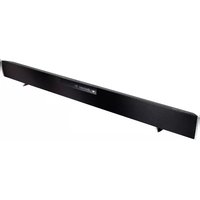
SB4020M-B0 - Soundbar VIZIO - Free user manual and instructions
Find the device manual for free SB4020M-B0 VIZIO in PDF.


Pick your language and provide your email: we'll send you a specifically translated version.
| Product Type | Soundbar |
| Model | SB4020M-B0 |
| Brand | VIZIO |
| Channels | 2.0 |
| Total Power Output | 40W RMS |
| Drivers | 2 x Full-range drivers, 2 x Tweeters |
| Dimensions (W x H x D) | 40.0 x 3.0 x 3.0 inches (approximately) |
| Weight | 5.2 lbs (approx.) |
| Power Supply | AC 100-240V, 50/60Hz |
| Power Consumption | 30W (typical) |
| Audio Inputs | Optical (TOSLINK), 3.5mm Analog Audio, Bluetooth |
| Bluetooth Version | 4.1 |
| Remote Control | Included (battery type: CR2032) |
| Wall Mountable | Yes (brackets included) |
| Additional Features | EQ presets (Movie, Music, Dialogue), DTS Virtual:X |
| Cleaning | Wipe with dry cloth; avoid liquids |
| Safety | Do not expose to rain or moisture; unplug during storms |
| Spare Parts | Remote control, power adapter available from VIZIO support |
Frequently Asked Questions - SB4020M-B0 VIZIO
How do I connect my VIZIO SB4020M-B0 to my TV?
Use the included optical cable or 3.5mm audio cable. Connect one end to the soundbar and the other to the corresponding output on your TV. Then select the correct input on the soundbar using the remote or button.
Can I control the soundbar with my TV remote?
Yes, if your TV supports HDMI ARC (not available on this model) or if you use the optical connection, enable CEC settings on your TV. Alternatively, use the included remote.
How do I pair a Bluetooth device?
Press the Bluetooth button on the remote or soundbar until the indicator blinks. On your phone or tablet, select 'VIZIO SB4020M-B0' from the Bluetooth list. The soundbar will automatically connect.
What batteries does the remote use?
The remote requires one CR2032 coin cell battery. To replace, slide the battery tray open, insert the new battery with the + side up, and close the tray.
How do I wall-mount the soundbar?
Use the included wall-mount brackets and screws. Measure and mark the desired height, drill holes, insert wall anchors (if needed), then attach brackets. Slide the soundbar onto the brackets until it clicks.
Why is there no sound from the soundbar?
Check that the soundbar is powered on and the correct input is selected. Ensure the TV audio output is set to external speakers. Try increasing volume on both devices. Reset by unplugging for 30 seconds.
How do I reset the VIZIO SB4020M-B0 to factory settings?
Press and hold both the Volume Down and Input buttons on the soundbar for 5 seconds until the LED flashes. This will clear all paired devices and settings.
What are the EQ presets and how do I use them?
Press the EQ button on the remote to cycle through Movie, Music, and Dialogue modes. Each optimizes sound for different content types.
Can I use the soundbar without a subwoofer?
Yes, the SB4020M-B0 is a standalone 2.0 soundbar with built-in speakers. It provides clear audio without a separate subwoofer, though bass may be limited.
How do I clean the soundbar?
Unplug the soundbar and wipe the exterior with a soft, dry cloth. Do not use any liquids or abrasive cleaners, as they may damage the finish.
User questions about SB4020M-B0 VIZIO
0 question about this device. Answer the ones you know or ask your own.
Ask a new question about this device
No questions yet. Be the first to ask one.
Download the instructions for your Soundbar in PDF format for free! Find your manual SB4020M-B0 - VIZIO and take your electronic device back in hand. On this page are published all the documents necessary for the use of your device. SB4020M-B0 by VIZIO.
USER MANUAL SB4020M-B0 VIZIO


Manual assistant
Powered by Anthropic
Waiting for your message
Product information
Brand : VIZIO
Model : SB4020M-B0
Category : Soundbar