Saga - Headphones IOGEAR - Free user manual and instructions
Find the device manual for free Saga IOGEAR in PDF.


Pick your language and provide your email: we'll send you a specifically translated version.
| Product Type | Wireless Over-Ear Headphones |
| Brand | IOGEAR |
| Model | Saga |
| Connectivity | Bluetooth 5.0 |
| Battery Life | Up to 20 hours of playback |
| Charging Port | USB-C |
| Driver Size | 40mm dynamic drivers |
| Frequency Response | 20Hz - 20kHz |
| Impedance | 32 Ohms |
| Weight | 250 grams |
| Dimensions | 18 x 16 x 8 cm |
| Material | Plush ear cushions, adjustable headband |
| Controls | On-ear buttons for volume, playback, and calls |
| Microphone | Built-in for hands-free calls |
| Compatibility | Smartphones, tablets, and computers |
| Maintenance | Wipe with a dry cloth; store in cool, dry place |
| Safety | Do not expose to water, heat, or moisture |
| Spare Parts | Replacement ear cushions and cables available |
| Repairability | Easy disassembly for battery and component replacement |
| General Info | Designed for immersive sound and comfortable daily use |
Frequently Asked Questions - Saga IOGEAR
How do I pair the IOGEAR Saga headphones with my phone?
Turn on the headphones and put them in pairing mode by holding the power button until the LED flashes. Then go to your phone's Bluetooth settings and select 'Saga' from the available devices.
What is the battery life of the Saga headphones?
The Saga offers up to 20 hours of continuous playback on a full charge. Battery life may vary with volume and usage.
How long does it take to fully charge the headphones?
A full charge via the USB-C port typically takes about 2 hours. A quick 10-minute charge can give you up to 2 hours of playback.
Can I use the Saga headphones while charging?
Yes, you can use the headphones in wired mode by connecting the included audio cable, or wireless while charging if you have a power bank.
Are there controls on the headphones for music and calls?
Yes, the Saga has on-ear buttons for volume, play/pause, track skipping, and answering or ending calls. The built-in microphone ensures clear conversations.
Is the microphone detachable?
The Saga features a built-in microphone that is not detachable. It is positioned on the ear cup for easy access.
Can I connect the Saga to multiple devices?
The Saga supports multipoint connectivity, allowing you to pair with two devices simultaneously and switch between them seamlessly.
How should I clean and maintain my headphones?
Wipe the ear cushions and headband with a soft, dry cloth. Do not use solvents or liquids. Store them in a cool, dry place when not in use.
Are replacement parts available?
Yes, replacement ear cushions, cables, and batteries are available from the IOGEAR website or authorized resellers. The design allows for easy replacement.
What should I do if my headphones stop working?
First, reset the headphones by turning them off and charging for 30 minutes. If the issue persists, consult the user manual for troubleshooting or contact IOGEAR support.
User questions about Saga IOGEAR
0 question about this device. Answer the ones you know or ask your own.
Ask a new question about this device
No questions yet. Be the first to ask one.
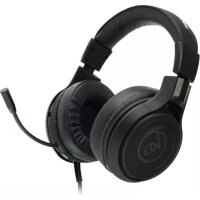
Download the instructions for your Headphones in PDF format for free! Find your manual Saga - IOGEAR and take your electronic device back in hand. On this page are published all the documents necessary for the use of your device. Saga by IOGEAR.
USER MANUAL Saga IOGEAR
Manual assistant
Powered by Anthropic
Waiting for your message
Product information
Brand : IOGEAR
Model : Saga
Category : Headphones