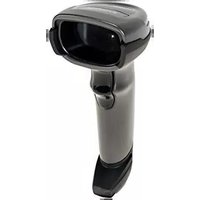
MS2207 - Barcode Reader MOTOROLA - Free user manual and instructions
Find the device manual for free MS2207 MOTOROLA in PDF.


Pick your language and provide your email: we'll send you a specifically translated version.
| Product Type | Handheld Barcode Reader |
| Brand | Motorola |
| Model | MS2207 |
| Scan Technology | Laser diode |
| Scan Rate | 100 scans per second |
| Read Range | 0.5 to 8 inches (13 mm to 203 mm) depending on barcode density |
| Supported Barcode Types | UPC/EAN, Code 39, Code 128, RSS, Interleaved 2 of 5, and more |
| Interface | USB, Keyboard Wedge, RS-232 |
| Power Source | 5V DC from host device |
| Cable Length | 6 feet (1.8 meters) |
| Dimensions (H × W × D) | 5.1 × 2.8 × 3.7 inches (13.0 × 7.1 × 9.4 cm) |
| Weight | 4.3 oz (122 g) |
| Housing Material | Polycarbonate |
| Operating Temperature | 32°F to 122°F (0°C to 50°C) |
| Storage Temperature | -40°F to 158°F (-40°C to 70°C) |
| Humidity | 5% to 95% (non-condensing) |
| Drop Resistance | Survives 5 ft (1.5 m) drops to concrete |
| Maintenance | Clean the scan window regularly with a soft, lint-free cloth |
| Cleaning | Use approved mild solvents; never submerge in liquid |
| Safety Certifications | FCC, CE, UL/cUL |
| What's in the Box | MS2207 scanner, USB cable, quick start guide |
Frequently Asked Questions - MS2207 MOTOROLA
How do I connect the Motorola MS2207 to my computer?
Plug the USB cable into the scanner's RJ-45 port and the other end into a USB port on your computer. The scanner is plug and play. Wait for the beep to confirm power.
What barcode symbologies can the MS2207 decode?
It supports UPC/EAN, Code 39, Code 128, RSS, and Interleaved 2 of 5, among others.
Why won't my scanner read barcodes from a screen?
The MS2207 uses a laser engine, which may struggle with reflective screens. Try increasing brightness and avoid glare, or use a scanner with 2D imager for electronic displays.
How do I reset my MS2207 to factory default settings?
Scan the barcode titled 'Reset to Defaults' from the user manual. Alternatively, hold the trigger for 10 seconds until the LED flashes, but consult the manual for exact steps.
Can the MS2207 read barcodes off a mobile phone display?
In most cases no, because the laser sacrifices reading from glossy screens. A scanner with image-based technology is recommended for mobile screens.
How should I clean the MS2207?
Unplug the scanner, use a soft, lint-free cloth with mild glass cleaner on the scan window. Never spray directly; dampen the cloth first.
The scanner beeps continuously, what does that mean?
A continuous beep usually indicates a failed scan or communication error with the host. Reconnect the cable, verify the interface, and scan a test barcode.
Is the MS2207 compatible with my POS system?
Yes, it works as an HID keyboard, so it behaves like a USB keyboard. Most POS systems accept HID input without extra drivers. Verify your output settings.
Can I program the scanner to add a carriage return after each scan?
Yes, use the configuration barcodes in the manual to set suffix parameters. Scan "Enter" suffix or "Carriage Return" depending on your host.
What is the maximum scanning distance for the MS2207?
For a typical 13 mil UPC barcode, the maximum distance is about 8 inches (20 cm). Higher density barcodes need closer proximity.
User questions about MS2207 MOTOROLA
0 question about this device. Answer the ones you know or ask your own.
Ask a new question about this device
No questions yet. Be the first to ask one.
Download the instructions for your Barcode Reader in PDF format for free! Find your manual MS2207 - MOTOROLA and take your electronic device back in hand. On this page are published all the documents necessary for the use of your device. MS2207 by MOTOROLA.
USER MANUAL MS2207 MOTOROLA

Manual assistant
Powered by Anthropic
Waiting for your message
Product information
Brand : MOTOROLA
Model : MS2207
Category : Barcode Reader