AVS1364 - Uncategorized DAEWOO - Free user manual and instructions
Find the device manual for free AVS1364 DAEWOO in PDF.


| Product Type | Bagless Cylinder Vacuum Cleaner |
| Brand | Daewoo |
| Model | AVS1364 |
| Dimensions (L x W x H) | 36 x 26 x 24 cm |
| Weight | 4.2 kg |
| Power Consumption | 1600 W |
| Voltage / Frequency | 220-240 V ~ 50 Hz |
| Dust Capacity | 1.5 L |
| Filtration System | Washable HEPA 13 filter |
| Noise Level | 78 dB(A) |
| Cord Length | 6 m |
| Operating Radius | 9 m |
| Suction Power Control | Electronic variable speed |
| Floor Head | Combination carpet & hard floor head |
| Included Accessories | Crevice nozzle, upholstery brush |
| Carrying Handle | Ergonomic handle |
| Parking Position | Vertical parking hook |
| Maintenance | Easy-empty dust bin, washable filters |
| Safety Features | Thermal cut-off protection |
| Spare Parts | Filters and nozzles available separately |
Frequently Asked Questions - AVS1364 DAEWOO
User questions about AVS1364 DAEWOO
0 question about this device. Answer the ones you know or ask your own.
Ask a new question about this device
Download the instructions for your Uncategorized in PDF format for free! Find your manual AVS1364 - DAEWOO and take your electronic device back in hand. On this page are published all the documents necessary for the use of your device. AVS1364 by DAEWOO.
USER MANUAL AVS1364 DAEWOO
DAEWOO®

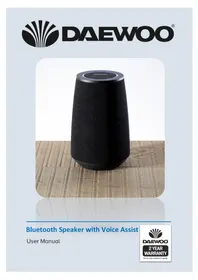
Bluetooth Speaker with Voice Assist
User Manual

IMPORTANT SAFEGUARDS
When using electrical appliances, basic safety precautions should always be followed. These instructions should be saved for future reference:
- Read and familiarise yourself with all operating instructions before using this Speaker.
- Before plugging your unit into the mains, visually check that the unit is intact and has not suffered any transit damage.
- Check that the voltage indicated on the data plate corresponds with that of the local network before connecting the appliance to the mains power supply.
- Always use this appliance on a solid, level, non-flammable surface.
- Ensure that there is clearance of at least 100mm (4 Inches) minimum around the Speaker for sufficient ventilation.
- Ensure that the ventilation openings are not covered with items, such as newspapers, table-cloths, curtains, etc.
- No naked flame sources, such as lighted candles, should be placed on the Speaker.
- Do not position the Speaker close to sources of heat such as radiators, heaters, other electronic equipment, etc.
- The Speaker shall not be exposed to dripping or splashing and that no objects filled with liquids, such as vases, shall be placed on the apparatus.
- Do not immerse the Speaker or its supply in water or any other liquids.
- Do not leave the Speaker unattended during use.
- Do not leave the Speaker unattended whilst connected to the USB supply.
- Close supervision is required when using this Speaker near children.
- Never leave this Speaker within reach of children.
- This appliance can be used by children aged from 8 years and above and persons with reduced physical, sensory or mental capabilities or lack of experience and knowledge if they have been given supervision or instruction concerning use of the appliance in a safe way and understand the hazards involved. Children shall not play with the appliance. Cleaning and user maintenance shall not be
made by children without supervision.
- Children of less than 3 years should be kept away unless continuously supervised.
- Do not use this Speaker outdoors.
- It is imperative to unplug the power supply after the Speaker has been used, before it is cleaned and whilst being repaired.
- Repairs to electrical appliances should only be performed by qualified personnel. Improper repairs may place the user at serious risk.
- Do not operate this appliance after a malfunction or after being dropped or damaged in any way.
- Do not allow the power cable to hang over sharp edges or come in contact with hot surfaces.
- Do not run the USB charging cable under carpets, rugs, etc.
- This product is intended for household use only and should not be used for industrial purposes.
- Do not use any accessories or attachments with this product other than those supplied or recommended by supplier.
- Do not use this product for anything other than its intended use.
- Do not push objects into any openings as damage to the product and/or electric shock may occur.
Description of Parts – Top Panel Controls
-
- Press to Play/Pause/Phone.
-
LED Indicator.
-
⏻-Press for power On/Off.
-
-
- Press to Skip forwards to the next track or press and hold for volume increase.
-
-
Microphone (used for phone calls and voice assistant.
-
🖼 Voice Assistant button.
-
—— Press to Skip back to the previous next track or press and hold for volume decrease.
-
LED Lights.

Description of Parts – Rear Panel & Accessories
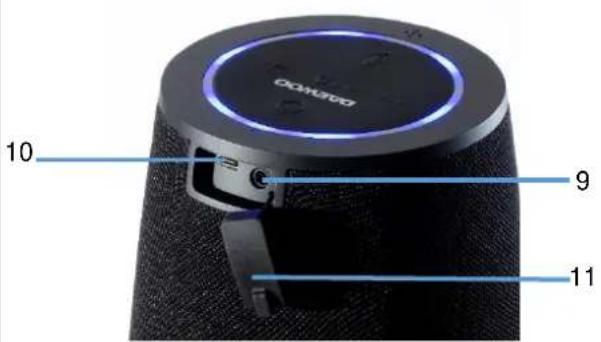
- AUX – External 3.5mm input.
- Micro USB DC Port.
- Cover.
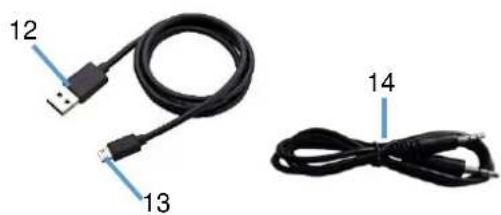
- USB Charging Cable.
- Micro USB Plug.
- 3.5mm Jack to Jack Cable
Before the first time you use your Bluetooth Speaker
Please read these operating instructions thoroughly and keep them in a safe place for future reference.
Remove all packing materials and discard responsibly.
Charging the internal Battery
Before use, please ensure that the internal rechargeable battery is fully charged as follows:
- Insert the Micro USB Plug (13) of the USB Charging Cable (12) into the Micro USB DC Port (10) on rear panel of the Speaker to charge the internal battery.
- Insert the large USB plug on the other end of the USB Charging Cable (12) into a suitable USB charger rated at 5 volts 1 amp minimum.
- The LED Indicator (2) on the top panel will light red to show the internal battery is charging. Once the battery is fully charged, the LED Indicator (2) will go out showing that the internal battery is fully charged and the USB Charging Cable (12) can be removed.
NB the Speaker can be used normally during charging.
Operating Instructions
Using the Bluetooth Mode
- Press and hold the Power button ⏻(3) on the Top Panel for three seconds to power up the speaker.
- The LED Lights (8) on the top panel will flash to show the speaker is powering up.
- Enable the Bluetooth mode on your Phone, Tablet or other Bluetooth compatible device and set it to search.
- Select 'AVS1364' from the search results found by your device which will now pair with the speaker. Once the device has paired with the speaker the LED lights (8) and the LED Indicator (2) will flash slowly and the speaker will chime.
- Enable the music player on your Phone, Tablet or other device you are using.
- Press the Play/Pause/Phone button (1) ▶ to start and stop (pause) the connected device playing.
- Briefly press the Skip Back — (7) and Skip Forward + buttons (4) to change the track being played.
- Press and hold the Skip Back — (7) and Skip Forward + buttons (4) to decrease and increase the volume level.
- Alternatively use your devices controls in the usual manner.
Using the AUX/LINE Input
The AUX/LINE Input allows a direct wired connection of an external audio device (such as a mobile phone, music player, etc.) via a 3.5mm jack socket input on the rear Panel.
- Press and hold the Power button ⏻ (3) on the Top Panel for three seconds to power up the speaker.
- Insert a suitable 3.5mm Jack to Jack lead (14) into the AUX socket (9) on the rear panel of the Speaker.
- The speaker will automatically detect the lead and switch to AUX mode.
-
Insert the other end of the lead into the device you are playing from.
-
Press and hold the Skip Back — (7) and Skip Forward + buttons (4) to decrease and increase the volume level.
Handling Telephone Calls
Answering a Call
- A call coming in will mute (cut) the music you are listening to.
- Briefly press the Play/Pause/Phone button ▶ (1) to answer the call.
- Press and hold down the Skip Forward + button (4) to increase the call volume level.*
- Press and hold down the Skip Back — button (7) to decrease the call volume level.
- Briefly press the Play/Pause/Phone button ▶ (1) again to end the call.
- The callers voice will be heard through the speaker and your voice will be picked up by the built-in Microphone inside the speaker.
Rejecting a Call
- A call coming in will mute (cut) the music you are listening to.
- Press and hold the Play/Pause/Phone ▶ button (1) for two seconds to reject the call.
Making a Call
- Whilst listening to music, press and hold the Play/Pause/Phone button (1) briefly twice to dial the last call made.
- Press and hold down the Skip Forward button (4) to increase the call volume level.*
- Press and hold down the Skip back button (7) to decrease the call volume level.
- Briefly press the Play/Pause/Phone button ▶ (1) again to end the call.
*Two high pitched beeps will be heard warning when the maximum volume setting has been reached.
Voice Assistant Operation
- Make sure that Siri is activated; Make sure Google Assistant is downloaded and set to default Voice Assistant.
- Ensure that your phone is Bluetooth paired as described above.
- Press the 🖱 button (6) once.
- Speak the require command to Siri or Google (whichever type of phone is connected) into the built in microphone on the top panel (5) of the speaker.
- Press the ⏻ button (6) again to cancel the voice assistant mode.
NB Google Assistant is available Android 5.0 devices or later. Works on Lollipop, Marshmallow and Nougat Android Phones with Google Play Services, >1.5GB of memory and 720P or higher screen resolution. Please ensure Google Assistant App is downloaded and made as default Voice Assistant on your mobile device.
Care and Use of your Speaker
• Always disconnect the Speaker from the USB charging supply before cleaning.
- Clean outside of the Speaker with a clean damp cloth. Never clean with harsh or abrasive cleaners.
- Do not submerge the Speaker in water or any other liquids.
Technical Specification
| Model Number | AVS1364, AVS1425 & AVS1426 |
| Power Supply/Charger | DC 5V @1A |
| Total audio output power | 2x 5W |
| Audio Frequency Response | 100Hz – 20KHz |
| Unpacked Weight | Approx. 540gs |
| Dimensions (Approx.) | Approx. 115 mm (dia.) x 180mm (h) |
| Operation temperature | 0°C to + 40°C |
| Built in Battery type | Lithium Ion, 3600 mAh |
| Bluetooth Frequency Range | 2402 - 2480MHz |
| Bluetooth Transmission power | ≤-3.325dBm |
| This product conforms to Radio Equipment Directive 2014/53/EU | |
Waste batteries should not be disposed of with household waste. Please recycle where facilities exist. Check with your Local Authority or retailer for recycling advice.
GUARANTEE
This product is guaranteed for twenty-four months from the date of original purchase. If any defect should occur due to faulty materials or workmanship, please return it to the store it was purchased from.
You will need to have your receipt of purchase to hand. The guarantee is subject to the following provisions:
- It is only valid within the boundaries of the country of purchase.
- The product must be correctly installed and operated in accordance with the instructions contained in the User Manual.
- The product must be used solely for domestic purposes.
- The guarantee will be rendered invalid if the product is re-sold or has been damaged by inexpert repair.
- The manufacturer disclaims any liability for incidental or consequential damages.
- The guarantee is in addition to, and does not diminish, your statutory or legal rights.
Waste electrical products should not be disposed of with household waste. Please recycle where facilities exist. Check with your Local Authority or retailer for recycling advice.

Daewoo Electricals is a registered trademark.
Produced and imported under licence by ESG Ltd
Manchester M3 1JS www.esgld.com
- DAEWOO®
- BLUETOOTH SPEAKER WITH VOICE ASSIST
- IMPORTANT SAFEGUARDS
- WHEN USING ELECTRICAL APPLIANCES, BASIC SAFETY PRECAUTIONS SHOULD ALWAYS BE FOLLOWED. THESE INSTRUCTIONS SHOULD BE SAVED FOR FUTURE REFERENCE
- DESCRIPTION OF PARTS – TOP PANEL CONTROLS
- DESCRIPTION OF PARTS – REAR PANEL & ACCESSORIES
- BEFORE THE FIRST TIME YOU USE YOUR BLUETOOTH SPEAKER
- CHARGING THE INTERNAL BATTERY
- OPERATING INSTRUCTIONS
- USING THE BLUETOOTH MODE
- USING THE AUX/LINE INPUT
- HANDLING TELEPHONE CALLS
- ANSWERING A CALL
- REJECTING A CALL
- MAKING A CALL
- VOICE ASSISTANT OPERATION
- CARE AND USE OF YOUR SPEAKER
- GUARANTEE
Brand : DAEWOO
Model : AVS1364
Category : Uncategorized