MG04SCA20EN - Hard Drive TOSHIBA - Free user manual and instructions
Find the device manual for free MG04SCA20EN TOSHIBA in PDF.


Pick your language and provide your email: we'll send you a specifically translated version.
| Product Type | Internal Hard Drive |
| Brand | Toshiba |
| Model | MG04SCA20EN |
| Storage Capacity | 2 TB |
| Interface | SATA 6 Gb/s |
| Rotational Speed | 7200 RPM |
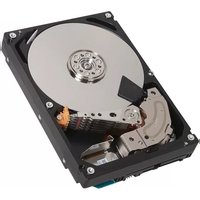
| Form Factor | 3.5 inch |
| Data Buffer | 128 MB |
| Sustained Transfer Rate | 242 MB/s |
| Average Latency | 4.17 ms |
| MTBF | 1,200,000 hours |
| Workload Rating | 550 TB/year |
| Power Consumption (Read/Write) | 7.5 W |
| Power Consumption (Idle) | 5.2 W |
| Operating Temperature | 5°C to 55°C |
| Noise Level (Idle) | 30 dBA |
| Dimensions (W x D x H) | 101.85 mm x 147.0 mm x 26.1 mm |
| Weight | 770 g |
| Maintenance | No routine maintenance required |
| Cleaning | Gently wipe with a dry, lint-free cloth |
| Safety | Handle with care; avoid static and physical shocks |
| Repairability | Not user-serviceable; contact authorized service |
Frequently Asked Questions - MG04SCA20EN TOSHIBA
How do I install this hard drive in my computer?
Ensure the computer is powered off. Connect the SATA cable and power cable to the drive, then mount it in a 3.5-inch bay. Secure it with screws. The drive will be recognized automatically in most systems.
Is this hard drive compatible with laptops?
No, this is a 3.5-inch hard drive designed for desktop computers and servers. It will not fit in most laptops that require 2.5-inch drives.
What is the storage capacity of the Toshiba MG04SCA20EN?
It has a capacity of 2 TB (2000 GB), suitable for large data storage and enterprise applications.
What is the rotational speed and does it affect performance?
The drive spins at 7200 RPM, which provides faster data access and better read/write performance compared to 5400 RPM drives.
Does this drive support hardware encryption?
Yes, it features hardware encryption (SED) with support for TCG Opal, ensuring data security.
Can I use this drive in a RAID setup?
Absolutely. It is designed for enterprise environments and supports multiple RAID configurations, including RAID 0, 1, 5, and 10.
How can I extend the lifespan of this hard drive?
Ensure proper cooling and avoid physical shocks. Regularly update firmware and monitor SMART data. Also, use it in a stable power environment with a UPS.
My computer does not detect the drive. What should I do?
Check the SATA and power connections, verify the SATA port is enabled in BIOS, and test with a different cable or port. You may also need to initialize the disk in Disk Management (Windows) or Disk Utility (macOS).
How do I clean the hard drive?
Do not open the drive. Clean the exterior using a dry, lint-free cloth. Avoid liquids and compressed air. Handle by the edges to prevent static damage.
What is the power consumption of this drive?
Typical power consumption is 7.5 W during read/write and 5.2 W when idle, making it energy-efficient for continuous operation.
User questions about MG04SCA20EN TOSHIBA
0 question about this device. Answer the ones you know or ask your own.
Ask a new question about this device
No questions yet. Be the first to ask one.
Download the instructions for your Hard Drive in PDF format for free! Find your manual MG04SCA20EN - TOSHIBA and take your electronic device back in hand. On this page are published all the documents necessary for the use of your device. MG04SCA20EN by TOSHIBA.
USER MANUAL MG04SCA20EN TOSHIBA


Manual assistant
Powered by Anthropic
Waiting for your message
Product information
Brand : TOSHIBA
Model : MG04SCA20EN
Category : Hard Drive