WR44-M700-CE1-RF - Router Digi - Free user manual and instructions
Find the device manual for free WR44-M700-CE1-RF Digi in PDF.


| Product Type | Industrial Cellular Router |
| Model | WR44-M700-CE1-RF |
| Brand | Digi |
| Cellular Connectivity | LTE / 4G / 3G |
| Ethernet Ports | 2 x 10/100/1000 Mbps |
| Serial Interface | RS-232 / RS-485 |
| Wi-Fi Standard | IEEE 802.11 b/g/n |
| SIM Slots | 2 (for failover) |
| VPN Support | IPsec, OpenVPN, GRE |
| Power Input | 9 - 30 VDC |
| Power Consumption | < 10 W typical |
| Dimensions (W x H x D) | 125 mm x 100 mm x 35 mm |
| Weight | 400 g |
| Antenna Connectors | 2 x SMA female |
| Mounting | DIN rail and wall mount |
| Operating Temperature | -40°C to +70°C |
| Certifications | CE, FCC, E-mark |
| LED Indicators | Power, signal strength, Ethernet, Wi-Fi |
| Firmware Update | Web interface or Digi Remote Manager |
| Maintenance | Keep firmware updated; clean with dry cloth |
| Spare Parts | Antennas, power supply, SIM cover |
| Repairability | Modular design with accessible connectors |
Frequently Asked Questions - WR44-M700-CE1-RF Digi
User questions about WR44-M700-CE1-RF Digi
0 question about this device. Answer the ones you know or ask your own.
Ask a new question about this device
Download the instructions for your Router in PDF format for free! Find your manual WR44-M700-CE1-RF - Digi and take your electronic device back in hand. On this page are published all the documents necessary for the use of your device. WR44-M700-CE1-RF by Digi.
USER MANUAL WR44-M700-CE1-RF Digi
DIGI TRANSPORT® WR44
Enterprise class, commercial grade Wi-Fi-to-cellular router with flexible interface options ideal for distributed branch applications
The Digi TransPort WR44 cellular router is an all-in-one branch networking solution with true enterprise-class routing, security and firewall. This multifunction cellular router features a flexible design with integrated Wi-Fi access point, USB, serial, 4-port Ethernet switch, with an optional serial expansion card.
The Digi TransPort family offers an advanced routing, security and firewall feature set including stateful inspection firewall and integrated VPN. Enterprise-class protocols incorporate BGP, OSPF and VRRP+, a patented technology built upon the popular VRRP failover standard providing true auto sensing, auto failure and auto recovery of any line drop.
Digi TransPort WR44 is ideal for retail and utility applications. Flexible power options include 9–36 VDC barrel or Molex connectors for direct integration into DC power supplies. Digi Remote Manager ® provides easy setup, configuration and maintenance of large installations of Digi TransPort and third-party devices.
- Enterprise class cellular routers with advanced dynamic routing, security and firewall features
– High speed cellular interfaces: HSPA+ and 4G LTE - Optional integrated 802.11 b/g/n; a/n Wi-Fi access point and 4-port Ethernet switch
- Flexible interfaces including serial with DC power options
– Powerful integrated end user programming - Digi Remote Manager® provides mass configuration, device management and troubleshooting tools
RELATED PRODUCTS

Digi TransPort ® WR11

Digi TransPort ® WR21

Digi TransPort ® WR44 R

Accessories Digi Remote Manager®

APPLICATION EXAMPLE
![graph LR A["HEADQUARTERS"] --> B["DIGI REMOTE MANAGER®"] B --> C["CREDIT CARD PROCESSOR"] D["Cellular/VPN"] --> B](/content/2026/07/1549804/images/0eaade638163d1ca8b1bd4e88370a5ae5e960e35b4e3ac911c15b29d2a2fc595.jpg)

| SPECIFICATIONS | Digi TransPort® WR44 |
| WIRELESS INTERFACES | |
| WWAN** | |
| LTE - EMEA/APAC (L1) | LTE CAT 3: 800(B20)/850(B5)/900(B8)/1800(B3)/1900(B2)/2100(B1)/2600(B7)3G HSPA+: 850/900/1900/2100 MHz2G EDGE/GPRS: 850/900/1800/1900 MHzTransfer rate (max): 100 Mbps down, 50Mbps upApprovals: Vodafone |
| LTE - NORTH AMERICA (L5) | Software defined multi-carrierLTE CAT 3: 700(B13,B17)/850(B5)/AWS(B4)/1900(B2,B25)3G HSPA+: 850/900/1700AWS/1900/2100 MHz3G EVDO: 800/1900 MHz2G EDGE/GPRS: 850/900/1800/1900 MHz2G 1XRTT: 800/1900 MHzTransfer rate (max): 100 Mbps down, 50Mbps upApprovals: Verizon Private Network, DMNR and PNTM, AT&T, Sprint, Telus, Bell |
| CONNECTOR | (2) 50Ω SMA (Center pin: female); (1) connector for non-LTE models |
| SIM SLOTS | (2) Mini-SIM (2FF) |
| SIM SECURITY | SIM slot cover plate optional |
| WI-FI* | |
| STANDARD | 802.11 b/g/n; a/n |
| MODES | Access point, Client and support for multiple SSID |
| TRANSMIT POWER | 20 dBm + 1.0/-1.5 dBm |
| RECEIVE SENSITIVITY | 54 Mbps /<-72 dBm and 11 Mbps /-90 dBm |
| SECURITY | Open or shared key authentication; WEP (64- and 128-bit) encryption; WPA/WPA2 with RADIUS (WPA Enterprise and pre-shared keys) |
| CONNECTORS | (2) 50Ω RP-SMA (Center pin: male) |
| WIRED INTERFACES | |
| SERIAL | |
| PORTS | (1) DB-9; DCE |
| STANDARD | RS-232 |
| SIGNAL SUPPORT | TXD, RXD, RTS, CTS, DTR, DCD, DSR, RI |
| FLOW CONTROL | Software (XON/XOFF), Hardware supported |
| ETHERNET | |
| PORTS | (4) RJ-45; 10/100 Mbps (auto-sensing) |
| USB | |
| PORTS | (1) USB 2.0 Type A |
| SOFTWARE | |
| REMOTE MANAGEMENT | Digi Remote Manager ® (cloud based); SNMP v1/v2c/v3 (user installed/managed) |
| LOCAL MANAGEMENT | Web Interface (HTTP/HTTPS); CLI (Telnet, SSH, SMS, Serial port) |
| MANAGEMENT/TROUBLESHOOTING TOOLS | FTP, SFTP, SCP, Protocol Analyzer with PCAP for Wireshark, Event Logging with Syslog and SMTP, NTP/SNTP |
| MEMORY | 128 MB NAND Flash/64 MB DDR2 SDRAM |
| POWER | |
| INPUT | 9 - 36 VDC |
| CONSUMPTION | 15W max, 8.5W typical |
| CONNECTOR | Locking barrel and 4-pin terminal block (2 pins are used for power; the other 2 pins are used for I/O). |
| DC POWER CORD* | Locking barrel to bare wire or 4-pin connector to bare wire |
| DC POWER SUPPLY* | 100-240 VAC 50/60 Hz; Option of standard temperature or extended temperature |
* Optional hardware. Lead time and/or minimum order quantity may apply. Contact Digi Sales for details.
** Transfer rates are network operator dependent
| SPECIFICATIONS | Digi TransPort® WR44 |
| PHYSICAL | |
| DIMENSIONS (L X W X H) | 5.7 in x 8.3 in x 1.6 in (145 mm x 210 mm x 40 mm) |
| WEIGHT | 1.98 lb (0.9 kg) |
| STATUS LEDS | Power, LAN, Wi-Fi, Serial, WWAN (Link, Act, SIM), Signal strength |
| MATERIAL/RATING**** | Industrial (Metal)/ IP30 |
| MOUNTING | Brackets for wall mount & DIN rail sold separately |
| ENVIRONMENTAL | |
| OPERATING TEMPERATURE *** | 0°C to +40°C; (Reduced cellular performance may occur above +60°C) |
| STORAGE TEMPERATURE | -40°C to +85°C |
| RELATIVE HUMIDITY | 0% to 95% (non-condensing) @ 25°C |
| ETHERNET ISOLATION | 1.5 kV RMS |
| SERIAL PORT PROTECTION (ESD) | 15 kV |
| HAZARDOUS (CLASS 1 DIV 2) | N/A |
| CONFORMAL COATING | N/A |
| APPROVALS | |
| GSM/HSPA/LTE | PTCRB, NAPRD.03, GCF-CC, R&TTE, EN 301 511 |
| SAFETY | UL 60950, CSA 22.2 No. 60950, EN60950 |
| EMISSIONS/IMMUNITY | CE, FCC Part 15 Class B, AS/NZS CISPR 22, EN55024, EN55022 Class B |
| WARRANTY | |
| PRODUCT WARRANTY | 5 years |
| ENTERPRISE SOFTWARE DESCRIPTION | |
| PROTOCOLS | HTTP, HTTPS, FTP, SFTP, SSL, SMTP, SNMP (v1/v2c/v3), SSH, Telnet and CLI for web management; remote management via Digi Remote Manager; SMS management, protocol analyzer, ability to capture PCAP for use with Wireshark; DynDNS; Dynamic DNS client compatible with BIND9/No-IP/DynDNS |
| SECURITY/VPN | Stateful inspection firewall with scripting, address and port translation; VPN: IPSec with IKEv1, IKEv2, NAT Traversal; SSL, SSLv2, FIPS 197, Open VPN client and server; PPTP, L2TP; (5) VPN Tunnels (upgradable to a maximum of 200); Cryptology: SHA-1, MD5, RSA; Encryption: DES, 3DES and AES up to 256-bit; Authentication: RADIUS, TACACS+, SCEP for X.509 certificates; Content Filtering (via 3rd party) ; MAC Address Filtering; VLAN support; Ethernet Port Isolation |
| ROUTING/FAILOVER | IP pass-through ; NAT, NAPT with IP Port Forwarding; Ethernet Bridging; GRE; Multicast Routing; Routing Protocols: PPP, PPPoE, RIP (v1, v2) OSPF, SRI, BGP, iGMP routing (multicast); RSTP (Rapid Spanning Tree Protocol); IP Failover: VRRP, VRRP+TM; Automatic failover/failback to second GSM network/Standby APN |
| OTHER PROTOCOLS | DHCP; Dynamic DNS client compatible with BIND9/No-IP/DynDNS; QoS via TOS/DSCP/WRED; Modbus UDP/TCP to serial; X.25 including XOT, SNA/IP, TPAD and PAD; Protocol switch; Modbus bridging for connecting diverse field assets |
* Optional hardware.
** Transfer rates are network operator dependent
*** Standard temperature power supplies may reduce temperature range.
**** The enclosure rating is self-declared and has not been formally verified by an independent lab.
DIGI REMOTE MANAGER®

INFRASTRUCTURE
– Hosted in a commercial-grade SAS 70-certified environment
– Superior availability, operating to 99.9% or greater
- Open APIs available to support application development
CAPABILITIES
- Centralized management of remote devices over 3G/4G LTE
- Define standard configurations and automatically monitor individual devices for PCI security compliance
- Report and alert on performance statistics, including connection history, signal quality, latency, data usage and packet loss
- No servers or applications to operate and maintain
- Complete tasks for your entire device network in minutes
- Edit configurations and update firmware for your individual devices or groups
- Monitor the status and location of your remote device via a web browser
- Active or deactivate cellular lines and monitor data to ensure you never incur overage charges
SECURITY
- Certified SSAE-16 facilities
– Member of the Cloud Security Alliance - Over 175 Security Controls in place to protect your data
- Enables compliance with security frameworks like PCI, HIPAA, NIST and more
- Earned SkyHigh's Cloud Trust Program highest ranking of Enterprise-Ready
PRODUCT IMAGES

CONNECTOR

ASYNC SERIAL PORTS (A3)
(3) asynchronous RS-232 serial ports
PART NUMBERS DESCRIPTION
| WR44-L100-CE1-SW 4G LTE International, No Wi-Fi |
| WR44-L100-NE1-SW 4G LTE International, Wi-Fi |
| WR44-L500-CE1-SU 4G LTE Multi-Carrier Software Defined, North America, No Wi-Fi |
| WR44-L500-NE1-SU 4G LTE Multi-Carrier Software Defined, North America, Wi-Fi |
| WR44-L5A3-CE1-SU 4G LTE Multi-Carrier Software Defined, North America, No Wi-Fi, (3) Async RS-232 Ports |
DIGI SERVICE AND SUPPORT / You can purchase with confidence knowing that Digi is always available to serve you with expert technical support and our industry leading warranty. For detailed information visit www.digi.com/support.
© 1996-2018 Digi International Inc. All rights reserved.
All trademarks are the property of their respective owners.
91001557
E11/218
DIGI INTERNATIONAL WORLDWIDE HQ
877-912-3444/952-912-3444/www.digi.com
DIGI INTERNATIONAL GERMANY
+49-89-540-428-0
DIGI INTERNATIONAL JAPAN
+81-3-5428-0261 / www.digi-intl.co.jp
DIGI INTERNATIONAL SINGAPORE
+65-6213-5380
DIGI INTERNATIONAL CHINA
+86-21-50492199 / www.digi.com.cn

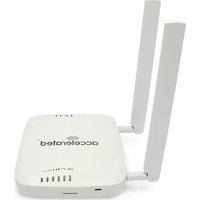
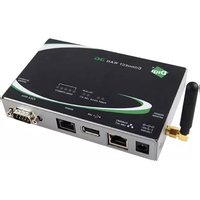

Brand : Digi
Model : WR44-M700-CE1-RF
Category : Router