OPTOMA W304M - Projector

W304M - Projector OPTOMA - Free user manual and instructions

Find the device manual for free W304M OPTOMA in PDF.

📄 63 pages English EN Download 💬 AI Question 10 questions ⚙️ Specs
Notice OPTOMA W304M - page 1
Pick your language and provide your email: we'll send you a specifically translated version.
Product Type DLP Projector
Brand Optoma
Model W304M
Technology Texas Instruments single-chip DLP®
Native Resolution XGA (1024 x 768)
Brightness Approx. 3000 lumens (estimated)
Contrast Ratio Approx. 20000:1 (estimated)
Lamp Replaceable projection lamp (typical lifespan 4000-6000 hours)
Keystone Correction Digital vertical ±30°
Zoom Manual (zoom ring)
Focus Manual (focus ring)
Built-in Speaker 1 Watt
Video Inputs HDMI, VGA (YPbPr compatible), Composite (RCA)
Audio Input 3.5mm mini jack
Audio Output 3.5mm mini jack
3D Functions 3D support (DLP Link, IR, Side-by-Side, Top-Bottom, Frame Sequential formats)
Power Consumption Standby < 0.5 W (Eco mode), operation approx. 250 W
Power Supply 100-240 V AC, 50/60 Hz
Weight Approx. 2.5 kg
Dimensions (W x D x H) Approx. 30 x 20 x 10 cm
Operating Temperature 5°C to 40°C
Operating Humidity 10% to 85% (non-condensing)
Maintenance Clean the lens with a soft cloth and optical cleaner; clean the cabinet with a damp cloth and mild detergent
Repairability User-replaceable lamp; other repairs by qualified technician
Security Kensington lock, security password, clock security

Frequently Asked Questions - W304M OPTOMA

How to turn the Optoma W304M projector on and off?
To turn on, connect the power, check that the power LED is solid, then press the Power button. To turn off, press Power once, a confirmation message appears; press again to confirm. The cooling cycle lasts about 10 seconds before entering standby.
How to connect a laptop to the projector?
Use a VGA cable to connect the computer's VGA port to the projector's VGA input. Also connect the USB cable to use the remote control's mouse function (optional). Turn on the projector, then on the computer, use the function key (e.g., Fn+F4) to switch the display.
The projected image is distorted or tilted, how to correct it?
Use Keystone correction: press the Keystone + or Keystone - buttons on the remote control or control panel to straighten the image. You can also adjust the height by lifting the projector and using the height adjustment button.
How to replace the projector lamp?
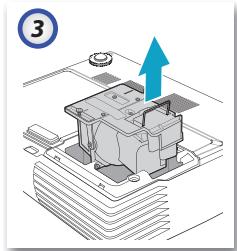
Turn off the projector and unplug it for at least one hour to let it cool. Loosen the screws on the lamp compartment cover, remove the cover, then unscrew the two screws on the lamp module. Pull the handle to remove the old lamp. Insert the new one (without touching the glass) and screw back in. Reset the lamp counter via the menu Options > Lamp Settings > Lamp Reset.
How to clean the projector lens and cabinet?
For the lens: use a suitable optical cleaner on a soft cloth and wipe in circular motions. For the cabinet: dampen a cloth with warm water and mild detergent (like dish soap), wipe, then rinse with a damp cloth without detergent. Never use abrasive solvents or alcohol.
What to do if no image appears?
Check that all cables are properly connected, the lens cap is removed, and the projector is on. Make sure the lamp is installed correctly. Press Re-Sync on the remote control. If using a PC, ensure the resolution is at or below UXGA (1600x1200) and change the display mode with the Fn keys.
How to activate the 3D function on the projector?
In the OSD menu, go to IMAGE > Display Mode and select 3D. Then, in DISPLAY > 3D Mode, choose DLP Link or IR according to your glasses. The 3D format (Side-by-Side, Top-Bottom, etc.) must match the source.
How to reset the lamp hour counter after replacement?
Access the OSD menu, select OPTIONS, then Lamp Settings, and choose Lamp Reset. Confirm by selecting Yes. The counter returns to zero.
How to change the OSD menu language?
Press Menu to open the OSD, go to SETTINGS, then Language. Use the directional keys to select the desired language (English, etc.) and confirm with Enter.
How to set up the security password?
In the SETTINGS > Security menu, select Security Settings and enable the option. A password will be prompted. By default, the password is 1,2,3,4,5. You can change it in Change Password. Once activated, the password will be required to turn on the projector.

User questions about W304M OPTOMA

0 question about this device. Answer the ones you know or ask your own.

Ask a new question about this device

The email remains private: it is only used to notify you if someone responds to your question.

No questions yet. Be the first to ask one.

Download the instructions for your Projector in PDF format for free! Find your manual W304M - OPTOMA and take your electronic device back in hand. On this page are published all the documents necessary for the use of your device. W304M by OPTOMA.

USER MANUAL W304M OPTOMA

natural_image Line drawing of a projector with a display and control knobs (no text or symbols)
natural_image Line drawing of a remote control with two batteries (no text or symbols)
natural_image Line drawing of a closed suitcase with open lid and side buttons (no text or symbols)

Mallette de transport

Diagram showing connections between a desktop computer, laptop, and audio equipment with labeled components

Technical diagram showing a mechanical assembly with labeled components A and B, likely illustrating a machining or assembly process.

OPTOMA W304M - 3

natural_image Isometric view of a mechanical component with an upward arrow indicating motion (no text or symbols present)
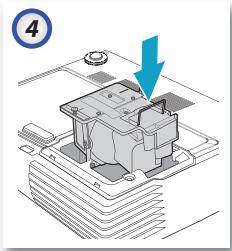
OPTOMA W304M - 4

natural_image Illustration of a mechanical component with a blue arrow pointing to a section, no text or symbols present.

42 Caxton Way, The Watford Business Park

Watford, Hertfordshire, WD18 8QZ, UK

E-mail : info@osscreen.com

www.os-worldwide.com

Taiwan

12F., No.215, Sec. 3, Beixin Rd., Xindian Dist.,

New Taipei City 231, Taiwan (R.O.C.)

Tél : +886 2 8911 8600

Télécopie :+886 2 8911 6550

www.optoma.com.tw

asia.optoma.com

Service : services@optoma.com.tw

Hong Kong

Unit A, 27/F Dragon Centre, 79 Wing Hong Street,

Cheung Sha Wan, Kowloon, Hong Kong

Tél : +852-2396-8968

5F, No. 1205, Kaixuan Rd., Changning District

Shanghai, 200052, China

Tél : +86-21-62947376

Table of contents Click a title to access it
Manual assistant
Powered by Anthropic
Waiting for your message
Product information

Brand : OPTOMA

Model : W304M

Category : Projector