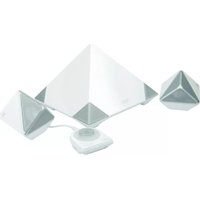
PC-082781 - Loudspeaker Perfect Choice - Free user manual and instructions
Find the device manual for free PC-082781 Perfect Choice in PDF.


Pick your language and provide your email: we'll send you a specifically translated version.
| Product Type | Active Loudspeaker |
| Brand | Perfect Choice |
| Model | PC-082781 |
| Connectivity | Bluetooth 5.0, AUX 3.5 mm |
| Bluetooth Range | Up to 10 m (33 ft) |
| Output Power | 10 W RMS |
| Frequency Response | 100 Hz - 20 kHz |
| Power Source | Rechargeable lithium-ion battery |
| Battery Capacity | 2400 mAh |
| Playback Time | Up to 12 hours |
| Charging Time | Approximately 3 hours |
| Charging Port | USB-C |
| Built-in Microphone | Yes, for hands-free calls |
| Control Buttons | Power, Volume, Play/Pause, Answer/End call |
| Dimensions (W x H x D) | 180 x 70 x 65 mm |
| Weight | 480 g |
| Included Accessories | USB-C cable, 3.5 mm audio cable, User manual |
| Maintenance & Cleaning | Wipe with a soft, dry cloth. Avoid water and solvents. |
| Safety Advice | Keep away from heat sources and direct sunlight. Do not disassemble. |
| Repairability | Spare parts available through an approved service center. Do not attempt to repair yourself. |
Frequently Asked Questions - PC-082781 Perfect Choice
How do I pair the speaker with my smartphone?
Turn on the speaker by pressing the power button until the indicator flashes. Enable Bluetooth on your smartphone and select PC-082781 from the list of available devices. If prompted, enter 0000 as the PIN.
What is the battery life of the speaker?
With a full charge, the speaker provides up to 12 hours of continuous playback at moderate volume. Battery life may vary based on volume level and music type.
How do I charge the speaker?
Connect the included USB-C cable to the charging port and a power adapter or computer. The LED indicator lights up red while charging and turns off when fully charged. Full charge takes about 3 hours.
Can I connect non-Bluetooth devices?
Yes, you can use the 3.5 mm AUX input to connect devices that do not support Bluetooth. Use the included audio cable to link the speaker and your device.
What should I do if the speaker does not turn on?
If the speaker fails to power on, check the battery level – connect the charger and wait a few minutes. If it still does not respond, perform a reset (see user manual) or contact customer support.
How do I reset the speaker?
To reset, press and hold the power button for 10 seconds until the LED flashes twice. Release the button; the speaker restarts and returns to pairing mode.
Can I use the speaker while it is charging?
Yes, the speaker can be used during charging. However, for optimal battery health, it is recommended to unplug once fully charged.
How should I clean the speaker?
Use a soft, dry cloth to wipe the surface. Never use water, chemical cleaners, or abrasive materials. Make sure the device is turned off before cleaning.
Is the speaker water-resistant?
The speaker is not rated as fully water-resistant. It is designed for everyday indoor use and should be kept away from liquids and moisture.
How can I improve sound quality?
Place the speaker on a stable, solid surface to avoid vibrations. Keep the speaker away from walls and corners to reduce bass distortion. Make sure the Bluetooth connection is stable by keeping the device within 10 meters.
User questions about PC-082781 Perfect Choice
0 question about this device. Answer the ones you know or ask your own.
Ask a new question about this device
No questions yet. Be the first to ask one.
Download the instructions for your Loudspeaker in PDF format for free! Find your manual PC-082781 - Perfect Choice and take your electronic device back in hand. On this page are published all the documents necessary for the use of your device. PC-082781 by Perfect Choice.
USER MANUAL PC-082781 Perfect Choice

Manual assistant
Powered by Anthropic
Waiting for your message
Product information
Brand : Perfect Choice
Model : PC-082781
Category : Loudspeaker