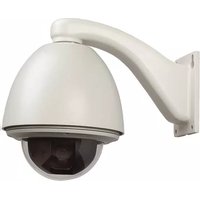
PTZA6-2P23H - Security Camera Aigis - Free user manual and instructions
Find the device manual for free PTZA6-2P23H Aigis in PDF.


Pick your language and provide your email: we'll send you a specifically translated version.
| Product Type | PTZ Security Camera |
| Brand | Aigis |
| Model | PTZA6-2P23H |
| Image Sensor | 1/2.8" Progressive Scan CMOS |
| Maximum Resolution | 1920 x 1080 (2MP) |
| Optical Zoom | 23x |
| Digital Zoom | 16x |
| Pan Range | 360° continuous |
| Tilt Range | -5° to 90° (auto flip) |
| IR Distance | 100m Smart IR |
| Video Compression | H.265+/H.265/H.264 |
| Power Supply | DC 12V / PoE+ (802.3at) |
| Power Consumption | ≤18W |
| Dimensions | Ø180mm × 310mm |
| Weight | 2.1 kg |
| Ingress Protection | IP66 |
| Operating Temperature | -30°C to 60°C |
| Storage | MicroSD up to 256GB |
| Connectivity | RJ45 10/100M Ethernet |
| Alarm I/O | 1 alarm input / 1 alarm output |
| Functions | Motion detection, intrusion detection, line crossing, PTZ presets, patrol |
| Maintenance | Clean the outer cover and lens with a soft dry cloth. |
| Safety | Built-in surge protection and lightning protection. |
| Spare Parts and Repairability | Modular design for easy replacement of lens, motherboard, and PTZ mechanism. |
| General Information | Suitable for indoor and outdoor use; compatible with NVR and cloud platforms. |
Frequently Asked Questions - PTZA6-2P23H Aigis
How do I reset the PTZA6-2P23H to factory defaults?
Press and hold the reset button on the camera for 10 seconds while the camera is powered on. The camera will reboot and restore all settings to factory defaults.
What is the maximum storage capacity for a microSD card?
The PTZA6-2P23H supports a microSD card up to 256GB for local storage. Ensure the card is formatted in FAT32 or exFAT before use.
Can this camera be used outdoors?
Yes, the camera has an IP66 weatherproof rating, making it suitable for outdoor installation. It can withstand rain, dust, and extreme temperatures from -30°C to 60°C.
How do I connect the camera to my router?
Connect an Ethernet cable from the camera's RJ45 port to an available LAN port on your router. Use the PoE+ feature to supply power and data with a single cable, or connect a DC 12V power adapter.
Does the camera support PoE?
Yes, the PTZA6-2P23H supports Power over Ethernet (PoE+) with IEEE 802.3at standard. This allows for simple installation with only one cable.
How far can the IR night vision see?
The camera is equipped with Smart IR providing a night vision range of up to 100 meters, ensuring clear images in complete darkness.
Can I set motion detection zones?
Yes, you can define up to 4 custom motion detection zones via the camera's web interface or mobile app. The camera can trigger alarms or send notifications when motion is detected within the specified areas.
What is the optical zoom range?
The camera has a 23x optical zoom lens, allowing you to focus on distant objects without losing image clarity. The digital zoom extends this to 16x for further magnification.
Does the camera support continuous pan and tilt?
Yes, the PTZA6-2P23H offers 360° continuous pan and a tilt range from -5° to 90° with auto flip, enabling comprehensive surveillance coverage.
How do I clean the camera lens?
To maintain optimal image quality, use a soft dry cloth or a lens cleaning pen to gently wipe the lens and outer housing. Avoid using harsh chemicals or abrasive materials.
User questions about PTZA6-2P23H Aigis
0 question about this device. Answer the ones you know or ask your own.
Ask a new question about this device
No questions yet. Be the first to ask one.
Download the instructions for your Security Camera in PDF format for free! Find your manual PTZA6-2P23H - Aigis and take your electronic device back in hand. On this page are published all the documents necessary for the use of your device. PTZA6-2P23H by Aigis.
USER MANUAL PTZA6-2P23H Aigis

Manual assistant
Powered by Anthropic
Waiting for your message
Product information
Brand : Aigis
Model : PTZA6-2P23H
Category : Security Camera