NV-ET1801 - Wi-Fi repeater Phybridge - Free user manual and instructions
Find the device manual for free NV-ET1801 Phybridge in PDF.


Pick your language and provide your email: we'll send you a specifically translated version.
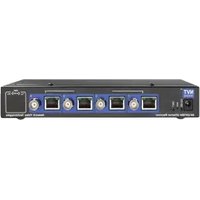
| Product Type | Wi-Fi Repeater |
| Model | NV-ET1801 |
| Brand | Phybridge |
| Dimensions (W x D x H) | 3.5 x 2.8 x 1.2 inches (90 x 70 x 30 mm) |
| Weight | 0.2 lbs (90 g) |
| Power Input | 5V DC, 1A via micro USB |
| Frequency Bands | 2.4 GHz and 5 GHz |
| Max Speed | Up to 1800 Mbps (combined) |
| Wi-Fi Standards | 802.11 a/b/g/n/ac |
| Ethernet Port | 1 x 10/100/1000 Mbps LAN |
| Security | WPA2-PSK, WPA3-PSK |
| WPS Support | Yes |
| Antenna Type | Internal dual-band antennas |
| Setup | WPS button or web browser |
| LED Indicators | Power, WPS, Signal strength |
| Operation Modes | Repeater, Access Point |
| Compatibility | All standard Wi-Fi routers |
Frequently Asked Questions - NV-ET1801 Phybridge
How do I reset the Phybridge NV-ET1801 to factory settings?
Press and hold the Reset button on the side for 10 seconds until the LEDs flash. The device will restart with default settings.
Can I use the NV-ET1801 as a wired access point?
Yes, connect an Ethernet cable from your router to the LAN port of the repeater, then configure it in Access Point mode via the web interface.
What is the maximum range of this Wi-Fi repeater?
The range depends on obstacles and interference, but typically it can extend coverage up to 300 feet (90 meters) outdoors and 100 feet indoors.
Does the NV-ET1801 support WPA3 security?
Yes, it supports WPA2-PSK and WPA3-PSK for enhanced wireless security.
How do I connect the repeater to my existing Wi-Fi network?
Use the WPS button on your router and the repeater, or open a web browser and follow the setup wizard at 192.168.10.1.
What does the LED signal indicator mean?
The signal strength LED shows three levels: Green (strong), Amber (medium), Red (weak). Place the repeater where it gets a green or amber light for best performance.
Can I change the Wi-Fi name (SSID) of the extended network?
Yes, you can customize the SSID and password in the web interface under Wireless Settings. You can choose to use the same SSID as your main router or a different one.
Is the Phybridge NV-ET1801 compatible with 802.11ax (Wi-Fi 6) routers?
Yes, it is backward compatible with all Wi-Fi generations, including 802.11ax, but it will operate at its own maximum speed (ac standard).
How do I update the firmware on the NV-ET1801?
Download the latest firmware from the Phybridge support site, log into the web interface, go to System Tools > Firmware Upgrade, and upload the file.
Why is my repeater not connecting to my router?
Ensure the repeater is within range of the router, the WPS feature is enabled on your router, or try manually entering the SSID and password via the web interface. Also check that the router is not set to a hidden SSID.
User questions about NV-ET1801 Phybridge
0 question about this device. Answer the ones you know or ask your own.
Ask a new question about this device
No questions yet. Be the first to ask one.
Download the instructions for your Wi-Fi repeater in PDF format for free! Find your manual NV-ET1801 - Phybridge and take your electronic device back in hand. On this page are published all the documents necessary for the use of your device. NV-ET1801 by Phybridge.
USER MANUAL NV-ET1801 Phybridge

Manual assistant
Powered by Anthropic
Waiting for your message
Product information
Brand : Phybridge
Model : NV-ET1801
Category : Wi-Fi repeater