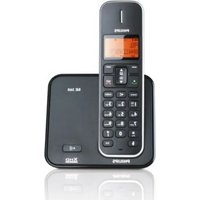
DECT 522 - Telephone PHILIPS - Free user manual and instructions
Find the device manual for free DECT 522 PHILIPS in PDF.


Pick your language and provide your email: we'll send you a specifically translated version.
| Product Type | Cordless DECT Phone |
| Brand | Philips |
| Model | DECT 522 |
| Frequency Band | 1.88–1.90 GHz (DECT) |
| Range (Indoor) | Up to 50 meters |
| Range (Outdoor) | Up to 300 meters |
| Handset Dimensions (H x W x D) | 165 x 45 x 25 mm (estimated) |
| Handset Weight | Approx. 100 g (including batteries) |
| Power Supply | 2 x AAA NiMH rechargeable batteries |
| Charger Input | AC 220–240 V, 50/60 Hz |
| Display | Backlit LCD with icon display |
| Phonebook Capacity | Up to 100 names and numbers |
| Caller ID | Supports CLIP (Calling Line Identification Presentation) |
| Redial | Last 10 numbers redial |
| Handsfree | Full-duplex speakerphone |
| Ringer | Polyphonic melodies, adjustable volume |
| Keypad Lock | Automatic key lock when handset is idle |
| Conference Call | Up to 2 internal + 1 external |
| Intercom | Between registered handsets |
| Battery Life (Standby/Talk) | Up to 140 hours / 12 hours |
| Charging Time | Approx. 8 hours |
| Cleaning Instructions | Wipe with a soft, dry cloth. Do not use liquid cleaners. |
| Safety Warnings | Keep away from water and excessive heat. Use only supplied charger. |
| Spare Parts Available | Batteries, charger, handset (contact Philips support) |
Frequently Asked Questions - DECT 522 PHILIPS
How do I set the date and time on my Philips DECT 522?
Press Menu, select Settings, then Date & Time. Use the keypad to enter the current date and time, and confirm with OK.
Why is there no dial tone when I try to make a call?
Check that the handset is registered to the base station and within range. Ensure the base station is connected to the telephone line and powered on. If the problem persists, try resetting the base station by unplugging it for 10 seconds.
How can I increase the ringer volume?
Press the Volume Up button on the side of the handset while idle. Alternatively, go to Menu > Settings > Ringer Volume and adjust using the arrow keys.
What type of batteries does the handset use?
The handset uses two AAA NiMH rechargeable batteries. For optimal performance, use the batteries provided with the phone or equivalent replacements from Philips.
The handset displays 'No Base' or 'Searching'. What should I do?
This indicates the handset is out of range or not registered. Bring the handset closer to the base station. If it doesn't connect, re-register the handset: press and hold the Find button on the base for 5 seconds, then on the handset press Menu > Register and follow the prompts.
How do I store a contact in the phonebook?
Press Phonebook, then Add New. Enter the name using the keypad (press multiple times for letters) and confirm with OK. Then enter the number and press OK to save.
Can I use the phone during a power outage?
The base station requires mains power to operate, so the phone will not work during a power outage. The handset batteries can only power the handset when the base is off, but it cannot make or receive calls.
Why are my calls breaking up or have static?
This may be due to interference from other electronic devices or being too far from the base station. Move closer to the base or away from devices like Wi-Fi routers, microwaves, or baby monitors. Also check that the base is placed in a central location.
How do I change the language on the display?
Press Menu, select Settings, then Language. Choose your preferred language from the list and confirm with OK.
What should I do if the handset doesn't charge?
Clean the charging contacts on the handset and base with a dry cloth. Ensure the batteries are correctly inserted. Try using a different power outlet. If the batteries are old, replace them with new AAA NiMH rechargeable batteries.
User questions about DECT 522 PHILIPS
0 question about this device. Answer the ones you know or ask your own.
Ask a new question about this device
No questions yet. Be the first to ask one.
Download the instructions for your Telephone in PDF format for free! Find your manual DECT 522 - PHILIPS and take your electronic device back in hand. On this page are published all the documents necessary for the use of your device. DECT 522 by PHILIPS.
USER MANUAL DECT 522 PHILIPS

Manual assistant
Powered by Anthropic
Waiting for your message
Product information
Brand : PHILIPS
Model : DECT 522
Category : Telephone