DECT 527 - Telephone PHILIPS - Free user manual and instructions
Find the device manual for free DECT 527 PHILIPS in PDF.


Pick your language and provide your email: we'll send you a specifically translated version.
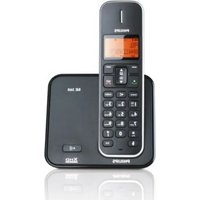
| Product Type | Cordless DECT telephone |
| Model | DECT 527 |
| Brand | Philips |
| Handset Dimensions | Approx. 170 x 50 x 30 mm |
| Base Station Dimensions | Approx. 120 x 100 x 80 mm |
| Handset Weight | Approx. 130 g (including batteries) |
| Base Station Weight | Approx. 150 g |
| Power Supply (Handset) | 2 x AAA Ni-MH rechargeable batteries (600 mAh) |
| Power Supply (Base) | 6V DC adapter |
| Display | Backlit LCD |
| Caller ID | Yes |
| Phonebook Capacity | Up to 100 contacts |
| Speakerphone | Yes (hands-free) |
| Intercom | Yes (between handsets) |
| Ringtones | 10 polyphonic ringtones |
| Keypad Lock | Yes |
| Volume Control | Adjustable earpiece and speakerphone volume |
| Answering Machine | Digital answering machine with remote access |
| Recording Time | Up to 30 minutes |
| Range | Up to 50 m indoors, 300 m outdoors |
| Maintenance | Clean with a soft, dry cloth |
| Safety | Do not expose to water; use only supplied power adapter |
| Spare Parts | Replacement battery pack, power adapter available |
| Repairability | User-replaceable batteries; other repairs by authorized service |
Frequently Asked Questions - DECT 527 PHILIPS
How do I register a new handset to the base?
Place the handset on the base and press the register button on the base (if available). Alternatively, go to 'Settings' > 'Register' on the handset and follow the prompts. The default PIN is usually 0000.
How do I set the date and time?
Press Menu, select Settings > Date/Time. Use the keypad to enter the current date and time, then confirm. If your network supports CLI, the phone may update automatically.
How do I store contacts in the phonebook?
Press Menu and select Phonebook > Add New. Enter the name and number, then confirm. You can store up to 100 contacts.
How do I use the speakerphone?
During a call, press the Speaker button (hands-free icon) on the handset. To switch back to the earpiece, press the same button again. The speakerphone allows hands-free conversations.
How do I adjust the volume?
During a call, use the volume up/down buttons on the side of the handset. For ringer volume, go to Menu > Settings > Ringer Volume and adjust.
What is the battery life?
The Ni-MH batteries typically provide up to 10 hours of talk time and 100 hours standby. Charging time is about 8 hours. Replace batteries when performance decreases.
How do I change the ringtone?
Press Menu > Settings > Ringtones. Select a handset or base tone (if applicable). You can choose from 10 polyphonic ringtones.
How do I use the answering machine?
Press the Answering Machine button on the base to turn on/off. To listen to messages, press Play. You can also access it remotely by dialing your landline and entering the remote access code (default: 0000).
What is the range of the phone?
The DECT technology provides a range of up to 50 meters indoors and up to 300 meters outdoors, depending on obstacles.
How do I clean the phone?
Use a soft, dry cloth to gently wipe the handset and base. Do not use abrasive materials or liquids. Avoid exposure to water and extreme temperatures.
User questions about DECT 527 PHILIPS
0 question about this device. Answer the ones you know or ask your own.
Ask a new question about this device
No questions yet. Be the first to ask one.
Download the instructions for your Telephone in PDF format for free! Find your manual DECT 527 - PHILIPS and take your electronic device back in hand. On this page are published all the documents necessary for the use of your device. DECT 527 by PHILIPS.
USER MANUAL DECT 527 PHILIPS

Manual assistant
Powered by Anthropic
Waiting for your message
Product information
Brand : PHILIPS
Model : DECT 527
Category : Telephone