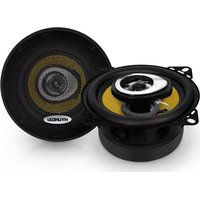
H-CSE403 - Loudspeaker HYUNDAI - Free user manual and instructions
Find the device manual for free H-CSE403 HYUNDAI in PDF.


Pick your language and provide your email: we'll send you a specifically translated version.
| Product Type | 2.0 Multimedia Speaker System |
| Model | Hyundai H-CSE403 |
| Speaker Configuration | 2-way (woofer + tweeter) |
| Total RMS Power | 30 W (2 x 15 W) |
| Frequency Response | 60 Hz – 20 kHz |
| Impedance | 4 Ω |
| Dimensions (each speaker) | 150 × 200 × 250 mm |
| Weight (total) | 3.5 kg |
| Power Supply | AC 100-240 V, 50/60 Hz |
| Power Consumption | 40 W max |
| Connectivity | Bluetooth 5.0, AUX (3.5 mm), USB playback |
| Controls | Volume, power, input selection, bass/treble adjustment |
| Material | MDF wood cabinet with fabric grille |
| Remote Control | Included |
| Indicators | LED power and Bluetooth status |
| Cleaning | Wipe with dry soft cloth; do not use solvents |
| Safety | Do not expose to moisture or extreme temperatures |
| Spare Parts & Repairability | Contact Hyundai support for replacement parts; product designed for professional repair only |
Frequently Asked Questions - H-CSE403 HYUNDAI
How do I pair the speaker with Bluetooth?
Press the Bluetooth button on the speaker or remote until the LED blinks. Enable Bluetooth on your device and select "Hyundai H-CSE403" from the list.
Why is there no sound?
Check that the speaker is powered on, the volume is turned up, and the correct input source is selected. Ensure your audio device is connected and playing.
Can I connect via AUX cable?
Yes, use a 3.5 mm AUX cable to connect your device to the AUX input on the back of the speaker.
How do I clean the speaker?
Unplug the speaker and wipe with a dry, soft cloth. Do not use liquid or abrasive cleaners.
What is the maximum power output?
The system delivers 30 W RMS total (2 x 15 W).
Does it support USB playback?
Yes, you can insert a USB drive with MP3 files into the USB port and select USB as the input source.
The Bluetooth keeps disconnecting. What should I do?
Ensure there are no obstructions between devices and the distance is within 10 meters. Try re-pairing or resetting the speaker by turning it off and on.
Can I use the speaker with a TV?
Yes, if your TV has a 3.5 mm audio output or Bluetooth, you can connect it to the speaker.
How do I reset the speaker to factory settings?
Press and hold the Volume + and Power buttons simultaneously for 5 seconds until the LED flashes rapidly.
Where can I find spare parts?
Contact Hyundai customer service or visit the official website for spare parts and repair information.
User questions about H-CSE403 HYUNDAI
0 question about this device. Answer the ones you know or ask your own.
Ask a new question about this device
No questions yet. Be the first to ask one.
Download the instructions for your Loudspeaker in PDF format for free! Find your manual H-CSE403 - HYUNDAI and take your electronic device back in hand. On this page are published all the documents necessary for the use of your device. H-CSE403 by HYUNDAI.
USER MANUAL H-CSE403 HYUNDAI

Manual assistant
Powered by Anthropic
Waiting for your message
Product information
Brand : HYUNDAI
Model : H-CSE403
Category : Loudspeaker