HM2 Nail - Uncategorized A-Designs - Free user manual and instructions
Find the device manual for free HM2 Nail A-Designs in PDF.


Pick your language and provide your email: we'll send you a specifically translated version.
| Product Type | Dual-Channel Compressor/Limiter |
| Brand | A-Designs |
| Model | HM2 Nail |
| Form Factor | 2U Rackmount |
| Dimensions (W x D x H) | 19 x 8 x 3.5 inches (483 x 203 x 89 mm) |
| Weight | 10 lbs (4.5 kg) |
| Power Supply | IEC connector, 115/230 VAC, 50/60 Hz |
| Power Consumption | 20 Watts |
| Audio Inputs | 2 x XLR (bal.) / 1/4\" TRS |
| Audio Outputs | 2 x XLR (bal.) / 1/4\" TRS |
| Frequency Response | 20 Hz - 20 kHz, ±0.5 dB |
| Compression Ratio | 2:1 to 20:1, continuously variable |
| Threshold Range | -40 dBu to +20 dBu |
| Attack Time | 0.1 ms to 100 ms |
| Release Time | 50 ms to 2 seconds |
| Makeup Gain | 0 to +30 dB |
| Sidechain | External sidechain insert (TRS) |
| Metering | Analog VU meter per channel |
| Construction | Steel chassis, aluminum front panel |
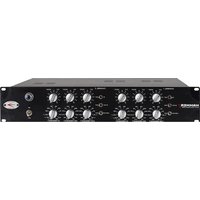
| Front Panel Controls | Threshold, Ratio, Attack, Release, Gain, Bypass, Power |
| Rear Panel | XLR I/O, sidechain insert, power IEC, fuse holder |
| Operating Temperature | 32°F to 104°F (0°C to 40°C) |
| Spare Parts Available | Yes, contact A-Designs support or authorized dealers |
| Repair | Serviceable by qualified technician; no user-serviceable parts inside |
| Warranty | 2 years limited warranty |
Frequently Asked Questions - HM2 Nail A-Designs
How do I connect the HM2 Nail to my audio interface?
Use balanced XLR cables from your interface outputs to the inputs of the HM2 Nail. Connect the outputs of the Nail to your interface inputs. Ensure the power is off when making connections.
What is the proper startup procedure?
Turn down all gain controls on the Nail and your monitoring system. Connect power and turn on the unit. Allow 5 minutes for warm-up. Gradually raise levels.
How do I set the threshold and ratio for vocals?
Start with a ratio of 2:1 and set the threshold so that the VU meter shows 3-5 dB of gain reduction on loudest passages. Adjust to taste.
Can I use the HM2 Nail in stereo mode?
Yes, the two channels can operate independently or can be linked for stereo operation via an internal jumper (see manual). For most stereo sources, set both channels identically.
What does the sidechain feature do?
The sidechain insert allows an external signal to control the compression. Useful for de-essing or ducking applications. Connect the sidechain source to the TRS insert.
How often should I clean the HM2 Nail?
Dust the exterior with a soft dry cloth. Avoid liquids. Clean the front panel gently to avoid scratching. No internal cleaning needed.
What do the VU meters indicate?
The VU meters show output level when the meter is set to output, or gain reduction when set to GR. The switch is on the front panel.
Why is there no sound coming out?
Check that the unit is powered (front LED on), cables are connected correctly, channels are not bypassed, and gain controls are not fully down. Also verify your audio interface routing.
Can I replace the power cord?
Yes, use a standard IEC C13 cord rated for your voltage. Ensure the unit is off and unplugged before replacement.
How do I reset the HM2 Nail to factory settings?
The HM2 Nail is an analog unit with no digital presets. To reset, turn all knobs fully counterclockwise, then set to typical starting points (Threshold: 0, Ratio: 2:1, Attack: 10ms, Release: 0.5s, Gain: 0 dB).
User questions about HM2 Nail A-Designs
0 question about this device. Answer the ones you know or ask your own.
Ask a new question about this device
No questions yet. Be the first to ask one.
Download the instructions for your Uncategorized in PDF format for free! Find your manual HM2 Nail - A-Designs and take your electronic device back in hand. On this page are published all the documents necessary for the use of your device. HM2 Nail by A-Designs.
USER MANUAL HM2 Nail A-Designs


Manual assistant
Powered by Anthropic
Waiting for your message
Product information
Brand : A-Designs
Model : HM2 Nail
Category : Uncategorized