
Mix Factory - Blender A-Designs - Free user manual and instructions
Find the device manual for free Mix Factory A-Designs in PDF.


| Product Type | Summing Mixer |
| Brand | A-Designs |
| Model | Mix Factory |
| Dimensions (W x H x D) | 19" x 3" x 10" (2RU rackmount) |
| Weight (unit only) | 16.4 lbs |
| Weight (with external PSU) | 17 lbs (total) |
| Shipping Weight | 17.5 lbs |
| Power Requirements | 100/120/230 VAC, external switchable power supply |
| Number of Channels | 16 (two groups of 8) |
| Inputs | 2x D-sub (16 channels), balanced |
| Outputs | Balanced XLR main mix out (post master fader), monitor outs (pre master fader) |
| Gain Controls | 16 channel gain knobs, 2 master gains (1-8 & 9-16), 1 grand master gain |
| Pan Controls | 16 pan controls with center detent |
| Mute/Signal Indicators | 16 mute switches with audio-sensitive LED (red mute, green signal) |
| Transformer Option | Custom Cinemag output transformers; in/out switch for clean or tonal mode |
| Insert Connections | 3 insert points (1-8, 9-16, master) for external compressor/EQ via XLR |
| Linking Capability | Yes, via XLRs for up to 64+ channels |
| LED Array | Output level LED array |
| Construction | Solid state design, custom milled aluminum knobs, 2RU rack space |
| Controls | 22 color-changing switches, transformer in/out, insert mutes |
| Street Price (USD) | $2,990.00 |
| Included Accessories | External power supply |
| Maintenance | Wipe with dry cloth; avoid liquids. No user-serviceable parts inside. |
Frequently Asked Questions - Mix Factory A-Designs
User questions about Mix Factory A-Designs
0 question about this device. Answer the ones you know or ask your own.
Ask a new question about this device
Download the instructions for your Blender in PDF format for free! Find your manual Mix Factory - A-Designs and take your electronic device back in hand. On this page are published all the documents necessary for the use of your device. Mix Factory by A-Designs.
USER MANUAL Mix Factory A-Designs
Mix Factory™
Introduction
A Designs Audio Inc. Introduces the Mix Factory
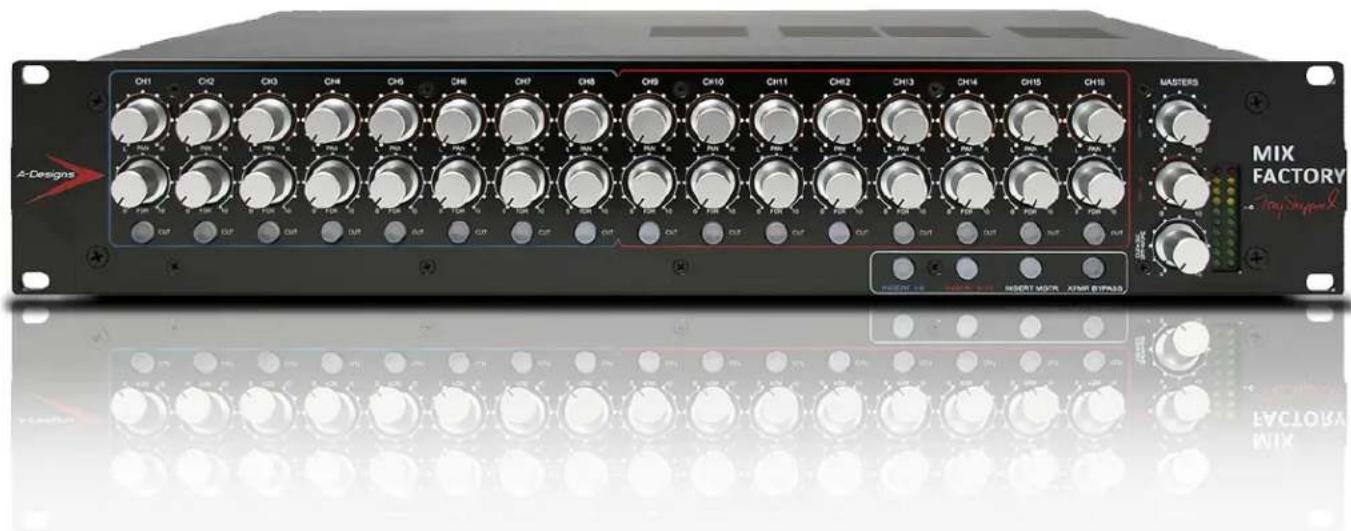
A-Designs Audio, Inc. is proud to announce the release of the MIX FACTORY, a totally new concept and approach to summing out-of-the-box for people who demand more from their current sound and work-flow.
The MIX FACTORY is not just a summing unit, it is a totally new product designed to create that analog sound with the depth and image needed to make your mixes stand out from the crowd.
The MIX FACTORY is a concept developed by Tony Shepperd (who is known for his high-quality recordings ranging from Gospel, R&B to Rock-and-Roll), designed by Paul Wolff (one of the top designers in the audio industry), and manufactured by A Designs Audio, Inc. - (manufacturer of products such as the Pacifica, Ventura, REDDI, Hammer2 and Nail).
Tony Shepperd was one of many modern engineers that felt that everything could be done “IN THE BOX.” But, he came to realize that analog and digital could live very well together. By combining the two - analog and digital - to create a Hybrid - was the special combination that took his mixes to a level that had other recording engineers calling him for tips and demanding to know how he made his recordings sound so great.
The end result, after years of R&D, was the MIX FACTORY.
What makes the MIX FACTORY special?
There are 16 channels (which are 2 D-sub inputs summing to a stereo XLR out). All 16 channels have a continuous Gain Knob, Pan (center detent), and Mute that acts as a signal indicator with an audio sensitive LED. The LED indicator glows when signal is passing into the channel and intensifies when the signal is stronger. The same Mute button changes color from Red, when used as a mute, to Green when signal is passing through the channel.
There are (2) Eight-Channel groups: 1-8 and 9-16. Each group has an Insert for a Compressor or EQ. There is also a Master Insert for all 16 Channels, along with 3 Mute buttons for each Insert.
And we aren't done, yet!
The MIX FACTORY has a pushbutton option to go from clean (the standard setup bypassing the transformers) to tonal, using the custom-made output transformers made by Cinemag. The difference between transformers and no transformers is night and day. This gives you an option for analog tone and/or color.
There's MORE!
The MIX FACTORY is also linkable! This means you can have 64 or more channels...it's like having a console in two 2RU Rack.
And if that isn't enough, there is an external power supply to insure a perfect sounding unit every time. This is a switchable Power Supply, which can be used for domestic (US) 120v and export 230v. The Power Supply is hefty enough to handle any needs you may require from the MIX FACTORY.
We understand there are summing boxes out there. But, nothing has come close to the MIX FACTORY for providing you an image to your mix that just stands out.
The street price: 2990.00 usd
The total weight of the MIX FACTORY with the external PSU (boxes) is 17 lbs.
Features
- Solid State Design
- Custom Milled Aluminum Knobs
- Custom Output Transformers
- 2RU Rack Space
• External Power Supply
• Balanced XLR Output
• 16 Gain Controls
• 2 Master Gain Controls 1-8 and 9-16
• 1 Grand Master Gain Control
• 16 Pan Controls - Master Insert
- 1-8 Insert
- 9-16 Insert
• 16 Mute Switches
• Transformer In/Out Switch
• 22 Color Changing Switches - LED Array
- Linking XLRs for more channels
In line with our company policy of continuous development, the above features are subject to change without notice.
Specifications
TECHNICAL DATA
Gain Range Total......Unity Gain to full Attenuation
Gain Range for 1-16 ...... Unity Gain
Max Input ....+27dBu
Balanced XLR Output
Power Requirements .... 100/120/230 VAC
Dimensions 19" x 3.00" x 10"
Weight.... 16.4 lbs.; 17.5 lbs. shipping weight
In line with our company policy of continuous development, the above specifications are subject to change without notice.
Functions
Front
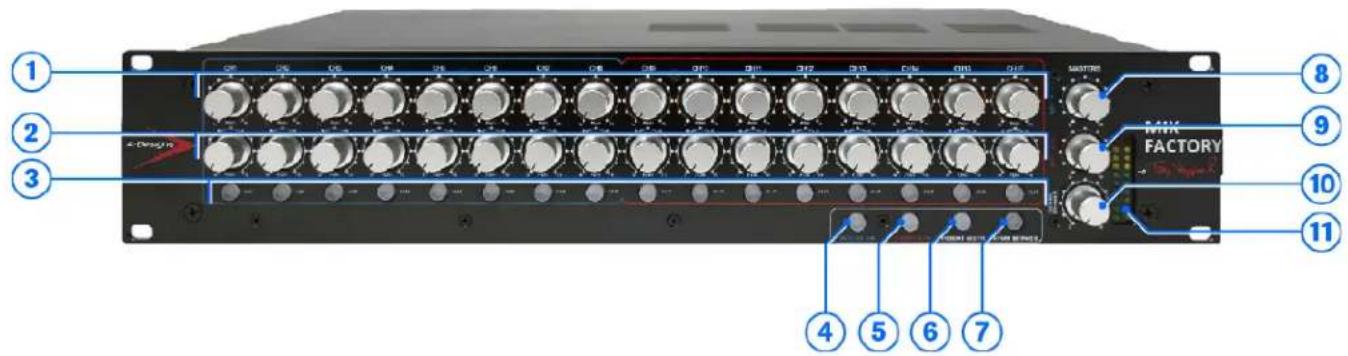
1 Pan
2 Fader/Gain
3 Signal Indicators/Mutes
4 Inserts 1-8 for external Compressor/EQ
5 Inserts 9-16 For external Compressor/EQ
6 Master Insert for 1-16
7 Transformer In/Out
8 Master Gain for 1-8
9 Master Gain for 9-16
10 Grand Master Gain for 1-6
11 LED Array for output
Functions (continued)
Back

12 Linking to more Mix Factory Units
13 Monitor Outs Pre Master Fader
14 Main Sum Out Insert Send
15 Sum out Insert Send 9-16
16 Sum Out Insert Send 1-8
17 External Power Supply Connector
18 Main Mix Out Post Master Fader
19 Main Insert Return
20 D-Sub Connector 9-16
21 9-16 Insert Return
22 D-Sub Connector 1-8
23 1-8 Insert Return 1-8




Recall Sheet

line
| Frequency (Hz) | Phase (deg) | | -------------- | ----------- | | 10 | -90 | | 20 | -60 | | 30 | -30 | | 50 | -10 | | 100 | 0 | | 200 | 0 | | 300 | 0 | | 500 | 0 | | 1k | 0 | | 2k | 0 | | 3k | 0 | | 5k | 0 | | 10k | 0 | | 20k | 0 | | 30k | 0 | | 50k | 0 |
Recall Sheet

line
| Frequency (Hz) | Level (dBtu) | | -------------- | ------------ | | 1k | -120 | | 10k | -120 | | 20k | -100 | | 30k | -120 | | 50k | -80 | | 1k | 0 | | 2k | -120 | | 3k | -80 | | 5k | -120 | | 10k | -160 | | 20k | -120 | | 50k | -160 |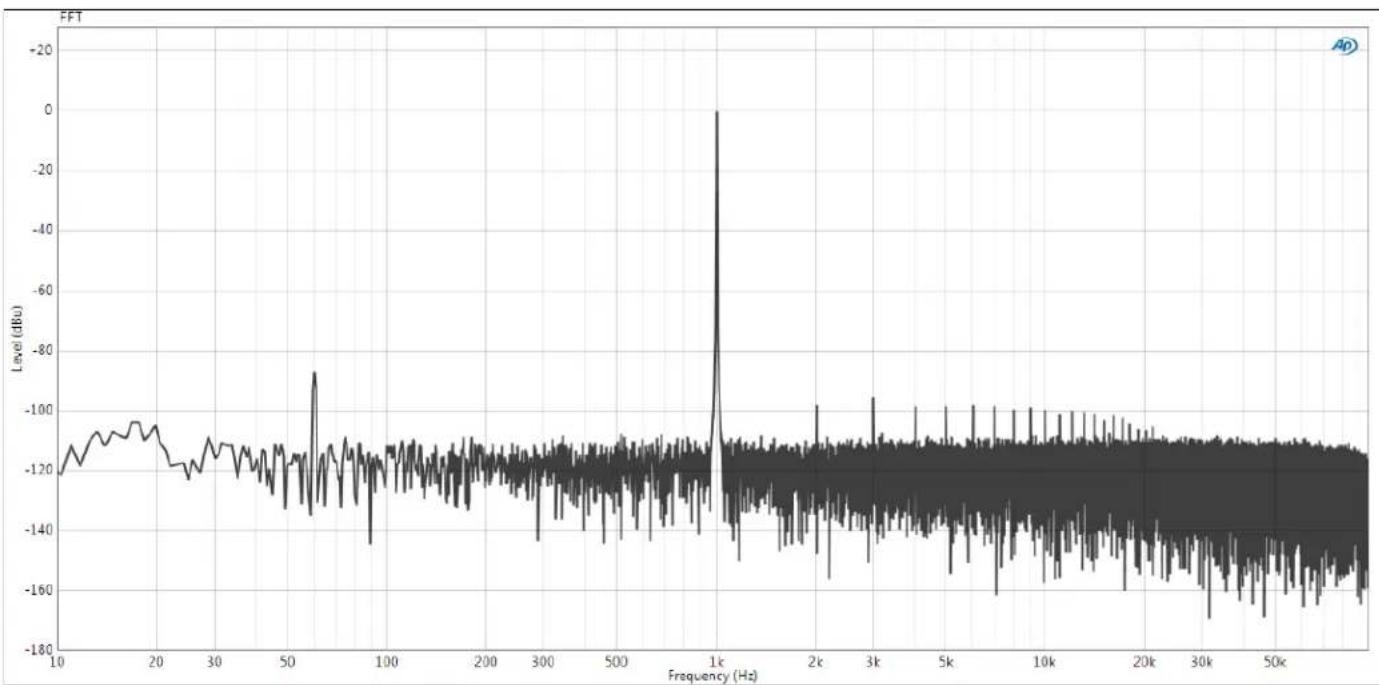
line
| Frequency (Hz) | Level (dBu) | | -------------- | ----------- | | 10 | -120 | | 20 | -110 | | 30 | -115 | | 50 | -125 | | 100 | -110 | | 200 | -115 | | 500 | -120 | | 1k | 0 | | 2k | -120 | | 3k | -100 | | 5k | -120 | | 10k | -120 | | 20k | -120 | | 30k | -160 | | 50k | -160 |Set-up
Some of you have been summing for awhile now and know how to set the box you own. But in this case we would like to go through the setting up process with you using the Mix Factory.
First, you will need to set your signal levels on the Mix Factory after you have plugged in all your cables. (External Power Supply and 2 XLRs from your DAW)
You will need to run a signal tone from your DAW at +4 (line level) to the Mix Factory.
The suggested setting on the Mix Factory will be as follows:
- All 18 gain knobs be set to 3:00 O'clock +/- and check with your tone to confirm what goes in will be the same as what is coming out. Never set the gain to full. if you do then you have nowhere to go and the gain just becomes a Pad at that point. You want room to move up or down.
- Set each Pan knob to hard left and hard right for stereo or center for mono depending on what you need for that track. Most tracks will be in Stereo.
- Set your Master Gain 1-8 and 9-16 all the way up to max.
- Set the Grand Master Gain (which controls ALL the other Gains) to Max.
- Now that you have done all this you can run your tone into the Mix Factory and adjust the Channel Gains (channels 1-16), for total gain out to match your DAW output.
- Once you have adjusted your levels you are now ready to run your tracks, groups or stems into the Mix Factory.
- The Inserts you have available on the back and controls on the front are for hardware compressors and or EQs. There are 3 Inserts connections via XLRs on the back. Each Insert connectors are labeled 1-8 / 9-16 and Main Sum Out Insert. There are switches on the front panel to activate each Insert. You can also use external Compressors and EQs on the main XLR outs to enhance your total mix at one time

A-DESIGNS AUDIO INC. PRO-AUDIO
P.O. Box 4255
West Hills, CA 91304 USA (818) 716-4153 www.adesignsaudio.com
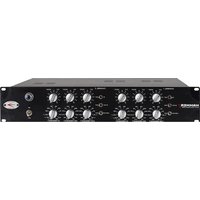


Brand : A-Designs
Model : Mix Factory
Category : Blender