5310 - Thermostats Braeburn - Free user manual and instructions
Find the device manual for free 5310 Braeburn in PDF.


Pick your language and provide your email: we'll send you a specifically translated version.
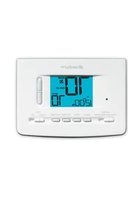
| Product Type | Programmable Thermostat |
| Brand | Braeburn |
| Model | 5310 |
| Dimensions (W x H x D) | 4.5 x 5.5 x 1 inches |
| Weight | 0.5 lb |
| Power Supply | 24 VAC (common wire required) |
| Display | Digital LCD with backlight |
| Programmable Periods | 4 periods per day (Wake, Leave, Return, Sleep) |
| Schedule Type | 5-2 day program (weekdays/weekend) |
| Control Functions | Heat, Cool, Auto, Off, Fan (On/Auto) |
| Temperature Range | 45°F to 90°F (7°C to 32°C) |
| Accuracy | ±1°F (±0.5°C) |
| Filter Reminder | Yes (programmable days) |
| Low Battery Indicator | Yes (on display) |
| Hold Feature | Permanent or temporary hold |
| Keypad Lock | Yes |
| Maintenance | Clean gently with a soft, damp cloth |
| Safety | Class 2 low voltage device |
| Spare Parts Available | Batteries (standard AA alkaline) |
| Repairability | Designed for replacement; no user-serviceable parts |
| General Information | Indoor use only; avoid direct sunlight and moisture |
Frequently Asked Questions - 5310 Braeburn
How do I reset the Braeburn 5310 thermostat to factory defaults?
Press and hold the Menu and Hold buttons simultaneously for 5 seconds until the display resets. This will erase all programming settings.
What type of batteries does the Braeburn 5310 use?
It uses two AA alkaline batteries as a backup for programming during power loss. The thermostat is powered by 24 VAC.
How do I set the time and day?
Press the Menu button, use the arrow keys to highlight 'Set Clock', then set the hour, minutes, and day using the arrow keys.
Why is my Braeburn 5310 thermostat not turning on?
Check if the thermostat is receiving 24 VAC power. Also ensure batteries are installed correctly if power is intermittent. Verify that the common wire (C-wire) is connected.
How do I program the 5-2 day schedule?
Press Menu, select 'Program', then choose 'Weekday' or 'Weekend'. For each period (Wake, Leave, Return, Sleep), set the start time and target temperature using the arrow keys.
Can I bypass the programmed schedule with a temporary hold?
Yes, press the Hold button once for a temporary hold until the next scheduled period, or press and hold Hold for 3 seconds for a permanent hold.
How do I enable or disable the keypad lock?
Press and hold the Menu button for 5 seconds. Use the arrow keys to toggle the lock on or off, then press Menu to confirm.
What does the filter reminder mean and how do I reset it?
The filter reminder indicates it's time to change your HVAC filter. After replacing, press and hold the Menu button for 3 seconds, then select 'Reset Filter' and confirm.
The display is showing 'LO' or 'HI'. What does that mean?
'LO' means the room temperature is below 32°F (0°C), and 'HI' means above 122°F (50°C). This is a range warning. The thermostat will still function but may not display accurate temperatures.
How do I switch between Celsius and Fahrenheit?
Press the Menu button, scroll to 'Settings', then select 'Temperature Scale'. Use the arrow keys to choose Celsius or Fahrenheit.
User questions about 5310 Braeburn
0 question about this device. Answer the ones you know or ask your own.
Ask a new question about this device
No questions yet. Be the first to ask one.
Download the instructions for your Thermostats in PDF format for free! Find your manual 5310 - Braeburn and take your electronic device back in hand. On this page are published all the documents necessary for the use of your device. 5310 by Braeburn.
USER MANUAL 5310 Braeburn


Manual assistant
Powered by Anthropic
Waiting for your message
Product information
Brand : Braeburn
Model : 5310
Category : Thermostats