OR-VID-EX-1060 - Intercom VIBELL - Free user manual and instructions
Find the device manual for free OR-VID-EX-1060 VIBELL in PDF.


Pick your language and provide your email: we'll send you a specifically translated version.
| Product Type | Video Intercom |
| Brand | VIBELL |
| Model | OR-VID-EX-1060 |
| Display | 7-inch TFT LCD, 1024x600 |
| Camera Resolution | 720p (1280x720) |
| Night Vision | Yes, IR LEDs up to 5m |
| Two-Way Audio | Yes, with echo cancellation |
| Door Unlock | Remote release via button |
| Power Supply | DC 12V/1A (adapter included) |
| Dimensions (Monitor) | 200 x 140 x 25 mm |
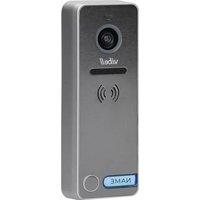
| Dimensions (Doorbell) | 120 x 80 x 30 mm |
| Weight (Monitor) | 350 g |
| Weight (Doorbell) | 200 g |
| Mounting | Wall mount (bracket included) |
| Ingress Protection | IP54 (doorbell unit) |
| Memory | Supports microSD up to 32GB (not included) |
| Compatibility | Works with standard electric door locks |
| Maintenance | Clean with soft dry cloth; avoid liquids |
| Security | Privacy mode, tamper alarm |
| Spare Parts | Replacement doorbell and monitor available |
| Warranty | 2 years |
Frequently Asked Questions - OR-VID-EX-1060 VIBELL
How do I install the VIBELL OR-VID-EX-1060 video intercom?
Installation involves mounting the doorbell unit outdoors and the monitor indoors. Connect the doorbell to the door lock and power supply. The monitor connects via a wired cable (included). Refer to the manual for detailed wiring diagrams.
Can I view the camera feed on my smartphone?
No, the OR-VID-EX-1060 is a standalone wired system and does not support remote viewing via smartphone. It is designed for local use only.
How do I adjust the volume of the doorbell chime?
Press the menu button on the monitor, navigate to 'Settings', then 'Volume'. You can adjust the ringtone volume and intercom volume separately.
Why is there no picture on the monitor?
Check the cable connections between the doorbell and monitor. Ensure the power adapter is plugged in and the monitor is turned on. Also, verify the doorbell camera is not obstructed.
Can I connect multiple monitors to one doorbell?
No, the OR-VID-EX-1060 supports a single monitor per doorbell. For multiple monitors, consider a different model.
What type of door lock is compatible?
The intercom is compatible with standard electric door locks that require a 12V pulse to unlock. Check your lock's voltage and wiring before connecting.
How do I set up night vision?
Night vision is automatic. The IR LEDs activate when ambient light is low. Ensure the doorbell lens is clean for optimal performance.
Can I use a microSD card for recording?
Yes, insert a microSD card (up to 32GB, Class 10) into the monitor slot. Recordings are triggered by motion or doorbell press. Format the card in the settings menu first.
What should I do if the doorbell unit gets wet?
The doorbell has IP54 rating, so it is splash-proof but not submersible. If it gets wet, dry it with a soft cloth and check for damage. If malfunctioning, contact support.
How do I reset the intercom to factory settings?
On the monitor, go to 'Settings' > 'System' > 'Factory Reset'. Confirm with the password (default: 0000). All settings will be erased.
User questions about OR-VID-EX-1060 VIBELL
0 question about this device. Answer the ones you know or ask your own.
Ask a new question about this device
No questions yet. Be the first to ask one.
Download the instructions for your Intercom in PDF format for free! Find your manual OR-VID-EX-1060 - VIBELL and take your electronic device back in hand. On this page are published all the documents necessary for the use of your device. OR-VID-EX-1060 by VIBELL.
USER MANUAL OR-VID-EX-1060 VIBELL



Manual assistant
Powered by Anthropic
Waiting for your message
Product information
Brand : VIBELL
Model : OR-VID-EX-1060
Category : Intercom