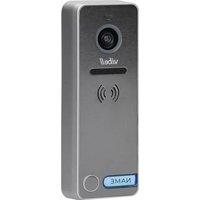
OR-VID-EX-1061 - Intercom VIBELL - Free user manual and instructions
Find the device manual for free OR-VID-EX-1061 VIBELL in PDF.


Pick your language and provide your email: we'll send you a specifically translated version.
| Product Type | Video Intercom System |
| Model | OR-VID-EX-1061 |
| Brand | Vibell |
| Dimensions (Unit) | 150 mm x 90 mm x 30 mm |
| Weight | 0.4 kg |
| Power Supply | AC 100-240V, 50/60Hz |
| Display | 7-inch TFT LCD color screen |
| Camera Resolution | 720p HD |
| Night Vision | Infrared LED, up to 5 meters |
| Audio | Full duplex two-way communication |
| Key Features | Door unlock, video recording, intercom calling |
| Mounting | Wall-mounted |
| Operating Temperature | -10°C to 50°C |
| Waterproof Rating | IP54 (outdoor unit) |
| Memory | Up to 32 GB microSD card |
| Connectivity | Wired (RJ45), optional Wi-Fi |
| Package Contents | Main unit, camera, mounting bracket, screws, manual |
| Cleaning | Wipe with soft dry cloth; avoid solvents |
| Safety | Low voltage; keep out of reach of children |
| Spare Parts Availability | Contact Vibell customer service |
| Repairability | Repairs only by authorized technicians |
Frequently Asked Questions - OR-VID-EX-1061 VIBELL
How do I install the VIBELL OR-VID-EX-1061 video intercom?
Installation involves mounting the outdoor unit at the door and the indoor monitor where you need it. Connect the provided cables (power and data) as per the wiring diagram in the manual. Secure the brackets and screws.
Ensure the power is off during installation.
Ensure the power is off during installation.
Can I connect multiple indoor monitors to one door station?
Yes, the OR-VID-EX-1061 supports up to 3 indoor monitors (sold separately). Use a wired connection or compatible wireless module.
How do I adjust the volume and brightness?
On the indoor monitor, press the Menu button and navigate to Settings. Use the arrow keys to adjust volume, brightness, and contrast. Confirm with the OK button.
What should I do if the camera shows no image?
Check connections: ensure the camera is properly connected to the monitor. Verify power supply (both units). If using a wireless option, check Wi-Fi signal. Restart both units. If problem persists, contact Vibell support.
How do I record video from the intercom?
Insert a microSD card (up to 32 GB) into the monitor slot. In the Menu, enable Auto Record or manually press the record button during a call. Recordings can be viewed in the Gallery.
Can I unlock the door remotely?
Yes, when a visitor calls, you can press the Unlock button on the indoor monitor to release the electric door lock. Ensure the lock is compatible and wired correctly.
How do I reset the device to factory settings?
Go to Menu > Settings > Factory Reset. Enter the default password (0000). Confirm to reset. All settings and recordings will be erased.
What is the night vision range?
The built-in infrared LEDs provide night vision up to 5 meters in complete darkness. The camera automatically switches to night mode when light levels drop.
Is the outdoor unit weatherproof?
Yes, the outdoor camera module has an IP54 rating, meaning it is protected against dust and splashing water from any direction. It can withstand rain but should not be submerged.
How do I clean the screen and camera lens?
Use a soft, lint-free cloth slightly dampened with water. Wipe gently. Do not use alcohol, ammonia, or abrasive cleaners. For the camera lens, use a microfibre cloth to avoid scratches.
User questions about OR-VID-EX-1061 VIBELL
0 question about this device. Answer the ones you know or ask your own.
Ask a new question about this device
No questions yet. Be the first to ask one.
Download the instructions for your Intercom in PDF format for free! Find your manual OR-VID-EX-1061 - VIBELL and take your electronic device back in hand. On this page are published all the documents necessary for the use of your device. OR-VID-EX-1061 by VIBELL.
USER MANUAL OR-VID-EX-1061 VIBELL



Manual assistant
Powered by Anthropic
Waiting for your message
Product information
Brand : VIBELL
Model : OR-VID-EX-1061
Category : Intercom