VLT35 - Flat Screen Mount SANUS - Free user manual and instructions
Find the device manual for free VLT35 SANUS in PDF.


Pick your language and provide your email: we'll send you a specifically translated version.
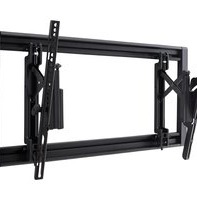
| Product Type | Tilt Wall Mount |
| Brand | Sanus |
| Model | VLT35 |
| Maximum Screen Size | 80 inches |
| Weight Capacity | 125 lbs (56.7 kg) |
| VESA Compatibility | 100x100 to 600x400 mm |
| Tilt Range | -15° to +5° |
| Profile Distance | 1.75 inches (44 mm) |
| Wall Plate Dimensions | 30 x 17 inches (76.2 x 43.2 cm) |
| Material | Steel |
| Color | Black |
| Installation Hardware | Included (lag bolts, screws, washers) |
| Leveling System | Post-installation leveling |
| Cable Management | Built-in clips |
| Construction Type | Single stud or dual stud compatible |
| Stud Spacing | Up to 24 inches (61 cm) |
| Safety | Secure locking mechanism |
| Maintenance & Cleaning | Wipe with a soft, dry cloth; no harsh chemicals |
| Spare Parts & Repairability | Available from Sanus customer service |
| Warranty | 10-year limited warranty |
Frequently Asked Questions - VLT35 SANUS
What is the maximum screen size and weight this mount can hold?
The Sanus VLT35 can hold flat screens up to 80 inches and up to 125 lbs (56.7 kg).
What VESA patterns are compatible with this mount?
It supports VESA patterns from 100x100 mm to 600x400 mm.
Does this mount tilt? What is the tilt range?
Yes, it tilts from -15° to +5°, allowing for reduced glare.
How far from the wall will my TV sit?
After installation, the TV sits 1.75 inches (44 mm) from the wall.
Is professional installation required?
No, installation is designed for DIY with included hardware, but ensure you mount to a wood stud or solid concrete wall.
What tools are needed for installation?
Tools required: stud finder, drill, socket wrench, level, and Phillips head screwdriver.
Can I mount this on a single stud?
Yes, the VLT35 can be mounted on a single stud or dual studs spaced up to 24 inches apart.
Does the mount have cable management?
Yes, it includes built-in cable clips to keep wires organized and hidden.
Can I level the TV after it's mounted?
Yes, the mount features a post-installation leveling system for fine adjustments.
How do I remove the TV from the mount?
Use the release mechanism on the mount arms. Refer to the manual for step-by-step removal instructions.
User questions about VLT35 SANUS
0 question about this device. Answer the ones you know or ask your own.
Ask a new question about this device
No questions yet. Be the first to ask one.
Download the instructions for your Flat Screen Mount in PDF format for free! Find your manual VLT35 - SANUS and take your electronic device back in hand. On this page are published all the documents necessary for the use of your device. VLT35 by SANUS.
USER MANUAL VLT35 SANUS

Manual assistant
Powered by Anthropic
Waiting for your message
Product information
Brand : SANUS
Model : VLT35
Category : Flat Screen Mount