IP805-M - Digital decoder Arris - Free user manual and instructions
Find the device manual for free IP805-M Arris in PDF.


Pick your language and provide your email: we'll send you a specifically translated version.
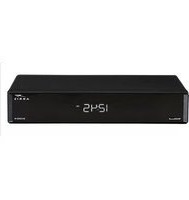
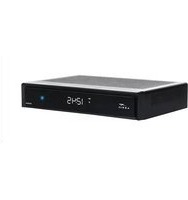
| Product Type | Digital Decoder |
| Brand | Arris |
| Model | IP805-M |
| Dimensions (W x D x H) | 25 x 15 x 4 cm |
| Weight | 0.5 kg |
| Power Supply | 12V DC, 1A |
| Input | Coaxial (F-connector), Ethernet |
| Output | HDMI, Composite (RCA) |
| Video Decoding | MPEG-4, H.264 |
| Audio Decoding | Dolby Digital, MPEG Audio |
| Network | Ethernet 10/100 Base-T |
| USB Port | 1 x USB 2.0 (front) |
| Remote Control | IR remote included |
| Menu Languages | English, Spanish, French, German |
| Channel Capacity | Up to 1000 channels |
| Parental Control | Yes (PIN-protected) |
| Energy Consumption | < 10 W |
| Warranty | 1 year |
Frequently Asked Questions - IP805-M Arris
How do I connect the Arris IP805-M digital decoder to my TV?
Connect the decoder to your TV using an HDMI cable for best quality. Alternatively, use the composite (RCA) cables (yellow, white, red) if HDMI is not available. Connect the coaxial cable from your antenna or cable provider to the F-connector on the decoder. Then plug in the power adapter and turn on the device.
How do I scan for channels on the IP805-M?
Go to the Menu and select Installation or Channel Search. Choose Auto Scan to search for all available channels. Make sure the antenna or cable is properly connected. The scan may take a few minutes. After completion, channels will be stored automatically.
How can I reset the decoder to factory settings?
To reset, go to Menu > Settings > Factory Reset. Enter the default PIN (usually 0000 or 1234) if prompted. Confirm the reset. The decoder will reboot and erase all saved channels and settings. Note: This cannot be undone.
What should I do if there is no signal on the decoder?
First, check that the coaxial cable is tightly connected to the F-connector. Ensure your antenna or cable service is active. Try a channel scan again. If the issue persists, test the cable on another device or contact your service provider. Weak signals may require an amplifier.
How do I set up parental controls?
Press Menu and navigate to Parental Control or Lock. Enable the feature and set a 4-digit PIN. You can then lock specific channels or programs by rating. To unlock, enter the PIN. Remember your PIN, as resetting it may require a factory reset.
How can I update the firmware?
Firmware updates are usually sent via the broadcast signal automatically. To check for updates manually, go to Menu > Settings > Software Update. Ensure the decoder is connected to the antenna or cable. Do not turn off the power during an update. If no update is available, check the Arris website for manual update instructions.
Can I play media files from a USB drive?
Yes, insert a USB flash drive into the front USB port. Press the USB button on the remote or go to Menu > Media Player. The decoder supports common video (MP4, AVI), audio (MP3), and image (JPEG) formats. Note: Some codecs may not be supported.
What if the remote control stops working?
First, check the batteries and replace if needed. Ensure there are no obstructions between the remote and the decoder's IR sensor. Try pressing the buttons near the sensor. If still not working, you can use the front panel buttons temporarily. Consider purchasing a replacement remote compatible with Arris IP805-M.
Why is there no sound from the decoder?
Check the audio cable connection (HDMI or RCA). Verify that the TV input is set correctly. Go to Menu > Audio Settings and ensure the audio output is set to PCM or Dolby Digital as supported by your TV. Some channels may broadcast in mono; adjust volume accordingly.
How do I power cycle the decoder?
To power cycle, unplug the power adapter from the electrical outlet. Wait at least 30 seconds. Plug it back in and wait for the decoder to boot up fully. This can resolve many temporary issues like freezing or no signal. Avoid frequent power cycles as it may affect the device.
User questions about IP805-M Arris
0 question about this device. Answer the ones you know or ask your own.
Ask a new question about this device
No questions yet. Be the first to ask one.
Download the instructions for your Digital decoder in PDF format for free! Find your manual IP805-M - Arris and take your electronic device back in hand. On this page are published all the documents necessary for the use of your device. IP805-M by Arris.
USER MANUAL IP805-M Arris
Manual assistant
Powered by Anthropic
Waiting for your message
Product information
Brand : Arris
Model : IP805-M
Category : Digital decoder