6355-SR - Router Accelerated - Free user manual and instructions
Find the device manual for free 6355-SR Accelerated in PDF.


Pick your language and provide your email: we'll send you a specifically translated version.
| Product Type | Router |
| Brand | Accelerated |
| Model | 6355-SR |
| Dimensions (W x D x H) | 200 x 150 x 30 mm |
| Weight | 0.5 kg |
| Power Supply | 12V DC, 1A |
| Wireless Standards | IEEE 802.11a/b/g/n/ac |
| Frequency Bands | 2.4 GHz and 5 GHz |
| Maximum Data Rate | Up to 1200 Mbps |
| Ethernet Ports | 4 x LAN (10/100/1000 Mbps), 1 x WAN (10/100/1000 Mbps) |
| USB Ports | 1 x USB 2.0 |
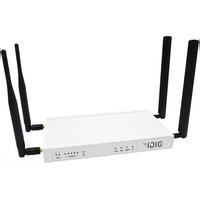
| Antenna Type | 2 x External detachable antennas |
| Security Features | WPA2, WPA, WEP, SPI Firewall, DoS Protection |
| Additional Features | QoS, VPN Pass-through, Guest Network, Parental Controls |
| Operating Temperature | 0°C to 40°C |
| Certifications | FCC, CE, RoHS |
| Package Contents | Router, Power Adapter, Ethernet Cable, Quick Start Guide, User Manual |
| Maintenance | Clean with a dry, soft cloth; do not use liquids or solvents |
| Safety Warnings | Do not expose to water or moisture; unplug during storms; avoid heat sources |
| Spare Parts Availability | Contact Accelerated support for replacement antennas or power adapters |
Frequently Asked Questions - 6355-SR Accelerated
How do I set up the Accelerated 6355-SR router for the first time?
Connect the router to your modem via the WAN port, power it on, and connect a computer to a LAN port. Open a web browser and go to 192.168.1.1 (default IP). Log in with default credentials (usually 'admin'/'admin') and follow the Quick Setup Wizard.
What is the default IP address and login credentials?
The default IP address is 192.168.1.1. The default username and password are both admin (case-sensitive). These can be changed in the router settings.
How can I reset the router to factory defaults?
Locate the Reset button on the back panel. Use a paperclip to press and hold for about 10 seconds until the power LED blinks. Release the button; the router will reboot with factory settings.
What should I do if I forget my WiFi password?
Log into the router's web interface (default IP 192.168.1.1). Go to Wireless Settings > Security to view or change the password. Alternatively, reset the router to defaults.
How to improve WiFi range on the 6355-SR?
Place the router in a central location away from obstructions and electronic interference. Adjust antennas for optimal orientation. Use the 2.4 GHz band for better range or 5 GHz for higher speed. Consider a WiFi extender if needed.
Does the router support VPN passthrough?
Yes, the Accelerated 6355-SR supports VPN passthrough for common protocols like PPTP, L2TP, and IPSec. You can configure VPN settings in the Advanced > VPN section of the web interface.
Can I connect a USB printer or storage to the router?
Yes, the router has a USB 2.0 port that supports sharing storage devices (FAT32/NTFS) via SMB or FTP, and can act as a print server for compatible printers. Configure in USB Settings.
How to update the router firmware?
Download the latest firmware from the Accelerated support website. Log into the router web interface, go to System Tools > Firmware Upgrade, choose the file, and click Upgrade. Do not power off during the update.
What is the warranty period for the Accelerated 6355-SR?
The router typically comes with a 2-year limited warranty. Check the included warranty card or contact Accelerated customer support for specific terms and conditions.
Why are some LEDs not lighting up?
Ensure the router is powered on and cables are properly connected. The Power LED should be solid. Check that the WAN/LAN cables are intact. If no LEDs light, try a different power outlet or contact support.
User questions about 6355-SR Accelerated
0 question about this device. Answer the ones you know or ask your own.
Ask a new question about this device
No questions yet. Be the first to ask one.
Download the instructions for your Router in PDF format for free! Find your manual 6355-SR - Accelerated and take your electronic device back in hand. On this page are published all the documents necessary for the use of your device. 6355-SR by Accelerated.
USER MANUAL 6355-SR Accelerated
Manual assistant
Powered by Anthropic
Waiting for your message
Product information
Brand : Accelerated
Model : 6355-SR
Category : Router