SuperStorage 6029P-E1CR12L - NAS Supermicro - Free user manual and instructions
Find the device manual for free SuperStorage 6029P-E1CR12L Supermicro in PDF.


Pick your language and provide your email: we'll send you a specifically translated version.
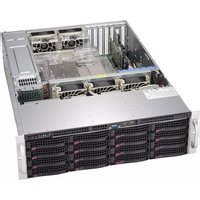
| Product Type | NAS / Storage Server |
| Form Factor | 2U Rackmount |
| Drive Bays | 12 x 3.5" LFF Hot-Swap SATA/SAS |
| Processor | Dual Intel Xeon Scalable (LGA 3647) |
| Memory | Up to 1TB DDR4 ECC RDIMM/LRDIMM (16 slots) |
| Storage Controller | Broadcom 3008 SAS3 (12Gb/s) or optional RAID |
| Networking | 2 x 10GbE SFP+, 2 x 1GbE RJ45 |
| Expansion Slots | 2 x PCIe 3.0 x16, 1 x PCIe 3.0 x8 (LP) |
| Power Supply | Dual Redundant 920W Platinum Level |
| Dimensions (WxDxH) | 17.2 x 25.5 x 3.5 inches (437 x 648 x 89 mm) |
| Weight | Approximately 45 lbs (20.4 kg) |
| Cooling | 4 x 8cm PWM fan modules (redundant) |
| Operating Temperature | 10°C to 35°C (50°F to 95°F) |
| RAID Support | Hardware RAID 0,1,5,6,10,50,60 (optional) |
| Management | IPMI 2.0 with dedicated LAN, SuperDoctor 5 |
| Maintenance | Tool-less drive trays, hot-swap components, LED status indicators |
| Cleaning | Use compressed air for dust removal; avoid liquids |
| Safety | UL/CSA/FCC/CE certified; ESD protection; overcurrent protection |
| Spare Parts & Repairability | Field-replaceable PSU, fans, backplane; 1-year warranty (extendable) |
| General Info | Supermicro SuperStorage 6029P-E1CR12L, enterprise-grade storage solution |
Frequently Asked Questions - SuperStorage 6029P-E1CR12L Supermicro
What type of drives does the SuperStorage 6029P-E1CR12L support?
It supports 12 x 3.5-inch LFF hot-swap SATA/SAS drives. Optional NVMe support may be available via PCIe slots.
How do I access the management interface?
The IPMI 2.0 interface is accessible via the dedicated management LAN port. Default IP is usually 192.168.0.10, username: ADMIN, password: ADMIN.
Can I configure RAID on this NAS?
Yes, you can use an optional hardware RAID controller (e.g., Broadcom 3108) to configure RAID 0,1,5,6,10,50,60. The onboard SAS controller provides JBOD mode.
What is the maximum memory capacity?
Up to 1TB using 16 x 64GB DDR4 ECC RDIMM/LRDIMM modules.
How do I update the firmware?
Firmware updates can be performed via IPMI (Web UI) or using Supermicro's Sum tool. Downloads are available from the Supermicro support site.
Is the power supply redundant?
Yes, the system comes with dual 920W Platinum redundant power supplies, supporting hot-swap replacement.
What is the noise level?
The 4 x 8cm fans produce approximately 45 dBA at normal operation. Fan speed can be adjusted via IPMI to balance noise and cooling.
How do I clean the NAS?
Power off and unplug. Use compressed air to remove dust from vents and fans. Avoid liquid cleaners. Clean drive filters monthly.
What are the warranty terms?
Standard 1-year limited warranty from Supermicro. Extended warranty options are available for up to 5 years with advanced replacement.
Can I install a GPU?
The two full-height PCIe 3.0 x16 slots can accommodate single-width GPUs like NVIDIA Tesla T4, but require adequate cooling and power.
User questions about SuperStorage 6029P-E1CR12L Supermicro
0 question about this device. Answer the ones you know or ask your own.
Ask a new question about this device
No questions yet. Be the first to ask one.
Download the instructions for your NAS in PDF format for free! Find your manual SuperStorage 6029P-E1CR12L - Supermicro and take your electronic device back in hand. On this page are published all the documents necessary for the use of your device. SuperStorage 6029P-E1CR12L by Supermicro.
USER MANUAL SuperStorage 6029P-E1CR12L Supermicro
Manual assistant
Powered by Anthropic
Waiting for your message
Product information
Brand : Supermicro
Model : SuperStorage 6029P-E1CR12L
Category : NAS