6038R-E1CR16N - NAS Supermicro - Free user manual and instructions
Find the device manual for free 6038R-E1CR16N Supermicro in PDF.


Pick your language and provide your email: we'll send you a specifically translated version.
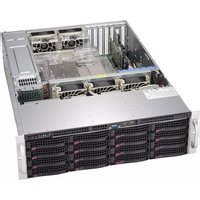
| Product Type | NAS / Enterprise Server |
| Form Factor | 3U Rackmount |
| Drive Bays | 16 x 3.5" Hot-Swap SATA/SAS |
| Processor | Dual Intel Xeon E5-2600 v4 (up to 22 cores each) |
| Memory | Up to 1TB DDR4 ECC RDIMM/LRDIMM (16 slots) |
| Network | 2 x 10GbE SFP+, 2 x 1GbE RJ45 |
| Storage Controller | LSI 3008 SAS3 (12Gbps) |
| Expansion Slots | 6 x PCIe 3.0 x8 (low-profile) |
| Power Supply | Dual Redundant 800W Platinum (80 PLUS) |
| Dimensions (W x H x D) | 17.2" x 5.2" x 25.5" |
| Weight | 45 lbs (20.4 kg) without drives |
| Operating Temperature | 10°C to 35°C (50°F to 95°F) |
| Supported RAID Levels | 0, 1, 5, 6, 10, 50, 60 (via hardware/software) |
| Management | IPMI 2.0, SuperDoctor 5 |
| Cooling | 4 x 80mm hot-swap fans |
| Security Features | Chassis intrusion detection, TPM 2.0 support |
| Maintenance | Hot-swap drives, tool-less access, replaceable fan modules |
| Cleaning | Use compressed air for dust removal; avoid liquids |
| Spare Parts Availability | Direct from Supermicro or authorized distributors |
Frequently Asked Questions - 6038R-E1CR16N Supermicro
What type of drives are compatible with the Supermicro 6038R-E1CR16N?
The system supports 3.5-inch SATA and SAS drives (up to 16 hot-swap). For SAS, use drives with a 12Gbps interface.
How do I configure RAID on this NAS?
RAID can be configured via the built-in LSI 3008 controller using the BIOS utility or software tools. Supported levels include 0, 1, 5, 6, 10, 50, and 60.
Can I install a non-Supermicro PCIe card?
Yes, the system has 6 low-profile PCIe 3.0 x8 slots. Ensure the card is compatible with the Linux or Windows OS you are using.
What is the maximum memory capacity?
Up to 1TB of DDR4 ECC memory using 64GB LRDIMMs across 16 slots. Registered and load-reduced DIMMs are supported.
How do I access the IPMI interface?
Connect to the dedicated management port (usually the one labeled IPMI). Default IP is 192.168.1.1, user admin, password admin (change immediately).
What is the power consumption of the 6038R-E1CR16N?
With dual 800W platinum power supplies, typical draw is around 200-400W depending on drives and CPU load. The system supports redundant operation.
Can I use 2.5-inch drives instead of 3.5-inch?
Yes, with adapters. The backplane supports both form factors, but 3.5-inch drive caddies are required for mounting.
How do I clean the server to maintain performance?
Power off and use compressed air to remove dust from fans, heatsinks, and filters. Do not use liquids. Check filters every 3 months.
What operating systems are supported?
The system is certified for Windows Server (2012 R2+), Red Hat Enterprise Linux, VMware vSphere, and FreeNAS.
Where can I find spare parts like fans or power supplies?
Spare parts are available from Supermicro direct or authorized resellers. Use the model number to locate compatible FRUs.
User questions about 6038R-E1CR16N Supermicro
0 question about this device. Answer the ones you know or ask your own.
Ask a new question about this device
No questions yet. Be the first to ask one.
Download the instructions for your NAS in PDF format for free! Find your manual 6038R-E1CR16N - Supermicro and take your electronic device back in hand. On this page are published all the documents necessary for the use of your device. 6038R-E1CR16N by Supermicro.
USER MANUAL 6038R-E1CR16N Supermicro
Manual assistant
Powered by Anthropic
Waiting for your message
Product information
Brand : Supermicro
Model : 6038R-E1CR16N
Category : NAS