TEG75U - Oven Technika - Free user manual and instructions
Find the device manual for free TEG75U Technika in PDF.


Pick your language and provide your email: we'll send you a specifically translated version.
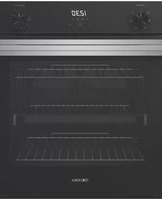
| Product Type | Built-in Electric Oven |
| Brand | Technika |
| Model | TEG75U |
| Capacity | 75 Liters |
| Energy Source | Electric |
| Oven Dimensions (H x W x D) | 595 x 595 x 568 mm |
| Cavity Dimensions (H x W x D) | 370 x 470 x 420 mm |
| Net Weight | 32 kg |
| Power Consumption (Conventional) | 2100 W |
| Power Consumption (Fan Forced) | 2500 W |
| Temperature Range | 50°C – 250°C |
| Functions | Conventional, Fan Forced, Grill, Defrost, Pizza, Bottom Heat |
| Display Type | LED Digital Display with Timer |
| Control Type | Touch Control + Knobs |
| Cleaning | Enamel Interior for Easy Cleaning |
| Safety Features | Child Lock, Automatic Shut-off, Cool Touch Door |
| Door Type | Triple Glazed Cool Touch Glass Door |
| Interior Light | Yes |
| Accessories Included | 2 x Wire Shelves, 1 x Baking Tray |
| Installation Type | Built-in Under Counter or High Cabinet |
| Energy Efficiency Class | A |
| Repairability Index | 7.5/10 |
Frequently Asked Questions - TEG75U Technika
How do I set the timer on the Technika TEG75U oven?
Press the Timer button on the control panel, then use the +/- buttons to set the desired time. Confirm by pressing the timer button again or start cooking.
What oven functions are available on the TEG75U?
The TEG75U offers Conventional, Fan Forced, Grill, Defrost, Pizza, and Bottom Heat functions. Choose using the function selector dial.
How do I clean the oven interior?
The interior has an enamel coating for easy cleaning. Wipe with a damp cloth and mild detergent. Avoid abrasive cleaners. For stubborn stains, use a non-abrasive oven cleaner.
Can I use aluminum foil in the oven?
Yes, but do not cover the oven floor entirely as it can affect heat distribution. Use foil on shelves to catch drips, but avoid contact with heating elements.
What should I do if the oven does not heat up?
Check that the oven is properly connected to the power supply. Ensure the child lock is not activated. If the problem persists, contact Technika customer service.
How do I replace the oven light bulb?
Disconnect the oven from power. Remove the glass cover by turning it counterclockwise. Replace with a 25W/300°C halogen bulb (type G9). Reinstall the cover.
Is the oven door removable for cleaning?
Yes, the door can be removed for easier cleaning. Open the door fully, release the locking clips on the hinges, and lift the door off. Reverse to reinstall.
What are the dimensions required for installation?
The cut-out dimensions are approximately 560 x 550 mm (W x D) and height varies (565-570 mm). Ensure proper ventilation gaps.
How do I activate the child lock?
Press and hold the Lock button for 3 seconds until the lock symbol appears on the display. Repeat to deactivate.
Can I cook multiple dishes at once?
Yes, using the Fan Forced function allows even heat distribution, enabling you to cook on multiple shelves simultaneously. Rotate dishes halfway for best results.
User questions about TEG75U Technika
0 question about this device. Answer the ones you know or ask your own.
Ask a new question about this device
No questions yet. Be the first to ask one.
Download the instructions for your Oven in PDF format for free! Find your manual TEG75U - Technika and take your electronic device back in hand. On this page are published all the documents necessary for the use of your device. TEG75U by Technika.
USER MANUAL TEG75U Technika


Manual assistant
Powered by Anthropic
Waiting for your message
Product information
Brand : Technika
Model : TEG75U
Category : Oven