Joy Tab Kids 2 - Tablet ALCATEL - Free user manual and instructions
Find the device manual for free Joy Tab Kids 2 ALCATEL in PDF.


Pick your language and provide your email: we'll send you a specifically translated version.
| Product Type | Kids Tablet |
| Brand | Alcatel |
| Model | Joy Tab Kids 2 |
| Display Size | 8 inches |
| Display Resolution | 1280 x 800 pixels |
| Processor | Quad-core 1.3 GHz |
| RAM | 1 GB |
| Internal Storage | 16 GB |
| Operating System | Android 10 (Go edition) |
| Battery Capacity | 4000 mAh |
| Charging Port | USB-C |
| Dimensions (H x W x D) | 200 x 150 x 10 mm |
| Weight | 350 g |
| Connectivity | Wi-Fi 802.11 b/g/n, Bluetooth 4.2 |
| Cameras | Front 2 MP, Rear 5 MP |
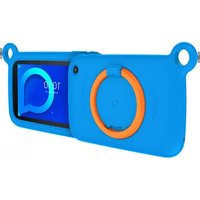
| Kid-Friendly Features | Pre-installed kids apps, rubber bumper case, parental controls |
| Maintenance | Wipe with soft, dry cloth; avoid liquids |
| Safety Certifications | CE, RoHS, EN71 (toy safety) |
| Spare Parts Availability | Limited; battery and screen replacement by authorized service |
| Repair Difficulty | Not user-serviceable; refer to manual for service centers |
Frequently Asked Questions - Joy Tab Kids 2 ALCATEL
How do I set up the Alcatel Joy Tab Kids 2 for the first time?
Charge the tablet fully, then press the power button. Follow the on-screen instructions to select language, connect to Wi-Fi, and sign in to a Google account. The parental control wizard will guide you to create a child profile.
Can I expand the storage on the Joy Tab Kids 2?
Yes, the tablet supports a microSD card up to 128 GB for additional photos, videos, and apps.
How long does the battery last?
The 4000 mAh battery provides up to 6-8 hours of mixed usage, depending on brightness and app activity.
Is the tablet safe for children?
Yes, it comes with a shockproof bumper case, a pre-installed child-friendly launcher, and robust parental controls to manage screen time and content.
What apps are pre-installed?
It includes educational apps like Khan Academy Kids, YouTube Kids, and a kid-safe browser. Additional apps can be downloaded from the Google Play Store.
How do I set up parental controls?
Go to Settings > Parental Controls or use the pre-installed Kids Zone app. Here you can set time limits, block apps, and filter content.
Does the tablet have a camera?
Yes, it has a 2 MP front camera for video calls and a 5 MP rear camera for taking photos.
What is the warranty period?
The tablet typically comes with a 1-year limited warranty covering manufacturing defects. Check your region for details.
Can I use the tablet without a Google account?
Basic setup is possible, but for app downloads and full functionality, a Google account is recommended. Parental controls still work without one.
How do I clean the screen?
Use a soft, lint-free cloth slightly dampened with water. Avoid abrasive cleaners or spraying liquids directly onto the screen.
User questions about Joy Tab Kids 2 ALCATEL
0 question about this device. Answer the ones you know or ask your own.
Ask a new question about this device
No questions yet. Be the first to ask one.
Download the instructions for your Tablet in PDF format for free! Find your manual Joy Tab Kids 2 - ALCATEL and take your electronic device back in hand. On this page are published all the documents necessary for the use of your device. Joy Tab Kids 2 by ALCATEL.
USER MANUAL Joy Tab Kids 2 ALCATEL

Manual assistant
Powered by Anthropic
Waiting for your message
Product information
Brand : ALCATEL
Model : Joy Tab Kids 2
Category : Tablet