NetBackup 5330 - Backup Software VERITAS - Free user manual and instructions
Find the device manual for free NetBackup 5330 VERITAS in PDF.


Pick your language and provide your email: we'll send you a specifically translated version.
| Product Type | Backup Appliance |
| Brand | Veritas |
| Model | NetBackup 5330 |
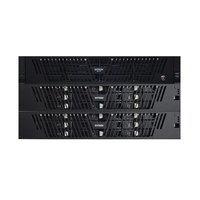
| Form Factor | 2U Rackmount |
| Dimensions (H x W x D) | 8.7 cm x 48.3 cm x 73.7 cm |
| Weight | Approximately 30 kg |
| Power Supply | Dual redundant hot-swappable, 100-240 VAC, 50/60 Hz |
| Power Consumption | 800 W typical |
| Main Functions | Data backup, recovery, deduplication, replication, cloud integration, centralized management |
| Storage Capacity | Up to 192 TB raw, expandable |
| Supported Backup Targets | Disk, tape, cloud, virtual machines |
| Operating System | Veritas NetBackup appliance OS |
| Management Interface | Web-based GUI, command-line, REST API |
| Security Features | Encryption (at rest and in transit), role-based access control, audit logging |
| Maintenance | Regular firmware updates, hardware diagnostics, remote support |
| Cleaning | Exterior: dry cloth; ensure proper airflow; avoid liquids |
| Spare Parts and Repairability | Field-replaceable units: hard drives, power supplies, fans, memory modules |
| Operating Temperature | 10°C to 35°C (50°F to 95°F) |
| Operating Humidity | 20% to 80% non-condensing |
| Warranty | 1 year hardware, extendable |
Frequently Asked Questions - NetBackup 5330 VERITAS
What is the Veritas NetBackup 5330?
The NetBackup 5330 is a purpose-built backup appliance from Veritas that combines software, server, and storage into a single solution for data protection and disaster recovery.
How do I perform an initial setup?
After racking and cabling, power on the appliance, access the web UI via its IP address (default: 192.168.1.1), and follow the initial configuration wizard to set up networking, storage, and licenses.
Can I expand storage capacity?
Yes, the 5330 supports expansion via optional disk shelves. You can add up to 192 TB raw capacity. Hot-swappable drives allow easy expansion without downtime.
What backup targets are supported?
The appliance supports backing up to disk, tape, cloud (AWS, Azure, Google Cloud), and virtual machines (VMware, Hyper-V). It also integrates with NetBackup for advanced features.
How do I troubleshoot connectivity issues?
Check network cables, verify IP configuration on both the appliance and clients, ensure firewall rules allow ports 1556 (NetBackup) and 443 (UI). Use the command 'vxms network status' for diagnostics.
What security features are included?
Includes hardware-based encryption, SSL/TLS for data in transit, role-based access control (RBAC), and integration with Active Directory for authentication. Audit logs track all administrative actions.
How do I perform a factory reset?
Access the maintenance menu via attached keyboard and monitor during boot (press F2). Select 'Factory Reset' and confirm. This will erase all configuration and data, restoring default settings.
What is the recommended maintenance schedule?
Regularly check hardware health via the dashboard, update firmware quarterly, clean air filters every 6 months (if present), and replace drives showing predictive failure alerts immediately.
Can I integrate with cloud storage?
Yes, the appliance supports cloud tiering and backup to public clouds. Configure cloud storage targets in the NetBackup UI and set policies to automatically move older backups to the cloud.
Where can I find spare parts?
Spare parts such as hard drives, power supplies, and fans are available through Veritas or authorized resellers. Use the appliance's serial number to order compatible replacements.
User questions about NetBackup 5330 VERITAS
0 question about this device. Answer the ones you know or ask your own.
Ask a new question about this device
No questions yet. Be the first to ask one.
Download the instructions for your Backup Software in PDF format for free! Find your manual NetBackup 5330 - VERITAS and take your electronic device back in hand. On this page are published all the documents necessary for the use of your device. NetBackup 5330 by VERITAS.
USER MANUAL NetBackup 5330 VERITAS

Manual assistant
Powered by Anthropic
Waiting for your message
Product information
Brand : VERITAS
Model : NetBackup 5330
Category : Backup Software