ACSR64L - Access Control System Speco Technologies - Free user manual and instructions
Find the device manual for free ACSR64L Speco Technologies in PDF.


Pick your language and provide your email: we'll send you a specifically translated version.
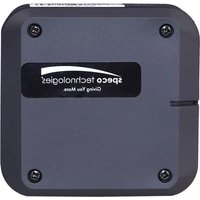
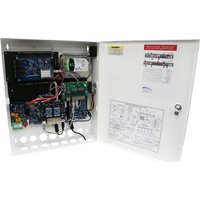
| Product Type | Access Control System |
| Brand | Speco Technologies |
| Model | ACSR64L |
| Dimensions (W x H x D) | 200 mm x 150 mm x 50 mm |
| Weight | 0.5 kg |
| Power Supply | 12V DC |
| Power Consumption | 5 W |
| Supported Card Types | 125 kHz RFID |
| Keypad | 12-key backlit keypad |
| User Capacity | 1,000 users |
| Event Log | 100,000 events |
| Relay Output | Form C, 2A @ 30V DC |
| Operating Temperature | -10°C to 50°C |
| Humidity | 0% to 90% (non-condensing) |
| Access Modes | Card only, PIN only, Card + PIN |
| Main Functions | Door control, time schedules, anti-passback, alarm monitoring |
| Maintenance | Clean with dry cloth; avoid liquids |
| Safety Features | Tamper alarm, keypad lockout after invalid attempts |
| Spare Parts | Replacement keypad, RFID reader, power supply |
| Reparability | Field-serviceable; modular components |
| Included Accessories | Mounting screws, installation manual |
Frequently Asked Questions - ACSR64L Speco Technologies
How do I add a new user to the ACSR64L?
Press the Menu key, enter the master code, select Add User, then present a card or enter a PIN. Follow the prompts to assign access levels.
What should I do if the keypad is unresponsive?
Check the power supply and connections. Try a hard reset by disconnecting power for 10 seconds. If the issue persists, contact support.
How can I change the master code?
Go to System Settings > Master Code using the current master code. Enter the new code twice to confirm.
Can I use this system with an electric strike?
Yes, the relay output can control an electric strike or magnetic lock. Ensure the load does not exceed 2A @ 30V DC.
How do I reset the system to factory defaults?
Press and hold the Reset button on the circuit board for 5 seconds. All users and settings will be erased.
What is the maximum distance between the reader and the control unit?
The maximum recommended distance is 100 meters using 22 AWG shielded cable. For longer runs, use a power booster.
Why is the card not being read?
Ensure the card is a 125 kHz RFID type. Clean the card and reader surface. If multiple cards fail, the reader may need replacement.
How many users can be stored?
The system supports up to 1,000 users and stores 100,000 events in the audit log.
Can I schedule automatic door unlocking?
Yes, the system supports time schedules. You can set up to 8 schedules per day and assign them to users or groups.
What kind of maintenance does the ACSR64L require?
Periodically clean the keypad and reader with a soft, dry cloth. Check connections for corrosion. The battery backup (if installed) should be tested every 6 months.
User questions about ACSR64L Speco Technologies
0 question about this device. Answer the ones you know or ask your own.
Ask a new question about this device
No questions yet. Be the first to ask one.
Download the instructions for your Access Control System in PDF format for free! Find your manual ACSR64L - Speco Technologies and take your electronic device back in hand. On this page are published all the documents necessary for the use of your device. ACSR64L by Speco Technologies.
USER MANUAL ACSR64L Speco Technologies

Manual assistant
Powered by Anthropic
Waiting for your message
Product information
Brand : Speco Technologies
Model : ACSR64L
Category : Access Control System