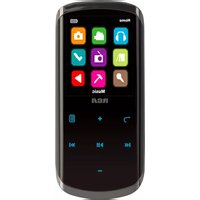
M6208 - Media player RCA - Free user manual and instructions
Find the device manual for free M6208 RCA in PDF.


Pick your language and provide your email: we'll send you a specifically translated version.
| Product Type | Portable Multimedia Player |
| Brand | RCA |
| Model | M6208 |
| Dimensions (W x D x H) | 5.3 x 0.9 x 3.5 inches (13.5 x 2.3 x 8.9 cm) |
| Weight | 0.5 lbs (227 g) |
| Power Supply | Rechargeable lithium-ion battery (1000 mAh) |
| Display | 4.3-inch TFT LCD (480 x 272 pixels) |
| Supported Video Formats | AVI, MP4, RMVB, MOV, MKV |
| Supported Audio Formats | MP3, WMA, WAV, FLAC, AAC |
| Supported Image Formats | JPEG, BMP, PNG, GIF |
| Memory Expansion | SD/SDHC card slot (up to 32 GB) |
| Connectivity | USB 2.0, AV-out, headphone jack |
| Battery Life | Up to 6 hours video playback |
| Charging Time | Approx. 3 hours |
| Main Functions | Video/audio/image playback, file browser, equalizer, FM radio optional |
| Languages Supported | English, French, Spanish, etc. |
| Accessories Included | USB cable, earphones, AV cable, user manual |
| Care and Cleaning | Wipe with a soft dry cloth; do not use liquid cleaners |
| Safety | Keep away from moisture; use only specified charger; avoid direct sunlight |
| Repairability | Battery replaceable by service center; no user-serviceable parts inside |
Frequently Asked Questions - M6208 RCA
How do I turn on the RCA M6208 media player?
Press and hold the power button located on the top edge for about 2-3 seconds until the screen lights up.
What video formats does the M6208 support?
It supports AVI, MP4, RMVB, MOV, and MKV formats. For best compatibility, use MP4 or AVI with standard codecs.
How do I charge the device?
Connect the included USB cable to a computer USB port or a 5V USB power adapter. The charging indicator turns red while charging and green when full.
Can I expand the storage?
Yes, insert a microSD card (up to 32 GB) into the slot on the side. The device will automatically recognize the card.
My screen shows 'No File' when I insert a card. What should I do?
Ensure the card is formatted in FAT32 and contains supported media files. Try reinserting the card or formatting it on a computer.
How do I reset the player if it freezes?
Use a paperclip to press the reset button located near the headphone jack. Alternatively, remove the battery if possible.
Can I use this device as a USB drive?
Yes, connect it to a computer via USB and set the mode to 'Mass Storage' in the settings menu. It will appear as a removable drive.
The sound is distorted. What can I do?
Check the equalizer settings and reduce the volume. Also ensure the audio file is not corrupted. Try using different headphones.
How do I clean the screen?
Use a soft, lint-free cloth slightly dampened with water. Do not apply pressure or use any chemicals.
Where can I find the full user manual?
The manual is available for download on the RCA support website or from notice-facile.com in PDF format.
User questions about M6208 RCA
0 question about this device. Answer the ones you know or ask your own.
Ask a new question about this device
No questions yet. Be the first to ask one.
Download the instructions for your Media player in PDF format for free! Find your manual M6208 - RCA and take your electronic device back in hand. On this page are published all the documents necessary for the use of your device. M6208 by RCA.
USER MANUAL M6208 RCA

Manual assistant
Powered by Anthropic
Waiting for your message
Product information
Brand : RCA
Model : M6208
Category : Media player