LED Pixel 10C - Lighting Adj - Free user manual and instructions
Find the device manual for free LED Pixel 10C Adj in PDF.


Pick your language and provide your email: we'll send you a specifically translated version.
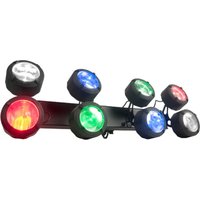
| Product Type | LED Pixel Lighting Fixture |
| Model | LED Pixel 10C |
| Brand | Adj |
| Dimensions | 10 x 10 x 10 in (25.4 x 25.4 x 25.4 cm) |
| Weight | 5.5 lbs (2.5 kg) |
| Power Consumption | 100W |
| Input Voltage | AC 100-240V, 50/60Hz |
| Light Source | 10x 10W RGBW LEDs |
| Pixel Mapping | Supports individual pixel control via DMX |
| DMX Channels | 4, 8, or 12 channel modes |
| Control | DMX512, Master/Slave, Sound Active, Auto |
| Housing Material | Aluminum alloy with tempered glass lens |
| Cooling | Passive convection cooling, fanless |
| IP Rating | IP20 (indoor use only) |
| Mounting | Floor stand, truss clamp, or wall mount |
| Operating Temperature | -10°C to 45°C (14°F to 113°F) |
| Maintenance | Clean with a soft, dry cloth; avoid solvents |
| Safety | Ensure proper ventilation; do not stare into beam |
| Spare Parts | Replaceable LED modules and power supply |
| Repairability | Modular design for easy servicing |
Frequently Asked Questions - LED Pixel 10C Adj
How do I connect the LED Pixel 10C to a DMX controller?
Use a standard 3-pin XLR cable. Connect the DMX output of your controller to the DMX input of the fixture. Set the desired DMX address via the control panel or DIP switches if available.
What are the available DMX channel modes and how do I set them?
The fixture supports 4-channel (RGBW), 8-channel (RGBW + effects), and 12-channel (full pixel mapping). Use the menu buttons to navigate to 'DMX Mode' and select the desired mode.
Can I use the LED Pixel 10C outdoors?
No, this fixture has an IP20 rating and is designed for indoor use only. Exposure to moisture or dust may damage the unit.
How do I perform a factory reset on the device?
Press and hold the 'Menu' button for 5 seconds until the display shows 'Factory Reset'. Confirm by pressing 'Enter'. This will restore all settings to default.
What power supply do I need for the LED Pixel 10C?
The fixture accepts AC 100-240V, 50/60Hz. It includes an internal power supply. Use the provided power cord. Maximum power draw is 100W.
How do I update the firmware?
Firmware updates are done via a USB connection to a computer. Download the latest firmware from the Adj website and follow the included instructions.
Why is the fixture not responding to DMX?
Check that the DMX cable is properly connected and not damaged. Ensure the fixture has the correct DMX address and mode. Verify that the DMX controller is sending data. Try terminating the DMX line with a 120 ohm resistor on the last fixture.
Can I link multiple LED Pixel 10C units together?
Yes, use DMX cables to daisy-chain fixtures. Set unique DMX addresses for each unit. The maximum recommended chain is 32 units, but it depends on the controller.
How do I clean the LED Pixel 10C?
Disconnect power. Use a soft, dry, lint-free cloth to wipe the housing and lens. Do not use any cleaning agents, as they may damage the surface. Never spray liquid directly onto the fixture.
What is the warranty period for this product?
Adj offers a limited 2-year warranty for defective materials and workmanship. Contact your dealer or Adj support for more details.
User questions about LED Pixel 10C Adj
0 question about this device. Answer the ones you know or ask your own.
Ask a new question about this device
No questions yet. Be the first to ask one.
Download the instructions for your Lighting in PDF format for free! Find your manual LED Pixel 10C - Adj and take your electronic device back in hand. On this page are published all the documents necessary for the use of your device. LED Pixel 10C by Adj.
USER MANUAL LED Pixel 10C Adj


Manual assistant
Powered by Anthropic
Waiting for your message
Product information
Brand : Adj
Model : LED Pixel 10C
Category : Lighting