FIP15G - Telephone FlyingVoice - Free user manual and instructions
Find the device manual for free FIP15G FlyingVoice in PDF.


Pick your language and provide your email: we'll send you a specifically translated version.
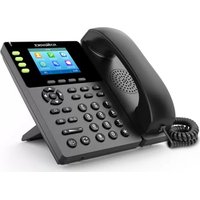
| Product Type | Corded Desk Telephone |
| Brand | FlyingVoice |
| Model | FIP15G |
| Dimensions | Approximately 21 x 17 x 7 cm |
| Weight | Approximately 500 g |
| Power Supply | AC adapter (9V DC) or line-powered |
| Display | LCD with backlight, 1 line x 16 characters |
| Dialing | Tone (DTMF) and pulse dialing |
| Ringer | Adjustable volume and tone |
| Speakerphone | Full-duplex speakerphone |
| Caller ID | FSK/DTMF caller ID with memory for 50 calls |
| Redial | Last number redial (up to 32 digits) |
| Memory | Speed dial memory for 10 numbers |
| Hold Function | Music on hold |
| Mute | Microphone mute button |
| Volume Control | Handset and speakerphone volume adjustable |
| Wall Mountable | Yes, with bracket |
| Maintenance | Clean with dry cloth; avoid liquids |
| Safety | Do not expose to moisture; use only approved adapter |
| Spare Parts | Handset cord, line cord, wall bracket available |
| General Information | Compliant with FCC/CE standards; for indoor use only |
Frequently Asked Questions - FIP15G FlyingVoice
How do I set the date and time on my FIP15G?
Press the Menu button, navigate to Date/Time, then use the keypad to enter the current date and time. Confirm with Save.
How can I adjust the ringer volume?
While the phone is idle, press the Volume Up/Down arrows on the side of the phone. The ringer volume can also be adjusted via the Menu under Ringer Settings.
Why is there no dial tone?
Ensure the telephone line cord is securely connected to both the phone and the wall jack. If using a power adapter, check it is plugged in. Also verify that the handset cord is properly connected.
How do I use caller ID?
When a call comes in, the caller's number (and name if available) will appear on the display. Press Caller ID button to view the call log. Use arrow keys to scroll through missed, received, and dialed calls.
How do I store a number in speed dial?
Press Store, then enter a memory location (0-9). Enter the phone number (up to 16 digits) and press Store again. To dial, press the corresponding memory key during dial tone.
Can I mute the microphone during a call?
Yes, press the Mute button during a call. The microphone is muted and the caller cannot hear you. Press Mute again to unmute.
How do I put a call on hold?
Press the Hold button during a call. The caller will hear hold music. To resume, press the same Hold button or lift another handset if using multiple phones.
What should I do if the display is dim?
The display brightness can be adjusted in the Menu under Display Settings. If still dim, ensure the power adapter is connected; the backlight requires external power.
How do I change the ringer tone?
Go to Menu > Ringer Settings > Ringer Tone. Use arrow keys to preview tones and press Save to select.
Can I mount this phone on the wall?
Yes, the FIP15G supports wall mounting. Insert the provided wall bracket into the slots on the back of the phone, then secure it to the wall using appropriate screws.
User questions about FIP15G FlyingVoice
0 question about this device. Answer the ones you know or ask your own.
Ask a new question about this device
No questions yet. Be the first to ask one.
Download the instructions for your Telephone in PDF format for free! Find your manual FIP15G - FlyingVoice and take your electronic device back in hand. On this page are published all the documents necessary for the use of your device. FIP15G by FlyingVoice.
USER MANUAL FIP15G FlyingVoice


Manual assistant
Powered by Anthropic
Waiting for your message
Product information
Brand : FlyingVoice
Model : FIP15G
Category : Telephone