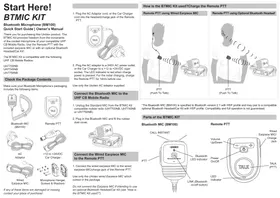
BT MIC KIT - Uncategorized UNIDEN - Free user manual and instructions
Find the device manual for free BT MIC KIT UNIDEN in PDF.


| Product Type | Bluetooth Microphone Kit |
| Brand | Uniden |
| Model | BT MIC KIT |
| Bluetooth Version | 5.0 or later |
| Wireless Range | Up to 30 feet (10 meters) |
| Microphone Type | Built-in omnidirectional |
| Battery Type | Rechargeable Lithium-ion |
| Battery Life | Up to 8 hours talk time |
| Charging Time | Approximately 2 hours |
| Charging Port | Micro USB or USB-C |
| Dimensions (Microphone) | Approx. 1.5 x 1.5 x 6 inches |
| Weight (Microphone) | Approx. 3.5 oz (100 g) |
| Compatibility | Smartphones, tablets, computers with Bluetooth |
| Key Features | Hands-free calling, voice control, noise reduction |
| Controls | Power, volume, answer/end button |
| Indicator Lights | LED for power and Bluetooth status |
| Care Instructions | Wipe with dry cloth; avoid moisture |
| Storage | Store in cool, dry place |
| Safety | Do not expose to extreme temperatures; use certified charger |
| Repairability | Battery replaceable by technician |
| What's in the Box | Microphone, charging cable, manual |
Frequently Asked Questions - BT MIC KIT UNIDEN
User questions about BT MIC KIT UNIDEN
0 question about this device. Answer the ones you know or ask your own.
Ask a new question about this device
Download the instructions for your Uncategorized in PDF format for free! Find your manual BT MIC KIT - UNIDEN and take your electronic device back in hand. On this page are published all the documents necessary for the use of your device. BT MIC KIT by UNIDEN.
USER MANUAL BT MIC KIT UNIDEN
Bluetooth Microphone (BM100)
Quick Start Guide | Owner's Manual
Thank you for purchasing this Uniden product. The BTMIC Kit provides freedom from the constraints of the corded microphone of your compatible UHF CB Mobile Radio. Use the Remote PTT with the included earpiece MIC or with an optional Bluetooth Headset/Car Kit 1 .
The BTMIC Kit is compatible with the following UHF CB Mobile Radios;
UH7700NB
UH7740NB
UH7750NB
Check the Package Contents
Make sure your Bluetooth Microphone's packaging includes the following items.
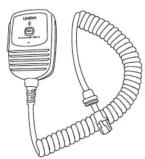
Bluetooth MIC (BM100)
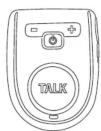
Remote PTT

AC
Adaptor
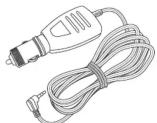
+12 to +24VDC
Car Charger
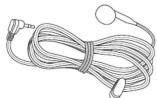
Wired Earpiece MIC
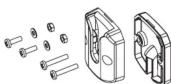
Microphone Hanger, Screws & Washers
If any of these items are damaged or missing contact your place of purchase!
- Plug the AC Adaptor cord, or the Car Charger cord into the headset/charge jack of the Remote PTT.

- Plug the AC adaptor to a 240V AC power outlet, or the Car Charger to a +12 to +24VDC cigar socket. The LED indicator is red when charge power is present. For the initial charging, charge the Remote PTT for 14hrs before use.
Use only the Uniden AC adaptor supplied.
Connect the Bluetooth MIC to the UHF CB Mobile Radio
-
Unplug the Standard MIC from the BTMIC Kit compatible mobile radio (UH7700NB, UH7740NB or UH7750NB).
-
Plug in the Bluetooth MIC and fit the rubber dust cover.

Connect the Wired Earpiece MIC to the Remote PTT
- Connect the wired earpiece MIC to the wired earpiece MIC/charge jack of the Remote PTT.
Use only the Uniden wired Earpiece MIC which comes in the package.
Do not connect the Earpiece MIC if intending to use an optional Bluetooth Headset/Car Kit (see "How is the BTMIC Kit used?").
How is the BTMIC Kit used? Charge the Remote PTT
Remote PTT using Wired Earpiece MIC
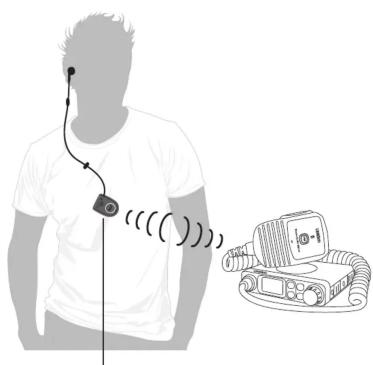
PTT (Push To Talk)
Remote PTT using Optional Bluetooth Headset 1
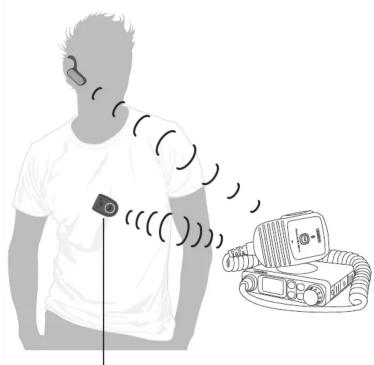
PTT (Push To Talk)
1 The Bluetooth MIC (BM100) is specified to Bluetooth version 2.1 with HSP profile and may pair to a compatible optional Bluetooth Headset/Car Kit with HSP profile. Compatibility and full operation is not guaranteed.
Parts of the BTMIC KIT
Bluetooth MIC (BM100)
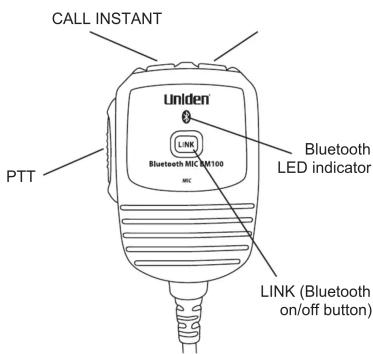
Remote PTT

Basic Operation
Using the Bluetooth MIC as a Standard MIC
At any time the Bluetooth MIC can be used just like the Standard MIC for PTT, CALL and INSTANT function. When using PTT on the Bluetooth MIC the Bluetooth MIC's microphone is used.
Power On/Off
Bluetooth MIC
-
Bluetooth MIC automatically turns on when the mobile radio powers on.
-
When the mobile radio has power:
Press LINK for 2 seconds to directly turn the Bluetooth feature On or Off.
The LED flashes Blue 3 times when the Bluetooth feature turns on.
The LED flashes Blue & Red when the Bluetooth feature turns off.
Remote PTT
- Press ⏻ for 2 seconds to power on.
The LED flashes Blue 3 times when turned on (connected headset will hear the turn on melody).
The LED flashes Blue & Red when turned off (connected headset will hear a low beep tone).
Pairing
Pairing the Bluetooth MIC with the Remote PTT
The Bluetooth MIC and Remote PTT come already paired for your convenience. If you need to pair the Remote PTT to the Bluetooth MIC first do “Delete Pairing Information”, then;
-
First power off both the Bluetooth MIC (LINK button) and the Remote PTT.
-
Press & hold for 4 seconds both the Remote PTT's power key and the Bluetooth MIC's LINK button to start pairing mode. The Bluetooth MIC and the Remote PTT will pair automatically, with no need to enter a PIN code.
Pairing the Bluetooth MIC with an Optional Bluetooth Headset/Car Kit 2
- Press & hold for 4 seconds the Bluetooth MIC's LINK button to start pairing mode. Put the optional Bluetooth Headset into pairing mode (see instructions for the Bluetooth Headset/Car Kit). The Bluetooth MIC and the Bluetooth Headset/Car Kit will pair automatically*.
*The PIN code for pairing is "0000", this is exchanged automatically.
2 Only one Bluetooth Headset/Car Kit can be paired with the Bluetooth MIC. Compatibility and full operation is not guaranteed.
To Delete Pairing Information
To Reset the Bluetooth MIC:
- Press & hold for 4 seconds the Bluetooth MIC's LINK button while powering On the UHF CB Mobile Radio.
To Reset the Remote PTT:
- First power Off the Remote PTT.
- Press & hold for 4 seconds TALK and ⏻ Power.
LED and Tone Indicators
| Bluetooth MIC LED Indication | |
| Powering On Blue LED blinks 3 times | |
| Power On (Remote PTT/Blueooth headset not connected) Blue LED blinks 1 time every 5 seconds | |
| Powering Off (via LINK button) Blue & Red LED blinks for 2 seconds | |
| Power Off (Mobile Radio) LED turns off | |
| Connected to Remote PTT with Wired Earpiece MIC Blue LED blinks 2 times every 5 seconds | |
| Connected to Remote PTT without Wired Earpiece MIC Blue LED blinks 3 times every 5 seconds | |
| Connected to Remote PTT & Bluetooth Headset/Car Kit Blue LED blinks 4 times every 5 seconds | |
| Pairing Blue LED and Red LED will blink alternately | |
| Remote PTT LED Indication | |
| Powering On Blue LED blinks 3 times | |
| Power On (Remote PTT/Blueooth headset not connected) Blue LED blinks 1 time every 5 seconds | |
| Connected to Bluetooth MIC with Wired Earpiece MIC Blue LED blinks 2 times every 5 seconds | |
| Connected to Bluetooth MIC without Wired Earpiece MIC Blue LED blinks 3 times every 5 seconds | |
| Pairing Blue LED and Red LED blink alternately | |
| Battery low Red LED blinks 1 time every 5 seconds | |
| Battery very low Red LED blinks 2 times every 5 seconds | |
| Charging Red LED turns on | |
| Tone Indication | Tone heard through Headset |
| Power On | A 3 tome melody sounds |
| Power Off | A low beep sounds |
| Connected to Bluetooth MIC | A high beep sounds |
| Disconnected from Bluetooth MIC | A low beep sounds |
| Battery low A high beep sounds 1 time every 5 seconds | |
| Battery very low A high beep sounds 2 times every 5 seconds | |
Using the Remote PTT to Transmit
- Press TALK on the Remote PTT to activate the Bluetooth MIC's PTT output.
- Pressing the optional Bluetooth Headset/Car Kit's Talk/connect button controls the audio connection.
- During a transmission using the Remote PTT wired Headset or Bluetooth Headset/Car Kit, PTT output is stopped when either device moves out of range of the Bluetooth MIC.
- If the Bluetooth Headset/Car Kit is also paired to a mobile phone, and a transmission is in progress when an incoming call is received, the transmission is stopped and the Bluetooth Headset/Car Kit switches to the mobile phone call 4 .
- When the Bluetooth Headset/Car Kit ends a mobile phone call, the audio connection will be restarted either by pressing TALK on the Remote PTT or by receiving a transmission.
3 If the optional Bluetooth Headset/Car Kit is multi-point capable, you may switch to a mobile phone call. This function depends on the specification of your Bluetooth Headset/Car Kit. Compatibility and full operation is not guaranteed.
Specifications
Bluetooth SPEC : VERSION 2.1/Class 2 Bluetooth Profile : HSP (Headset Profile)
Limited One Year Warranty
Bluetooth Microphone BTMIC Kit
IMPORTANT: Satisfactory evidence of the original purchase is required for warranty service
Please refer to our Uniden website for any details or warranty durations offered in addition to those contained below.
Warrantor: The warrantor is either Uniden Australia Pty Limited ABN 58 001 865 498 ("Uniden Aust") or Uniden New Zealand Limited ("Uniden NZ") as the case may be.
Terms of Warranty: Uniden Aust/NZ warrants to the original retail purchaser only that the BTMIC Kit ("the Product"), will be free from defects in materials and craftsmanship for the duration of the warranty period, subject to the limitations and exclusions set out below.
Warranty period: This warranty to the original retail purchaser is only valid in the original country of purchase for a Product first purchased either in Australia or New Zealand and will expire one (1) year from the date of the original retail sale.
If a warranty claim is made, this warranty will not apply if the Product is found by Uniden to be:
(A) Damaged or not maintained in a reasonable manner or as recommended in the relevant Uniden Owner's Manual;
(B) Modified, altered or used as part of any conversion kits, subassemblies or any configurations not sold by Uniden Aust or Uniden NZ;
(C) Improperly installed contrary to instructions contained in the relevant Owner's Manual
(D) Repaired by someone other than an authorized Uniden Repair Agent in relation to a defect or malfunction covered by this warranty; or
(E) Used in conjunction with any equipment, parts or a system not manufactured by Uniden.
Parts Covered: This warranty covers the Product and included accessories.
User-generated Data: This warranty does not cover any claimed loss of or damage to user-generated data (including but without limitation phone numbers, addresses and images) that may be stored on your Product.
Statement of Remedy: If the Product is found not to conform to this warranty as stated above, the Warrantor, at its discretion, will either repair the defect or replace the Product without any charge for parts or service. This warranty does not include any reimbursement or payment of any consequential damages claimed to arise from a Product's failure to comply with the warranty.
Our goods come with guarantees that cannot be excluded under the Australian Consumer Law. You are entitled to a replacement or refund for a major failure and for compensation for any other reasonably foreseeable loss or damage. You are also entitled to have the goods repaired or replaced if the goods fail to be of acceptable quality and the failure does not amount to a major failure.
This warranty is in addition to and sits alongside your rights under either the COMPETITION AND CONSUMER ACT 2010 (Australia) or the CONSUMER GUARANTEES ACT (New Zealand) as the case may be, none of which can be excluded.
Procedure for obtaining warranty service: Depending on the country in which the Product was first purchased, if you believe that your Product does not conform with this warranty, you should deliver the Product, together with satisfactory evidence of your original purchase (such as a legible copy of the sales docket) to Uniden at the addresses shown below. You should contact Uniden regarding any compensation that may be payable for your expenses incurred in making a warranty claim. Prior to delivery, we recommend that you make a backup copy of any phone numbers, images or other data stored on your Product, in case it is lost or damaged during warranty service.
UNIDEN AUSTRALIA PTY LTD Service Division 345 Princes Highway, Rockdale, NSW 2216 Phone: 1300 366 895 Email: custservice@uniden.com.au UNIDEN NEW ZEALAND LTD Service Division 150 Harris Road, East Tamaki Auckland 2013 Phone: (09) 273 8377 Email: service@uniden.co.nz

THANK YOU FOR BUYING A UNIDEN PRODUCT © 2011 Uniden Australia Pty Ltd. Uniden New Zealand Ltd. Printed in PRC. UUZZ01369ZA(0)



- BLUETOOTH MICROPHONE (BM100)
- QUICK START GUIDE | OWNER'S MANUAL
- CHECK THE PACKAGE CONTENTS
- CONNECT THE BLUETOOTH MIC TO THE UHF CB MOBILE RADIO
- CONNECT THE WIRED EARPIECE MIC TO THE REMOTE PTT
- HOW IS THE BTMIC KIT USED? CHARGE THE REMOTE PTT
- PARTS OF THE BTMIC KIT
- BASIC OPERATION
- USING THE BLUETOOTH MIC AS A STANDARD MIC
- POWER ON/OFF
- BLUETOOTH MIC
- REMOTE PTT
- PAIRING
- PAIRING THE BLUETOOTH MIC WITH THE REMOTE PTT
- PAIRING THE BLUETOOTH MIC WITH AN OPTIONAL BLUETOOTH HEADSET/CAR KIT 2
- TO DELETE PAIRING INFORMATION
- USING THE REMOTE PTT TO TRANSMIT
- SPECIFICATIONS
- LIMITED ONE YEAR WARRANTY
- BLUETOOTH MICROPHONE BTMIC KIT
Brand : UNIDEN
Model : BT MIC KIT
Category : Uncategorized