WLI2-USB2-G54 - Uncategorized UNIDEN - Free user manual and instructions
Find the device manual for free WLI2-USB2-G54 UNIDEN in PDF.


| Product Type | Wireless USB Adapter |
| Model | WLI2-USB2-G54 |
| Brand | Uniden |
| Wireless Standard | IEEE 802.11b/g |
| Maximum Data Speed | 54 Mbps |
| Frequency Band | 2.4 GHz |
| Interface | USB 2.0 |
| Antenna Type | Internal |
| Security Support | WEP, WPA, WPA2 |
| Operating Systems | Windows 98/ME/2000/XP, Mac OS X |
| Dimensions (approx.) | 65 × 20 × 10 mm |
| Weight (approx.) | 10 g |
| Power Source | USB bus-powered |
| Power Consumption | Less than 2.5 W |
| Operating Temperature | 0°C to 40°C |
| Storage Temperature | -20°C to 60°C |
| Humidity | 10% to 90% (non-condensing) |
| LED Indicators | Power, Link/Activity |
| Maintenance | Clean with a soft, dry cloth; do not use liquids |
| Safety Precautions | Keep away from water and extreme heat; do not disassemble |
| Repairability | Non-repairable; replace if faulty |
Frequently Asked Questions - WLI2-USB2-G54 UNIDEN
User questions about WLI2-USB2-G54 UNIDEN
0 question about this device. Answer the ones you know or ask your own.
Ask a new question about this device
Download the instructions for your Uncategorized in PDF format for free! Find your manual WLI2-USB2-G54 - UNIDEN and take your electronic device back in hand. On this page are published all the documents necessary for the use of your device. WLI2-USB2-G54 by UNIDEN.
USER MANUAL WLI2-USB2-G54 UNIDEN
Uniden Australia Pty Ltd
73 Alfred Road
Chipping Norton 2170 NSW
Tel: 02 9599 3355 | Fax: 02 9599 4018
www.uniden.com.au

WLI2-USB2-G54
PRINT this page
EMAIL a friend
Range Brochure PDF


Air Station
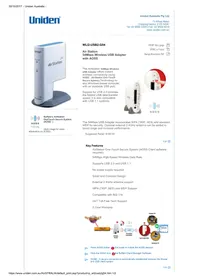
54Mbps Wireless USB Adapter with AOSS
The AirStation 54Mbps Wireless USB Adapter offers instant wireless connectivity using AOSS☐ (AirStation One-Touch Secure System) Technology to any Windows-based computer with an available USB port.
Support for USB 2.0 provides the fastest USB data transfer speed; it is also compatible with USB 1.1 systems.
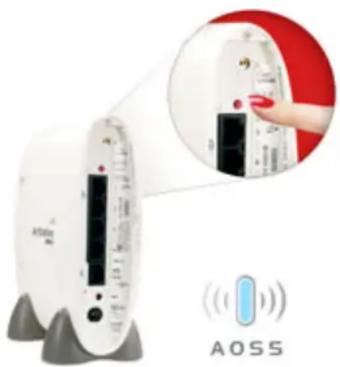

AOSS
Friendly
Buffalo's AirStation OneTouch Secure System (AOSS□)
(click image for more
information on AOS S)
The 54Mbps USB Adapter incorporates WPA (TKIP, AES) and standard WEP for security. Optional external 2.4GHz antenna can be added to boost range and increase performance.
Suggested Retail: \$199.00
TOP
Key Features
AirStation One-Touch Secure System (AOSS Client software required)
54Mbps High-Speed Wireless Data Rate
Supports USB 2.0 and USB 1.1
No power supply required
Small and Compact Design
External 2.4GHz antenna support
WPA (TKIP, AES) and WEP Support
Compatible with 802.11b
24/7 Toll-Free Tech Support
2-Year Warranty
![graph LR A["INTERNET"] --> B["CABLE 2+L/Modem"] B --> C["Wireless Router"] C --> D["Enoypted Connection"] D --> E["WU2-US82-G54"] E --> F["Desktop PC"] E --> G["Notebook PC"] C --> H["ADSS"] H --> I["ADSS™"]](/content/2026/07/1489202/images/134054c9863790481437418067704b92e7ed5bf5e1209d8252cdf6aeffb443de.jpg)
Press AOSS button on the router to initiate the AOSS session.
Click the AOS S icon in the Buffalo Client Manager Software.
DONE - A secure connection is automatically established between the Router and USB client system.
TOP ↑
Specifications
Communication Range:
*All Distances are estimated. Wireless connections may be affected as physical conditions and circumstances vary.

OS Support
WinXP, 98SE, ME, 2000, XP
Package Contents
AirStation 54Mbps USB Adapter, CD driver disk, Mounting Bracket, USB Cable, Quick Setup Guide and Warranty Statement
Technical Specifications - Wireless LAN
Standards Compliance: 802.11g (IEEE Wireless LAN Standard), 802.11b (IEEE Wireless LAN Standard)
Frequency Range: 2,412 - 2,462GHz
Transmission Mode: DSSS, OFDM, CCK, Half Duplex
Security: WPA (TKIP, AES), 64/128-Bit WEP
Access mode: Infrastructure Mode, AdHoc Mode
External Antenna Connector: MC
Output Power: 15dBm (32mW)
Interface: USB 2.0
Communication Protocol: Direct Sequence Spread Spectrum (DSSS), Half Duplex, OFDM, CCK, DQPSK, DBPSK

Others
Weight: 3.1oz (88g)
Dimensions: W4.8 x H3.7 x D2.2in (120 x 92 x 56mm)
Work Environment: Temperature 0-400 C, 20-80% Humidity (non-condensing)
Power Supply: DC 5V (Powered via PC)
Power Consumption: 2.45W (Max)
Electric Current Consumption: 490mA (Max), 450mA (Normal)



Brand : UNIDEN
Model : WLI2-USB2-G54
Category : Uncategorized