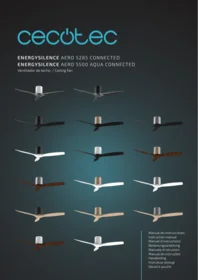
CECOTEC Energysilence Aero 5500 Aqua Ironblack Connected - Ceiling fan

Energysilence Aero 5500 Aqua Ironblack Connected - Ceiling fan CECOTEC - Free user manual and instructions

Find the device manual for free Energysilence Aero 5500 Aqua Ironblack Connected CECOTEC in PDF.

📄 104 pages English EN Download 💬 AI Question 10 questions ⚙️ Specs
Notice CECOTEC Energysilence Aero 5500 Aqua Ironblack Connected - page 8
Pick your language and provide your email: we'll send you a specifically translated version.
Product type Ceiling fan
Brand Cecotec
Model Energysilence Aero 5500 Aqua Ironblack Connected
Blade diameter 132 cm
Net weight 5.8 kg
Power supply 220-240 V ~ 50/60 Hz
Motor power 50 W
Speeds 6 adjustable speeds
Reverse function Yes (summer/winter)
Connectivity Wi-Fi, Cecotec Smart mobile app
Remote control Yes, included
Lighting Not integrated
Noise level Up to 35 dB (quiet)
Blade material ABS
Color Ironblack
Maintenance and cleaning Clean with a soft dry cloth. Do not use abrasive products.
Safety Do not use outdoors. Professional installation recommended.
Spare parts and repairability Blades, remote control, and Wi-Fi module available as spare parts.

Frequently Asked Questions - Energysilence Aero 5500 Aqua Ironblack Connected CECOTEC

How to install the ceiling fan?
Installation must be carried out by a qualified electrician. Attach the bracket to the ceiling, connect the wires according to the diagram in the manual, then attach the motor and blades.
How to use the remote control?
Insert the batteries, point the remote at the fan. Use the buttons to turn on/off, adjust speed, and activate the reverse function.
How to connect the fan to the Cecotec Smart app?
Download the app, create an account, press the Wi-Fi button on the remote, then follow the instructions to pair the device.
What to do if the remote does not work?
Check the batteries, ensure they are correctly inserted. Replace them if necessary. If the problem persists, reset the fan by turning off the power for 10 seconds.
How to reverse the rotation direction?
In summer, the blades rotate counterclockwise to create a cooling breeze. In winter, use the reverse button on the remote for clockwise direction which redistributes warm air.
What regular maintenance is needed?
Clean the blades and motor with a soft dry cloth every month. Check the fixings once a year. Do not lubricate the motor.
The fan makes noise, what to do?
Check that all screws are tight. Ensure the blades are balanced. If the noise persists, contact technical support.
Can I use the fan outdoors?
No, this fan is designed for indoor use only. Exposure to humidity or rain may damage the device and pose an electrical risk.
Where to buy spare parts?
The blades, remote control, and Wi-Fi module are available on the official Cecotec website or from authorized dealers. Use the references indicated in the manual.
How to reset the fan to factory settings?
Press and hold the power button on the remote for 10 seconds until the fan flashes. Release, then restart. You can also cut the mains power for 30 seconds.

User questions about Energysilence Aero 5500 Aqua Ironblack Connected CECOTEC

0 question about this device. Answer the ones you know or ask your own.

Ask a new question about this device

The email remains private: it is only used to notify you if someone responds to your question.

No questions yet. Be the first to ask one.

Download the instructions for your Ceiling fan in PDF format for free! Find your manual Energysilence Aero 5500 Aqua Ironblack Connected - CECOTEC and take your electronic device back in hand. On this page are published all the documents necessary for the use of your device. Energysilence Aero 5500 Aqua Ironblack Connected by CECOTEC.

USER MANUAL Energysilence Aero 5500 Aqua Ironblack Connected CECOTEC

Manual assistant
Powered by Anthropic
Waiting for your message
Product information

Brand : CECOTEC

Model : Energysilence Aero 5500 Aqua Ironblack Connected

Category : Ceiling fan