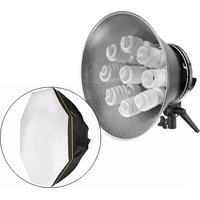
Octa FF-OF4 - Lighting Impact - Free user manual and instructions
Find the device manual for free Octa FF-OF4 Impact in PDF.


Pick your language and provide your email: we'll send you a specifically translated version.
| Product Type | LED Lighting Panel |
| Model | Octa FF-OF4 |
| Brand | Impact |
| Dimensions (L x W x H) | 30 cm x 30 cm x 8 cm |
| Weight | 1.2 kg |
| Power Source | AC 100-240V, 50/60Hz |
| Power Consumption | 20W |
| Color Temperature Range | 3200K - 5600K |
| Dimmable | Yes, 0-100% stepless dimming |
| Light Source | 192 high-CRI SMD LEDs |
| CRI (Color Rendering Index) | ≥95 |
| Mounting Options | Stand, light stand adapter, or wall mount |
| Control Methods | On-board buttons and remote control |
| Remote Control Range | Up to 10 meters |
| Material | Aluminum alloy housing |
| Cooling System | Passive heat sink, silent operation |
| Included Accessories | Power cord, remote control, diffusion dome, carrying case |
| Compatibility | Universal light stand mount |
| Safety Certifications | CE, RoHS |
Frequently Asked Questions - Octa FF-OF4 Impact
How do I mount the Octa FF-OF4 on a light stand?
The Octa FF-OF4 comes with a universal mount adapter that fits standard light stands (5/8" baby pin). Simply slide the adapter onto the stand and tighten the knob. Ensure the light is securely attached before use.
Can I use the Octa FF-OF4 with a battery?
The Octa FF-OF4 is designed for AC power only. It does not have built-in battery support. For portable use, you may need an external AC power source like a generator or inverter.
How to adjust color temperature?
Press the "MODE" button repeatedly to cycle through preset color temperatures (3200K, 4300K, 5600K). You can also fine-tune using the + and - buttons when in the desired mode.
What does the diffusion dome do?
The included diffusion dome softens the light output, reducing harsh shadows for a more flattering effect. It clips onto the front of the panel and is recommended for portrait or interview lighting.
Is the remote control included?
Yes, a remote control is included in the package. It allows you to adjust power, color temperature, and brightness from a distance up to 10 meters. Requires 2 AAA batteries (not included).
How to clean the light panel?
Always unplug the light before cleaning. Use a soft, dry cloth to gently wipe the surface. Do not use any liquid cleaners, as they may damage the LEDs or internal components.
What is the expected lifespan of the LEDs?
The Octa FF-OF4 uses high-quality SMD LEDs with a rated lifespan of 50,000 hours. This equates to roughly 5-6 years of continuous use. Gradual brightness reduction may occur over time.
Can I daisy-chain multiple Octa lights?
The Octa FF-OF4 does not support daisy-chaining. Each unit must be plugged into a separate AC outlet. If you need to control multiple units simultaneously, consider using a separate RF remote controller.
How to replace a faulty power cord?
If the power cord is damaged, it must be replaced by a qualified technician. Do not attempt to repair it yourself. Contact Impact customer support for authorized service options.
What is the warranty period?
The Impact Octa FF-OF4 comes with a 2-year limited warranty against manufacturing defects. Registration may be required. Keep your purchase receipt for warranty claims.
User questions about Octa FF-OF4 Impact
0 question about this device. Answer the ones you know or ask your own.
Ask a new question about this device
No questions yet. Be the first to ask one.
Download the instructions for your Lighting in PDF format for free! Find your manual Octa FF-OF4 - Impact and take your electronic device back in hand. On this page are published all the documents necessary for the use of your device. Octa FF-OF4 by Impact.
USER MANUAL Octa FF-OF4 Impact


Manual assistant
Powered by Anthropic
Waiting for your message
Product information
Brand : Impact
Model : Octa FF-OF4
Category : Lighting