
CS-MXS9UKZ - Air conditioner PANASONIC - Free user manual and instructions
Find the device manual for free CS-MXS9UKZ PANASONIC in PDF.


| Product Type | Split Air Conditioner |
| Model | CS-MXS9UKZ |
| Brand | Panasonic |
| Cooling Capacity (kW) | 2.5 kW (approx.) |
| Heating Capacity (kW) | 3.2 kW (approx.) |
| Energy Efficiency Ratio (EER) | 3.5 W/W (approx.) |
| Power Supply | 220-240 V, 50 Hz, 1 Ph |
| Indoor Unit Dimensions (WxHxD) | 780 x 280 x 222 mm |
| Outdoor Unit Dimensions (WxHxD) | 660 x 430 x 250 mm |
| Indoor Unit Weight | 8.0 kg |
| Outdoor Unit Weight | 25.0 kg |
| Refrigerant Type | R32 |
| Operating Modes | Cool, Heat, Fan, Dry, Auto |
| Airflow Rate (Indoor, High) | 600 m³/h (approx.) |
| Noise Level (Indoor, Low/High) | 22/42 dB(A) |
| Noise Level (Outdoor) | 48 dB(A) |
| Inverter Technology | Yes, Inverter |
| Filter Type | Washable, Antibacterial |
| Remote Control | Included |
| Timer Function | Yes, 24-hour timer |
| Sleep Mode | Yes |
| Self-Cleaning Function | Yes |
| Maintenance | Clean air filter every 2 weeks |
| Safety Features | Overload protection, auto restart |
| Spare Parts Availability | Filters, remote control, PCB boards |
Frequently Asked Questions - CS-MXS9UKZ PANASONIC
User questions about CS-MXS9UKZ PANASONIC
0 question about this device. Answer the ones you know or ask your own.
Ask a new question about this device
Download the instructions for your Air conditioner in PDF format for free! Find your manual CS-MXS9UKZ - PANASONIC and take your electronic device back in hand. On this page are published all the documents necessary for the use of your device. CS-MXS9UKZ by PANASONIC.
USER MANUAL CS-MXS9UKZ PANASONIC
Operating Instructions
Air Conditioner
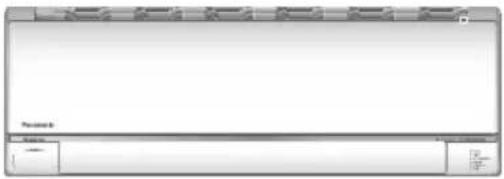
Model No.
Indoor Unit Outdoor Unit
CS-MXS9UKZ CU-2XS20UKZ
CS-MXS12UKZ CU-3XS27UKZ
CS-MXS15UKZ CU-4XS30UBZ
CS-MXS18UKZ CU-4XS34UBZ
CS-MXS24UKZ
Operating Instructions 2-13 Air Conditioner
Before operating the unit, please read these operating instructions thoroughly and keep them for future reference.
The included Installation Instructions should be kept and read by the installer before installation.
Remote control is packaged in the indoor unit and removed by the installer before installation.
操作說明書 14-25 空調器
Provide fast cooling, maximum comfort, clean air and optimise energy saving
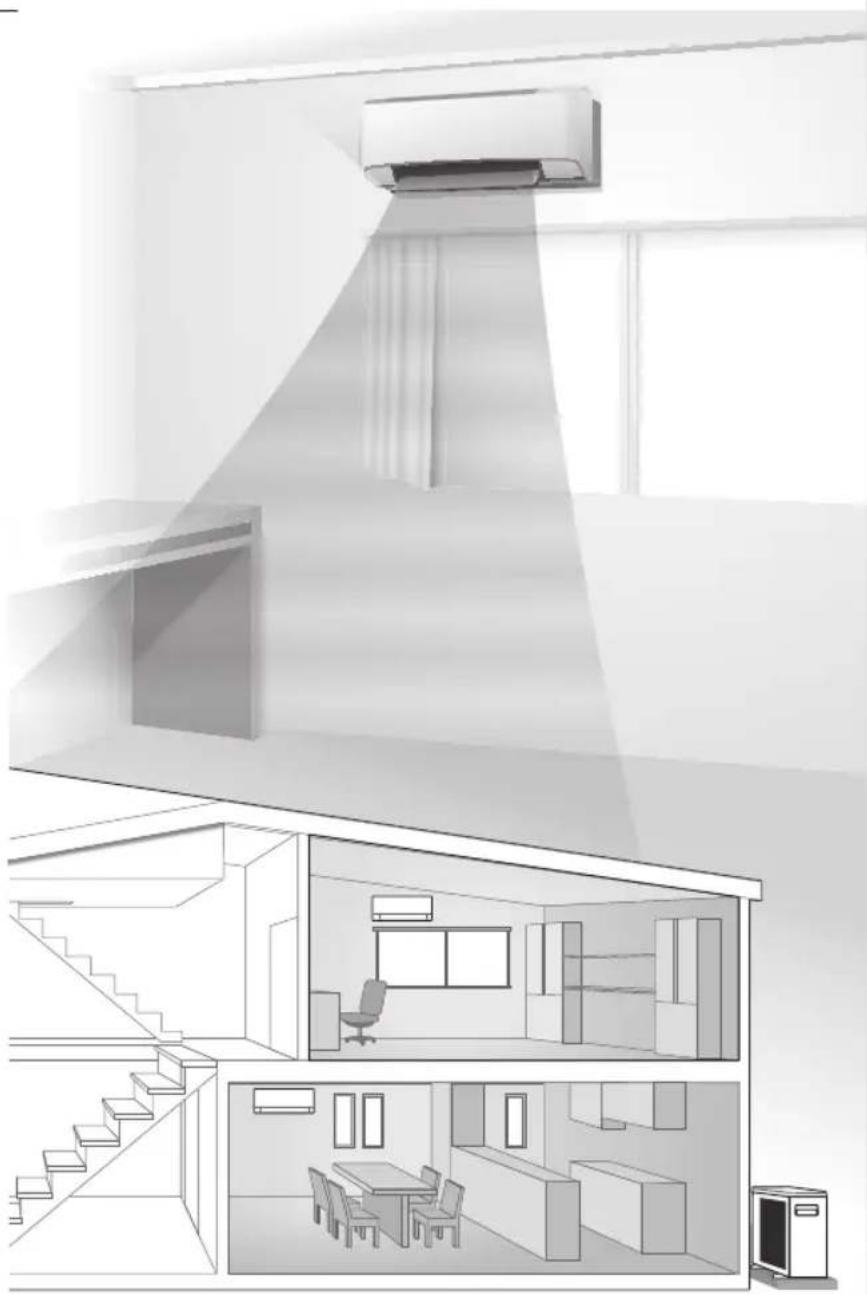
Human activity sensor
- Area Search
- Activity Detection
• Absence Detection
Use remote control within 8 m from the remote control receiver of the indoor unit.
Sunlight sensor and remote control receiver
Flexibility to connect Single Split System or Multi Split System Air Conditioner to suit your needs. For complete product features, please refer to catalogue.


Quick Guide
Inserting the batteries

A Clock setting

① Press CLOCK and set the time
- Press and hold for approximately 5 seconds to show time in 12-hour (am/pm) or 24 hour indication.
② Confirm SET .
2
Thank you for purchasing Panasonic Air Conditioner.
Table of contents
Safety precautions .... 4-5
How to use...... 6-7
To learn more....8-9
Cleaning instructions..... 10
Troubleshooting...... 11-13
Information...... 26
Accessories
- Remote control
- AAA or R03 batteries × 2
- Remote control holder
- Screws for remote control holder × 2
The illustrations in this manual are for explanation purposes only and may differ from the actual unit. They are subject to change without notice for future improvement.
B Basic operation
① Press MODE to select the desired mode.

② Press to start/stop the operation.

- Please note that the OFF indication is on display to start the unit.
③ Select the desired temperature.

Selection range:
16.0 °C \~ 30.0 °C / 60 °F \~ 86 °F.
- Press and hold √ for approximately 10 seconds to switch the temperature indication in °C or °F.
Safety precautions
To prevent personal injury, injury to others or property damage, please comply with the following: Incorrect operation due to failure to follow instructions below may cause harm or damage, the seriousness of which is classified as below:
This appliances is not intended for accessibility by the general public.
| WARNING | This sign warns of death or serious injury. |
| CAUTION | This sign warns of injury or damage to property. |
The instructions to be followed are classified by the following symbols:
| This symbol denotes an action that is PROHIBITED. | |
| These symbols denote actions COMPULSORY. |
![graph TD A["Indoor unit"] --> B["Air outlet"] C["Power supply"] --> D["Air inlet"] E["Remote control"] --> F["Air outlet"] G["Outdoor unit"] --> H["Air outlet"] I["Air inlet"] --> J["Air outlet"]](/content/2026/07/1524754/images/851ef4b1a48759d23befde7a83aac5de203bc7eb201aa21cd1bfb1fe8b113052.jpg)

WARNING
Indoor unit and outdoor unit

This appliance is not intended for use by persons (including children) with reduced physical, sensory or mental capabilities, or lack of experience and knowledge, unless they have been given supervision or instruction concerning use of the appliance by a person responsible for their safety. Children should be supervised to ensure that they do not play with the appliance.
Please consult authorised dealer or specialist to clean the internal parts, repair, install, remove and reinstall the unit. Improper installation and handling will cause leakage, electric shock or fire.
Confirm with authorised dealer or specialist on usage of any specified refrigerant type. Using refrigerant type other than the specified may cause product damage, burst and injury etc.

Do not use means to accelerate the defrosting process or to clean, other than those recommended by manufacturer. Any unfit method or using incompatible material may cause product damage, burst and serious injury.
Do not install the unit in a potentially explosive or flammable atmosphere. Failure to do so could result in fire.
Do not insert your fingers or other objects into the air conditioner indoor or outdoor unit, rotating parts may cause injury.

Do not touch the outdoor unit during lightning, it may cause electric shock.
Do not expose yourself directly to cold air for a long period to avoid excess cooling.
Do not sit or step on the unit, you may fall down accidentally.

Remote control

Do not allow infants and small children to play with the remote control to prevent them from accidentally swallowing the batteries.
Power supply

Do not use a modified cord, joint cord, extension cord or unspecified cord to prevent overheating and fire.


To prevent overheating, fire or electric shock:
- Do not share the same power outlet with other equipment.
- Do not operate with wet hands.
- Do not over bend the power supply cord.
- Do not operate or stop the unit by inserting or pulling out the power plug.

Use complete power supply cord without joining. In unavoidable circumstances that complete power supply cord without joining is impossible, use an approved connection means (for example: socket and plug).
![graph TD A["Power Supply"] --> B["Air Conditioner"] B --> C["Indoor Unit"] B --> D["Outdoor Unit"] E["Complete wire without joining OR"] --> B F["Approved connecting means (for example: approved socket and plug)"] --> E F --> D](/content/2026/07/1524754/images/d7f11c42022849ab7d8a28c107f8c992358ac95bd44df6e5e0dd9df082949fe6.jpg)
If the supply cord is damaged, it must be replaced by the manufacturer, service agent or similarly qualified persons in order to avoid a hazard.
It is strongly recommended to be installed with Earth Leakage Circuit Breaker (ELCB) or Residual Current Device (RCD) to prevent electric shock or fire.
To prevent overheating, fire or electric shock:
- Insert the power plug properly.
- Dust on the power plug should be periodically wiped with a dry cloth.
Stop using the product if any abnormality/failure occurs and disconnect the power plug or turn off the power switch and breaker.
(Risk of smoke/fire/electric shock) Examples of abnormality/failure
• The ELCB trips frequently.
- Burning smell is observed.
- Abnormal noise or vibration of the unit is observed.
• Water leaks from the indoor unit.
• Power cord or plug becomes abnormally hot.
• Fan speed cannot be controlled.
- The unit stops running immediately even if it is switched on for operation.
- The fan does not stop even if the operation is stopped.
Contact your local dealer immediately for maintenance/repair.

This equipment must be earthed to prevent electrical shock or fire.

Prevent electric shock by switching off the power supply and unplug:
- Before cleaning or servicing,
- When extended non-use, or
- During abnormally strong lightning activity.


Indoor unit and outdoor unit

Do not wash the indoor unit with water, benzine, thinner or scouring powder to avoid damage or corrosion at the unit.
Do not use for preservation of precise equipment, food, animals, plants, artwork or other objects. This may cause quality deterioration, etc.
Do not use any combustible equipment in front of the airflow outlet to avoid fire propagation.
Do not expose plants or pet directly to airflow to avoid injury, etc.
Do not touch the sharp aluminium fin, sharp parts may cause injury.

Do not switch ON the indoor unit when waxing the floor. After waxing, aerate the room properly before operating the unit.
Do not install the unit in oily and smoky areas to prevent damage to the unit.
Do not dismantle the unit for cleaning purpose to avoid injury.
Do not step onto an unstable bench when cleaning the unit to avoid injury.
Do not place a vase or water container on the unit. Water may enter the unit and degrade the insulation. This may cause an electric shock.
Do not open window or door for long time during operation, it may lead to inefficient power usage and uncomfortable temperature changes.

Prevent water leakage by ensuring drainage pipe is: - Connected properly,
- Kept clear of gutters and containers, or
- Not immersed in water
After a long period of use or use with any combustible equipment, aerate the room regularly.
After a long period of use, make sure the installation rack does not deteriorate to prevent the unit from falling down.
Remote control

Do not use rechargeable (Ni-Cd) batteries. It may damage the remote control.

To prevent malfunction or damage of the remote control:
- Remove the batteries if the unit is not going to be used for a long period of time.
- New batteries of the same type must be inserted following the polarity stated.
Power supply

Do not disconnect the plug by pulling the cord to prevent electric shock.
nanoe-G generator

Do not touch the sharp pin which may cause injury.
How to use


Not used in normal operations.
Press to restore the remote control to default setting.
To adjust airflow direction
![graph TD A["Upper direction"] --> B["AUTO"] C["Lateral direction"] --> D["AUTO"] style A fill:#f9f,stroke:#333 style C fill:#f9f,stroke:#333 style B fill:#ccf,stroke:#333 style D fill:#ccf,stroke:#333](/content/2026/07/1524754/images/c8d4e64f9f62592db8d8cbc1777694b3c78ca251a5b0ce0c3c97efe34f10625e.jpg)
- Do not adjust the flap by hand.
To adjust fan speed

- For AUTO, the indoor fan speed is automatically adjusted according to the operation mode.
To switch between POWERFUL/QUIET

POWERFUL:
To reach temperature quickly
• This operation stops automatically after 4 hours.
QUIET:
To enjoy quiet operation
• This operation reduces airflow noise.
To save energy

- When manual AIR SWING is selected, the ECONAVI operations will be cancelled.
To maximise comfort

- When manual AIR SWING is selected, the AUTO COMFORT operations will be cancelled.
To purify the air

- nanoe-G starts automatically when the unit is turned on with . .
- nanoe-G will not start automatically during ON timer if the unit has been turned off by
- Can be activated even when the unit is turned off. In this condition, the unit will operate as a fan with AUTO fan speed and flap swing.
To set the timer
2 sets of ON and OFF timers are available to turn ON or OFF the unit at different preset times.
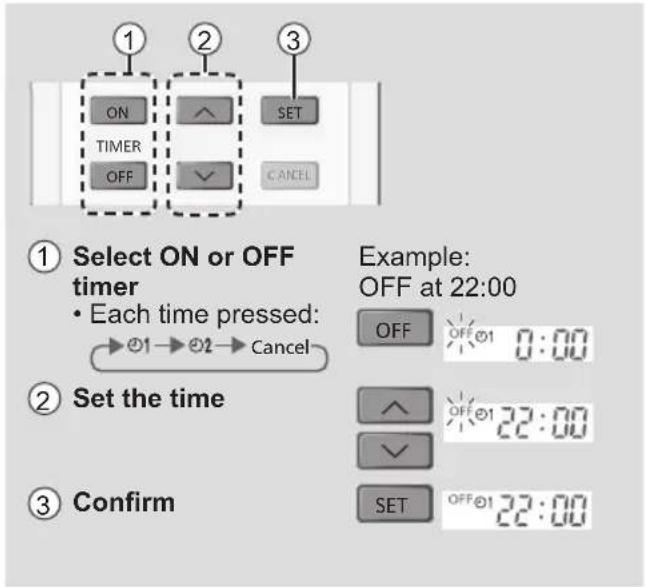
- To cancel ON or OFF timer, press ON or OFF to select respective ☑ or then press CANCEL.
- If timer is cancelled manually or due to power failure, you can restore the timer again by pressing ON or OFF to select respective ☑ or then press SET.
- The nearest timer setting will be displayed and will activate in sequence.
- Timer operation is based on the clock set in the remote control and repeats daily once set. For clock setting, please refer to Quick Guide.
Note

To learn more...
Operation mode
AUTO : During operation mode selection the POWER indicator blinks.
COOL : Provides efficient comfort cooling to suit your needs.
DRY : Unit operates at low fan speed to give a gentle cooling operation.
Energy saving temperature setting
Operating the unit within the recommended temperature range may save energy.
COOL : 26.0 °C \~ 28.0 °C / 79 °F \~ 82 °F.
Air flow direction
In COOL/DRY mode:
If AUTO is set, the flap swings left/right and up/down automatically.
Auto restart control
If power is resumed after a power failure, the operation will restart automatically after a period of time with previous operation mode and airflow direction.
- This control is not applicable when TIMER is set.
nanoe-G in-filter deactivation
Depending on the unit's accumulated operation time, nanoe-G in-filter deactivation may activate only once a day after the unit turned off.
To remove the moisture left in the internal parts, the fan will operate for 30 minutes with flap opened slightly. This process only applicable when the unit is operated in COOL/DRY mode before turned off. Then, nanoe-G deactivates viruses/bacteria on the filter for 2 hours with fan stopped and flap closed.
Do not turn off the power supply during this operation. After power failure, this operation will not resume.
ECONAVI and AUTO COMFORT
■ Econavi with intelligent eco sensors
Intelligent eco sensors detect potential waste of energy using the human activity sensor and sunlight sensor.
■ Auto Comfort with intelligent eco sensors
Intelligent eco sensors detect potential waste of energy using the human activity sensor and auto adjust the temperature and fan speed during high activity level to provide comfort environment.
The human activity sensor scans areas of heat source and movement in a room.
- Based on area activeness, flap will adjust its position automatically.
- The human activity sensor is influenced by the location of the indoor unit, the movement speed of human/non-human activity, temperature range, etc.
- The human activity sensor may mistakenly detect non-human activity and source of heat, such as pets, or may not detect the human activity or source of heat if the person stays motionless.
- Do not place large objects near the sensor and keep away heating units or humidifier from the sensor's detections area.
The sunlight sensor detects changes in sunlight intensity in the room. It reduces the waste of energy under less sunlight conditions.
5 Features
① Temperature wave

Rhythmic temperature-controlled pattern to save energy without sacrificing comfort.
②Area search

③ Activity detection

④ Absence detection

Human activity sensor detects presence/absence of human beings and the movement speed of human activities minimising the required amount of energy.
⑤ Sunlight detection

Adjusts power to changes in sunlight intensity.
Operating conditions
Use this air conditioner in the temperature range indicated in the table.
| Temperature °C (°F) | Indoor Outdoor | ||||
| DBT WBT D | DBT WBT | ||||
| COOL | Max. 32 | (89.6) 23 (73.4) 43 | (109.4) 26 (78.8) | ||
| Min. 16 | (60.8) 11 (51.8) 16 | (60.8) 11 (51.8) | |||
DBT: Dry bulb temperature, WBT: Wet bulb temperature
Cleaning instructions
To ensure optimal performance of the unit, cleaning has to be carried out at regular intervals. Dirty unit may cause malfunction and you may see nanoe-G indicator blinks or error code "H99". Please consult authorised dealer.
- Switch off the power supply and unplug before cleaning.
- Do not touch the aluminium fin, sharp parts may cause injury.
- Do not use benzine, thinner or scouring powder.
- Use only soap ( pH 7) or neutral household detergent.
- Do not use water hotter than 40°C / 104°F .
Indoor unit
Wipe the unit gently with a soft, dry cloth.
Coils and fans should be clean for at least every 6 months by an authorised dealer.

Human activity sensor
Do not hit or violently press or poke it with a sharp object. This can lead to damage and malfunction.
Outdoor unit
Clear debris that surround the unit. Clear any blockage from drain pipe.

Front panel
Wash gently and dry.
Remove the front panel
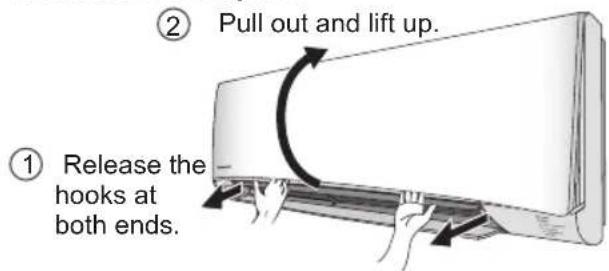
Close it securely

③ Close down.
④ Press both ends and center of the front panel.
Indoor unit

nanoe-G Generator
Once every 2 weeks
- Clean with dry cotton bud.
- Do not touch during operation.

Air filters
Once every 2 weeks
- Wash/rinse the filters gently with water to avoid damage to the filter surface.
- Dry the filters thoroughly under shade, away from fire or direct sunlight.
- Replace any damaged filters.
Remove air filter Attach air filter


Insert into the unit
Troubleshooting
The following symptoms do not indicate malfunction.
| Symptom Cause | |
| POWER indicator blinks before the unit is switched on. | This is a preliminary step in preparation for the operation when the ON timer has been set.When ON Timer is set, the unit may start earlier (up to 15 minutes) before the actual set time in order to achieve the desired temperature on time. |
| TIMER indicator is always on. • The timer setting repeats daily once set. | |
| Operation is delayed a few minutes after restarting. | The delay is a protection to the unit's compressor. |
| Indoor fan stops occasionally during automatic fan speed setting. | This helps to remove the surrounding odour. |
| The room has a peculiar odour. • This may be due to damp smell emitted by the wall, carpet, furniture or clothing. | |
| Cracking sound during operation. • Changes of temperature caused the expansion/contraction of the unit. | |
| Water flowing sound during operation. • Refrigerant flow inside the unit. | |
| Mist emerges from indoor unit. • Condensation effect due to cooling process. | |
| Outdoor unit emits water/steam. • Condensation or evaporation occurs on pipes. | |
| Discoloration of some plastic parts. • Discoloration is subject to material types used in plastic parts, accelerated when exposed to heat, sun light, UV light or environmental factor. | |
| Dust may have collected around the front panel, grilles and wall surrounding the unit after extended use. | The dust accumulation is due to air purification effect of negative ions from nanoe-G. Remove the dust regularly with a clean dampened cloth. |
Check the following before calling for servicing.
| Symptom Check | |
| Operation in COOL mode is not working efficiently. | Set the temperature correctly.Close all doors and windows.Clean or replace the filters.Clear any obstruction at the air inlet and air outlet vents. |
| Noisy during operation. • Check if the unit | has been installed at an incline.Close the front panel properly. |
| Remote control does not work. (Display is dim or transmission signal is weak.) | Insert the batteries correctly.Replace weak batteries. |
| The unit does not work. • Check if the circuit breaker is tripped. | Check if timers have been set. |
| The unit does not receive the signal from the remote control. | Make sure the receiver is not obstructed.Certain fluorescent lights may interfere with signal transmitter. Please consult authorised dealer. |
Troubleshooting
When...
■ The remote control is missing or a malfunction has occurred
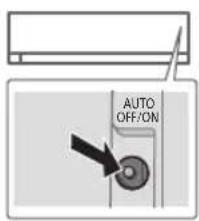
- Raise the front panel.
- Press the button once to use in AUTO mode.
- Press and hold the button until you hear 1 beep, then release to use in forced COOL mode.
- Press the button again to turn off.
■ The indicators are too bright
- To dim or restore the unit's indicator brightness, press and hold for 5 seconds.
■ Conducting a seasonal inspection after extended non-use
- Check the remote control batteries.
- Check that there is no obstruction around the air inlet and outlet vents.
- Use Auto OFF/ON button to select COOL operation. After 15 minutes of operation, it is normal to have the following temperature difference between the air inlet and outlet vents:
COOL: ≥ 8 °C / 14.4 °F
■ The units are not going to be used for a long period of time
- Activate nanoe-G operation for 2\~3 hours as an alternative to remove moisture left in the internal parts thoroughly to prevent mould growth.
- Turn off the power supply and unplug.
- Remove the remote control batteries.
NON SERVICEABLE CRITERIAS
TURN OFF THE POWER SUPPLY AND UNPLUG then please consult an authorised dealer when in following conditions:
• Abnormal noise during operation.
• Water/foreign particles have entered the remote control.
• Water leaks from Indoor unit.
- Circuit breaker switches off frequently.
• Power cord becomes unnaturally warm.
- Switches or buttons are not functioning properly.
How to retrieve error codes
If the unit stops and the TIMER indicator blinks, use the remote control to retrieve the error code.
① Press for 5 seconds
③ Press for 5 seconds to quit checking

② Press until you hear beep sound, then write down the error code
④ Turn the unit off and reveal the error code to authorised dealer
- For certain errors, you may restart the unit for limited operation if there are 4 beeps when operation starts.
| Diagnostic display | Abnormality/Protection control |
| H 00 No memory of failure | |
| H 11 | Indoor/outdoor abnormal communication |
| H 12 Indoor unit capacity unmatched | |
| H 14 | Indoor intake air temperature sensor abnormality |
| H 15 | Outdoor compressor temperature sensor abnormality |
| H 16 | Outdoor current transformer (CT) abnormality |
| H 17 | Outdoor suction temperature sensor abnormality |
| H 19 Indoor fan motor mechanism lock | |
| H 21 | Indoor float switch operation abnormality |
| H 23 | Indoor heat exchanger temperature sensor 1 abnormality |
| H 24 | Indoor heat exchanger temperature sensor 2 abnormality |
| H 25 Indoor ion device abnormality | |
| H 26 Minus ION abnormality | |
| H 27 | Outdoor air temperature sensor abnormality |
| H 28 | Outdoor heat exchanger temperature sensor 1 abnormality |
| H 30 | Outdoor discharge pipe temperature sensor abnormality |
| H 31 Abnormal swimming pool sensor | |
| H 32 | Outdoor heat exchanger temperature sensor 2 abnormality |
| H 33 | Indoor/outdoor misconnection abnormality |
| H 34 | Outdoor heat sink temperature sensor abnormality |
| H 35 | Indoor/outdoor water adverse current abnormality |
| H 36 | Outdoor gas pipe temperature sensor abnormality |
| H 37 | Outdoor liquid pipe temperature sensor abnormality |
| H 38 Indoor outdoor mismatch (brand code) | |
| H 39 | Abnormal indoor operating unit or standby units |
| Diagnostic display | Abnormality/Protection control |
| H 41 Abnormal wiring or piping connection | |
| H 50 Ventilation fan motor locked | |
| H 51 Ventilation fan motor locked | |
| H 52 | Left-right limit switch fixing abnormality |
| H 58 Indoor gas sensor abnormality | |
| H 59 Eco sensor abnormality | |
| H 64 | Outdoor high pressure sensor abnormality |
| H 67 nanoe abnormality | |
| H 70 Light sensor abnormality | |
| H 71 | DC cooling fan inside control board abnormality |
| H 72 Abnormality tank temperature sensor | |
| H 97 Outdoor fan motor mechanism lock | |
| H 98 Indoor high pressure protection | |
| H 99 Indoor operating unit freeze protection | |
| F 11 4-way valve switching abnormality | |
| F 16 Total running current protection | |
| F 17 | Indoor standby units freezing abnormality |
| F 18 Dry circuit blocked abnormality | |
| F 87 Control box overheat protection | |
| F 90 | Power factor correction (PFC) circuit protection |
| F 91 Refrigeration cycle abnormality | |
| F 93 | Outdoor compressor abnormal revolution |
| F 94 | Compressor discharge pressure overshoot protection |
| F 95 | Outdoor cooling high pressure protection |
| F 96 | Power transistor module overheating protection |
| F 97 Compressor overheating protection | |
| F 98 Total running current protection | |
| F 99 | Outdoor direct current (DC) peak detection |
* Some error code may not be applicable to your model. Consult authorised dealer for clarification.
A 時間設定


裝入主機
故障檢修
以下現象並非表示故障。
Information for Users on Collection and Disposal of Old Equipment and used Batteries


[Information on Disposal in other Countries outside the European Union]
These symbols are only valid in the European Union. If you wish to discard these items, please contact your local authorities or dealer and ask for the correct method of disposal.
Note for the battery symbol (bottom two symbol examples):
This symbol might be used in combination with a chemical symbol. In this case it complies with the requirement set by the Directive for the chemical involved.
Pb
中文
關於用戶回收與丟棄舊設備及電池的信息


[非歐共體國家的處理信息]
1006 Kadoma, Kadoma City,
Osaka, Japan
Website: http://www.panasonic.com
© Panasonic Corporation 2017
Printed in Malaysia
ACXF55-17770
FA1217-0
- OPERATING INSTRUCTIONS
- OPERATING INSTRUCTIONS 2-13 AIR CONDITIONER
- 操作說明書 14-25 空調器
- PROVIDE FAST COOLING, MAXIMUM COMFORT, CLEAN AIR AND OPTIMISE ENERGY SAVING
- HUMAN ACTIVITY SENSOR
- QUICK GUIDE
- INSERTING THE BATTERIES
- A CLOCK SETTING
- TABLE OF CONTENTS
- ACCESSORIES
- B BASIC OPERATION
- SAFETY PRECAUTIONS
- WARNING
- INDOOR UNIT AND OUTDOOR UNIT
- REMOTE CONTROL
- POWER SUPPLY
- NANOE-G GENERATOR
- HOW TO USE
- POWERFUL
- TO REACH TEMPERATURE QUICKLY
- QUIET
- TO ENJOY QUIET OPERATION
- TO PURIFY THE AIR
- TO SET THE TIMER
- NOTE
- TO LEARN MORE
- OPERATION MODE
- ENERGY SAVING TEMPERATURE SETTING
- AIR FLOW DIRECTION
- IN COOL/DRY MODE
- AUTO RESTART CONTROL
- NANOE-G IN-FILTER DEACTIVATION
- ECONAVI AND AUTO COMFORT
- ECONAVI WITH INTELLIGENT ECO SENSORS
- AUTO COMFORT WITH INTELLIGENT ECO SENSORS
- FEATURES
- OPERATING CONDITIONS
- CLEANING INSTRUCTIONS
- INDOOR UNIT
- OUTDOOR UNIT
- FRONT PANEL
- REMOVE THE FRONT PANEL
- CLOSE IT SECURELY
- AIR FILTERS
- REMOVE AIR FILTER ATTACH AIR FILTER
- TROUBLESHOOTING
- WHEN
- THE REMOTE CONTROL IS MISSING OR A MALFUNCTION HAS OCCURRED
- THE INDICATORS ARE TOO BRIGHT
- CONDUCTING A SEASONAL INSPECTION AFTER EXTENDED NON-USE
- THE UNITS ARE NOT GOING TO BE USED FOR A LONG PERIOD OF TIME
- NON SERVICEABLE CRITERIAS
- HOW TO RETRIEVE ERROR CODES
- 故障檢修
- INFORMATION FOR USERS ON COLLECTION AND DISPOSAL OF OLD EQUIPMENT AND USED BATTERIES
- [INFORMATION ON DISPOSAL IN OTHER COUNTRIES OUTSIDE THE EUROPEAN UNION]
- NOTE FOR THE BATTERY SYMBOL (BOTTOM TWO SYMBOL EXAMPLES)
- 中文
- 關於用戶回收與丟棄舊設備及電池的信息
- [非歐共體國家的處理信息]
Brand : PANASONIC
Model : CS-MXS9UKZ
Category : Air conditioner