ACE114XM0 - Air conditioner WHIRLPOOL - Free user manual and instructions
Find the device manual for free ACE114XM0 WHIRLPOOL in PDF.


Pick your language and provide your email: we'll send you a specifically translated version.
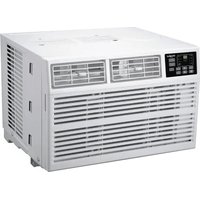
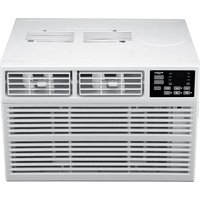
| Product Type | Window Air Conditioner |
| Model | ACE114XM0 |
| Brand | Whirlpool |
| Cooling Capacity | 10000 BTU |
| Rated Voltage | 115 V |
| Rated Current | 7.5 A |
| Power Consumption | 1000 W |
| Airflow | 250 CFM |
| Fan Speeds | 3 (Low, Medium, High) |
| Thermostat Control | Yes |
| Remote Control | Yes with LCD display |
| Timer | 24-hour programmable |
| Sleep Mode | Yes |
| Energy Star | Yes |
| Dimensions (W x D x H) | 20 x 22 x 15 inches |
| Weight | 60 lbs |
| Filter | Washable mesh filter |
| Refrigerant | R410A |
| Installation Kit Included | Yes (window mounting kit) |
| Noise Level | 55 dB (low), 62 dB (high) |
| Warranty | 1 Year |
Frequently Asked Questions - ACE114XM0 WHIRLPOOL
How do I install the ACE114XM0 air conditioner?
Installation requires a window with a minimum width of 22 inches. Slide the unit into the window, extend the side panels, and secure with the provided brackets. Ensure the unit tilts slightly downward to allow condensation to drain outside. For full instructions, refer to the installation manual.
How often should I clean the filter?
Clean the washable mesh filter every two weeks under normal usage. Remove the filter by pulling it out from the front grille, wash with lukewarm water, let it dry, and reinsert. A dirty filter reduces cooling efficiency.
The unit is not cooling properly.
First, check if the filter is clean. Ensure the thermostat is set lower than room temperature. Verify that windows and doors are closed. If the issue persists, check for blocked airflow outside the unit or refrigerant leaks (requires professional service).
How do I use the remote control?
The remote control allows you to adjust temperature, fan speed, and mode (Cool, Fan, Sleep). Insert two AAA batteries (not included). Point the remote at the unit’s receiver. Press the power button to turn on/off, and use arrow buttons to set temperature.
What does the "Clean Filter" light mean?
The "Clean Filter" indicator lights up after 250 hours of operation to remind you to clean the air filter. After cleaning, press the "Filter Reset" button on the control panel to turn off the light.
Can I use an extension cord?
It is not recommended to use an extension cord with this air conditioner. If necessary, use a heavy-duty 3-prong 14 AWG cord that is as short as possible and rated for 15A. However, plugging directly into a wall outlet is safer.
How do I set the timer?
Press the Timer button on the remote or control panel. Use the + or - buttons to set the desired number of hours for the unit to turn off (or on if programmed). Confirm by pressing Timer again. The timer can be set from 1 to 24 hours.
The unit makes noise.
Some noise is normal: a hum from the compressor, fan whir, or clicking from the thermostat. If you hear rattling, check if the unit is level and properly installed. Loose screws or debris in the fan may cause noise. Tighten any loose parts.
Where can I find the model number?
The model number ACE114XM0 is located on a rating plate on the side of the unit or behind the front grille. It is also printed on the original packaging.
How do I reset the unit?
To reset the air conditioner, unplug it from the power outlet for at least 1 minute, then plug it back in. Alternatively, press the Reset button on the power cord plug (if present) or use the Control Reset button on the unit’s panel.
User questions about ACE114XM0 WHIRLPOOL
0 question about this device. Answer the ones you know or ask your own.
Ask a new question about this device
No questions yet. Be the first to ask one.
Download the instructions for your Air conditioner in PDF format for free! Find your manual ACE114XM0 - WHIRLPOOL and take your electronic device back in hand. On this page are published all the documents necessary for the use of your device. ACE114XM0 by WHIRLPOOL.
USER MANUAL ACE114XM0 WHIRLPOOL
Manual assistant
Powered by Anthropic
Waiting for your message
Product information
Brand : WHIRLPOOL
Model : ACE114XM0
Category : Air conditioner